Cydia


 Loading...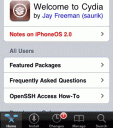
Cydia is a replacement packaging and repository manager for the original Installer.app for the iPhone or iPod touch. It was created by Jay Freeman to replace BSD Subsystem and Installer.app. Cydia is a UI frontend to his Open Source APT for Debian called Telesphoreo. Cydia pomonella is the scientific name for the codling moth, which is what we often think of as the stereotypical apple worm. Cydia itself looks similar to Installer.app but adds many improvements to organization, functionality and performance of Installer. With Cydia you:
– See the number of apps in each category
– See details of what installing each app includes such as file size and functionality added
– Search for apps by name
– See changes to your currently installed apps and available upgrades
– See details of currently installed apps and easily manage them
– A full user system for app purchases and reviews
– A theme system
– An iPad version
Installing Cydia
Cydia App Icon To install Cydia you need to jailbreak your iPhone/iPod touch or iPad. There are many ways you jailbreak depending on which device you own and what version of iOS you have installed. Most notably you can use blackra1n, redsn0w, PwnageTool, Spirit jailbreak, jailbreakme 2.0, and QuickPwn. Also, if you already have Installer.app installed just add http://apptapp.saurik.com/ as a source to Installer and install the package “Cydia Installer” from the “System” category.
Generally if you upgrade your iOS to the latest version from Apple, it will unjailbreak your device and/or prohibit you from being able to install Cydia. Jailbreak developers generally support things one release behind the active iOS version. Use this table to easily find out how to install Cydia depending on your iOS version.
| If you have this iOS version and Device | Install Cydia Using |
|---|---|
| iOS 6.0 – 6.1.2 (iPhone, iPod touch, iPad and iPad mini – untethered) | evasi0n |
| iOS 6.0.0 (A4 devices only, tethered) | redsn0w 0.9.13 dev4 |
| iOS 5.1.1 (All) | Absinthe 2.0 (untethered) |
| iOS 5.1 (A4 only) | redsn0w 0.9.10b6 (semi-tethered) |
| iOS 5.0.1 (A5 iPhone 4S & iPad 2 ) | GreenPois0n Absinthe |
| iOS 5.0.1 (A4 not 4S or iPad 2) | redsn0w 0.9.10b3 (untethered) or Corona |
| iOS 5 (A4 not 4S or iPad 2) | redsn0w 0.9.9b5 (tethered) |
| iOS 5 beta 1 | redsn0w 0.9.8b1 (tethered) |
| 4.3.5 (not iPad 2) | redsn0w 0.9.9b1 (tethered) |
| 4.3.4 | redsn0w 0.9.8b3 (tethered) |
| 4.3.3 | redsn0w 0.9.6rc15 (untethered) |
| 4.3.2 | redsn0w 0.9.6rc14 (untethered) |
| 4.3.1 | redsn0w 0.9.6rc9 (untethered) |
| 4.2.1 | GreenPois0n 1.0 RC5 (untethered) |
| 4.0.2 | Not supported |
| 4.0.1/4.0/3.1.3, 3.2.1/3.2 (iPad) | JailbreakMe.com |
| 3.1.3, 3.1.2 (2G unlock), 3.2 (iPad) | Spirit (Windows + Mac OS) |
| 3.1.3, 3.1.2 (2G unlock) (no new 3GS) | redsn0w (Windows + Mac OS) |
| 3.1.2 (newer 3GS models tethered) | blackra1n (Windows + Mac OS) |
| 3.1.2 (but iPhone 3GS Issues) | PwnageTool (Mac OS) |
| 3.0 (3GS Only) | blackra1n (Windows + Mac OS) |
| 2.2.1 (Obsolete) | QuickPwn (Mac OS & Windows) |
iOS Jailbreak News
iOS 6.0.0 A4 devices only tethered jailbreak
Update: The latest version of Redsnow (0.9.13 dev 4) is out and can jailbreak iOS 6 on older devices with a tether. This means it only works on the iPhone 4, 3GS, 3G, iPad 1, and iPod touch 3G.
iOS 6.0.0 iPhone 5 jailbreak rumors
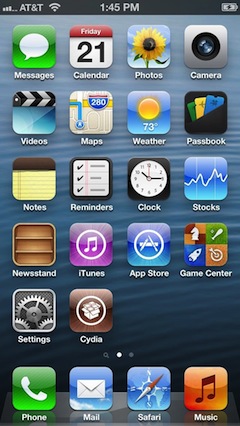 After the iPhone 5 was released, hacker @chpwn tweeted a photo of Cydia on the new taller iPhone 5 screen. This was partly a publicity stunt to prove a point that he has already jailbroken the device. Unfortunately for the rest of us, his hack is not yet available publicly. We will post updates on the iPhone 5 jailbreak situation as they become available.
iOS 5.1 A4 semi-tethered jailbreak
Update: You can perform a semi-tethered jailbreak on your A4 powered devices running iOS 5.1 using Redsn0w 0.9.10b6 thanks to the Dev Team. Note that this requires an older A4 device which does not include the iPhone 4S, iPad 2 or iPad 3. Full instructions and a video tutorial are listed on our Redsn0w page.
New iPad 3 (iOS 5.1) Jailbreak
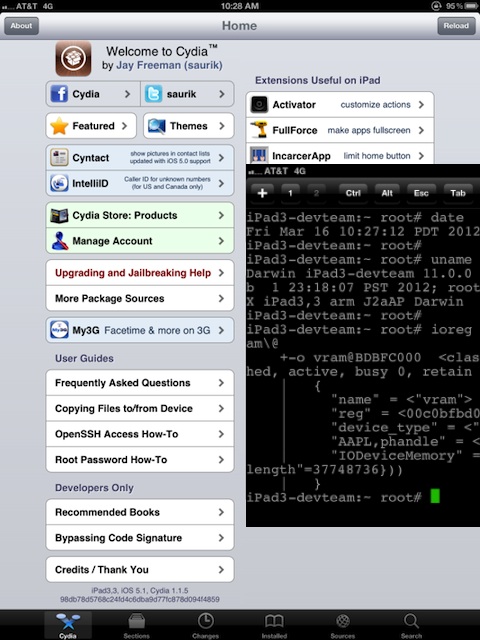
Update: Good news on the New iPad jailbreak front today. Developers have already jailbroken the New iPad that was released just today. Twitter user MuscleNerd has already posted screenshots of the New iPad with root access and running Cydia shown below. There is no ETA on a public iPad 3 jailbreak tool yet, but we will post details as they become available.
iPhone 4S and iPad 2 (iOS 5) Jailbreak
Update: Good News! GreenPois0n Absinthe has been released by the Chronic Dev Team giving you the ability to perform an untethered jailbreak on the iPhone 4S and iPad 2 with the A5 chip. For detailed instructions check out the GreenPois0n Absinthe page.
Best Cydia apps
 Cydia has a ton of apps for you to try but some of them can be complicated or not very exciting. This is why we review the best Cydia apps you can download here at AppSafari. To browse our reviews check out the Cydia apps category. We often add new reviews of popular Cydia apps so be sure to come back often.
Cydia Notes & Updates
White Cydia Icon Fix
Sometimes after installing Cydia, you might notice an all white icon. To fix this white icon issue just follow these steps: Open Cydia > Manage > Sources >Edit > Add > Paste the following URL http://apt.saurik.com/cydia-3.7 > Add Source and wait while Cydia updates itself. This should now give you the official Cydia icon.
If you have iOS 4.3.1 you can install Cydia using either redsn0w 0.9.6rc9 (Mac and PC) or PwnageTool 4.3 (Mac only) for an untethered jailbreak.
If you have iOS 4.2.1, you can either use GreenPois0n to do an untethered jailbreak, and you can also try a tethered jailbreak using redsn0w.
With the release of the iPhone 3G which comes with OS 2.0 and the related iPhone pwnage tools many of the apps written for the older Installer.app have to be ported over so developers are working on that. In the next few weeks you will start to see more and more apps in Cydia with lots of cool new features, so check back often.
For Windows users with the iPhone 2.1 software update, you can get both Cydia and Installer on your iPhone really quickly and easily by installing the QuickPwn software on your Windows PC. The entire process is streamlined and takes only a few minutes.
Ultrasn0w for iPhone 3G or 3GS can unlock your iPhone 3G or 3GS with OS 3.0 firmware.
1. Ensure you have upgraded to iPhone OS 3.0
2. Jailbreak your iPhone 3G using redsn0w or PwnageTool & if you have the 3GS use the purplera1n installer app to jailbreak it instead. (after this step you will have Cydia)
3. Run Cydia
4. Add the repo repo666.ultrasn0w.com to Cydia. (that last o is actually the number zero)
5. Search for “ultrasn0w” in cydia and install ultrasn0w
6. Reboot your iPhone 3G
7. T-Mobile USA users should disable 3G before using ultrasn0w
Purplesn0w can also unlock your iPhone 3GS, so use it instead of Ultrasn0w if you wish. The steps are exactly the same as the above. Only use this repo source in Cydia apt.geohot.com and install Purplesn0w from there.
If you have OS 3.1.2 you can use blackra1n or PwnageTool 3.1.4 to jailbreak and get Cydia installed on your iPhone or iPod touch.
If you are running OS 3.1.2, 3.1.3 or 3.2 and want to install Cydia on your iPad, iPhone, or iPod touch, use Spirit. It is simple, takes 30 seconds and best of all it is untethered.
Important: If you install SSH on your device, be sure to change the default root password on your jailbroken device:
1) Install Mobile Terminal From Cydia and run it
2) Type in “su root” and tap return
3) When prompted for a password, enter “alpine” hit return
4) Type “passwd” and hit return
5) Type a new password and hit return
6) Re-Enter your new password to confirm and hit return
7) You’re done. You’ve successfully changed your default root password and should feel safer now.
The website jailbreakme 2.0 let’s you install Cydia on your iPhone, iPad and iPod touch by just visiting a website, if you have not updated past 4.0.1 yet. No installs or cables needed. Get Cydia in 3 minutes flat.
Most people new to jailbreaking ask the question; is it legal to jailbreak my device?
The answer is, technically yes. Jailbreaking your iPhone will void your contract, but it is not illegal. Having said that, you can restore your device to its factory settings if all else fails as a last resort. Now, it is possible that your device will have issues and you might lose your data stored on the device. This is why it is highly recommended that your always backup your device via iTunes before jailbreaking. This assures that you can restore to a working backup as a worst case scenario.
New Features in Cydia:
Cydia keeps getting better on every release and update, and saurik’s support is exceptional. Below are a list of additional features that have been added to Cydia so far.
– Rock was a new mod app store which has been acquired by Cydia.
– Theme Center has been added to Cydia. It gives you the ability to buy and manage jailbreak themes on your iPhone from a single location, as an alternative to a competing app called Theme It. Right now you have a selection of the top selling themes from Cydia in the Theme Center and staff picks. You will soon be able to rate the themes as a user, thanks to the new user account system in Cydia.
– A new user account management system has been added to Cydia that lets users check previously installed packages.
– Cydia developers Jay Freeman & chpwn have created an iPad version of Cydia.
– Cydia is coming to the Mac! Apple is soon to release the Mac App Store. The new Mac App Store won’t allow Mac developers sell in-app purchases for “Lite” apps, create Game Center integration or even to generate promo codes. Since some developers don’t want to deal with going through Apple, Mac Cydia will let you do just that. Contact Cydia via patrick@saurikit.com if you are a developer and want more details on getting your Mac app into the Cydia Mac App Store, set to launch in a few weeks.
Apple should and sometimes does (folders for example) take a few elements from the Cydia Store and port them to the App Store.
Use iPhone mods and hacks at your own risk! Installing 3rd Party iPhone apps requires you to jailbreak the iPhone before installing the native software and apps. Browse the full list of all iPhone and iPod touch native 3rd party apps filed under the software category.
Cydia Developer’s website can be found at saurik.com

815 Comments to “Cydia”
About AppSafari
Popular App Review Categories
- Games
- Featured apps
- iPad apps
- Free apps
- Cydia apps
- App Lists
- Music
- Utilities
- Reference
- Social
- Chat
- Video
- Productivity
- Notes
- Fun
- GPS
- Files
- Augmented reality
- Shopping
- Education
- Finance
- Travel
- Food
- Sports
- News
- Weather
- Health
- Movies
- Photos
- VOIP
- Calendar
- Contacts
- Auto
- Dating
- Books
- Web apps
- All categories >>
Recent iPhone App Reviews
- Elevate – Brain Training May 28th, 14
- UpTo Calendar – Syncs with Google Calendar, iCloud, Outlook and more May 28th, 14
- Quip May 23rd, 14
- Marco Polo: Find Your Phone by Shouting MARCO! May 22nd, 14
- Ku – creative social network May 13th, 14
- Personal Zen May 9th, 14
- Fiasco! Free May 9th, 14
- Forza Football (formerly Live Score Addicts) Apr 29th, 14

is this ilegal i mean i have my iphone via contract so do i get any trouble if i use this? like can my iphone become useless or something?
Posted on July 31st, 2008 at 8:02 pm by skankyho@rHow do u get rid of the app because I go into installer to try and uninstall it but it only let’s me reinstall it so can u plz help me. Thanks.
Posted on August 4th, 2008 at 9:41 am by farooqi think you jailbraek and unluck your phone esaly you can return the native app at any time, all you need to connect it back to itune and your iphone is back as orginal. I already unluck my iphone yestrday and it work same as it was only i have the cydia app icon
Posted on August 5th, 2008 at 5:24 am by lofaszYep, it works perfectly. It takes a while when you originally install it to your phone (but it works) nice work team! Once I installed the Ipwn app it locked up my phone a few times… but after I updated the apps it worked perfect.
Posted on August 15th, 2008 at 4:36 am by KevinCydia is starting to shape up now 🙂 I’m starting to see some new original Apps in there now. Keep up the good work guys!!
Posted on August 16th, 2008 at 2:52 pm by AppminGood job guys, Cydia works….The only prob;lem I’ve now is Syncing my iPhone with my Laptop which has the new version of iTunes!!! every time I connect my iPhone to my Laptop I get the blue screen of Death. need help guys please?
Posted on August 21st, 2008 at 9:13 pm by GusThx, Gus
how do you get Cydia on a hacked iPhone with 1.1.4 software? I’ve tried to install software 2.0 on it through an iTunes update, but the phone froze after that. (had to get the phone restored to 1.1.4)
Posted on August 24th, 2008 at 7:10 am by PatrickThanks for any help
Cydia is the best, its better than installer. I have a iPhone wit the firmware 1.1.4 and I have gradet up to 2.0.2 wit Quickpwn, it s the best toll to active jailbreak and unlock the iPhone.
Posted on August 30th, 2008 at 7:34 am by M@boyhello, do you know how to get ringtones imported into iphone w/o having to purchase from itunes
thanks
jose
Posted on September 4th, 2008 at 10:04 am by joseSo far, I see alot of questions and no answers. That seems broken to me. Oh well, looks like I get no help here.
Posted on September 7th, 2008 at 9:28 am by SGTSimscydia is not for 1.1.4 so if you have 1.1.4 you should be using Installer.app not Cydia. To get Cydia you need to have Installer.app already. Then just add http://apptapp.saurik.com/ as a source to Installer and install the package “Cydia Installer” from the “System” category.
Posted on September 7th, 2008 at 3:22 pm by AppminI agree with SGTSims, too many questions with no real answers & a lot of BS…..I’m very disappointed?????
Posted on September 7th, 2008 at 11:50 pm by Gushi, i m using Iphone 3G 2.0.2 Is this work with 3G iphone? thanks in advance
Posted on September 8th, 2008 at 7:53 am by MKyes you can just get QuickPwn here http://www.dev.appsafari.com/software/6034/quickpwn/
Posted on September 8th, 2008 at 11:44 am by AppminI downloaded this and installed it with very little trouble. The instructions were pretty clear and the process was not difficult.
(Here comes the, “But”)
After 3 days of trying to get it to work with all kinda of third party downloads, I see that it’s only capable of working with apps from it’s own separate database of programs.
I have not been able to get anything from the iTunes website to download with this installer.
After asking for help from the technical dept twice, I have given up from lack of response. I guess all that’s left to do is find out how to reset the iPod back to the factory settings and then find some other way to jailbreak it.
Hope this helps someone out there.
Posted on September 11th, 2008 at 8:15 am by SGTSimsWow never heard that before. Dood you don’t need Cydia in that case, there should already be the App Store icon there if not you have to upgrade your iphone software in iTunes. Also in iTunes you see a button called Restore or when you are syncing. It will reset your phone, make sure you have backups.
Posted on September 11th, 2008 at 8:54 am by HarryAhh, good help, friend. That works for me. I will try that. TYVM
Posted on September 11th, 2008 at 9:00 pm by SGTSimsHi,how do i get install cydia to my new 3G iphone?
Posted on September 13th, 2008 at 2:23 am by DannyOkay, reset went alright. And, with a reinstall, something weird happened. (Surprise!) I have three applications downloaded. They all appear in iTunes in the Application section. But, only one of them made it onto the iPod.
In the Applications section, all the items there are greyed out like there’s something keeping them from syncing. Is there some way to get that part un-greyed so that I can check the boxes and get the Apps onto my iPod?
Posted on September 13th, 2008 at 1:30 pm by SGTSimsihpone orginal verison 2.0.2 jailbroken how do i get ringtones with a cydia program?
Posted on September 16th, 2008 at 8:20 pm by hgfdGuys, While I was attempting to restore my Jail Broken 3G iphone to its original state, a Steve jobs Russian Cartton popped out of my phone screen & will not go away….Any idea on what to do? please need solutions..
Posted on September 21st, 2008 at 10:47 pm by GusThx, Gus
Hi my Ihone 2.1 3G every time I open the changer for update the pakages the cydia close not allow me for update the cydia close down
Posted on October 4th, 2008 at 1:10 am by essaholy f wow there sure are a lot of noobs V
Posted on October 9th, 2008 at 6:18 pm by kyoHi Guys, I just got myself a 3G Iphone, how do i get installer and cydia on my phone? I dont have them
Posted on October 13th, 2008 at 2:11 am by Kevinthis thing works! i have pages and pages of apps for my “older model” unlocked iphone!
Posted on October 21st, 2008 at 7:48 pm by mosesGuys, the Same BS over & over; just BS & not real solutions…I’m getting fed up with these comments….either address the god damn issues that people are bringing or shut up…
Posted on October 22nd, 2008 at 10:16 am by GusHow do I get more programs for my 3g Iphone
Posted on October 23rd, 2008 at 9:41 pm by Jorge Olmedohow do i download cydia? is there a link for it if so please tell me :[
Posted on October 26th, 2008 at 1:01 pm by xaznstarzxFirst of all I love this site. It has made my day. Now I will say to people. These problems would not of happened anyways if you didn’t install it.
Posted on October 27th, 2008 at 3:36 pm by austinchickenjust scroll up and read the info, it tells you to get QuickPwn
Posted on October 27th, 2008 at 5:09 pm by Appminhttp://www.tuaw.com/2008/09/13/pwnagetool-and-quickpwn-for-2-1-iphones-released/
Don’t be scared just do it,I’ve had problems but it restored every time,well chuffed now,runs very nice and loads of apps
Posted on October 28th, 2008 at 6:06 am by Stewyif you go to i tunes and update the itunes version of the phone you can get rid of the programs
Posted on November 14th, 2008 at 9:41 pm by sydiaHi,, I have a jailbroken I phone… with 2.2 firmware (2G iphone). How can i install cydia. I followed the above method but it says unable to decode package more info at http://……
Pleaseeeee help me… thanks!!
Posted on November 26th, 2008 at 11:25 pm by Joeyi have the same issue as above..need assistance
Posted on November 27th, 2008 at 10:58 am by mostafaheyy guys.how do i degrade my iPod touch from version 2.2 to 2.1??? or does anyone know how to jailbreak the version 2.2???
Posted on December 2nd, 2008 at 2:31 pm by Arunhi guys… i bought my iphone couple days ago and loaded it with cydia and i think i went a little out of hand filling up cool apps in my iphone… but this is my problem now… i cant dial any numbers to my phone.. i will need to go to contacts and call from there… any help pls???
Posted on December 3rd, 2008 at 2:31 am by mitchI only get an error message when I try to instal cydia instaler. “Error unable to decode package”
Posted on December 6th, 2008 at 12:37 pm by SonjaWhat do I do???
pls can anyone tell me how to jailbreak 3G iphone with details
Posted on December 6th, 2008 at 12:46 pm by SalimSame here.
Posted on December 7th, 2008 at 7:14 am by RaymondWhen i start the dialer is shuts down in a few seconds
When i dial with the contacts or answer an inkomming call i can only hang-up by turning of the iphone
hey cydia is only for unlocked(jailbroken) phone………u have a 2 yrs contract
Posted on December 7th, 2008 at 9:52 pm by nitinIn order to get Cydia or Installer, you have to jailbreak the Iphone using the program called ” Quickpwn ” for Windows or ” Pwnage ” for Macs. Remember the Iphones have different firmwares. The latest are 2.1 and 2.2 . So first download Quickpwn 2.1 or 2.2 version. Then download Iphone 3g 2.1 or 2.2 ipsw (firmware) respectively. If you don’t know where to get Quickpwn or ipsw, google them. Then run the Quickpwn and follow the procedures step by step. At certain point, the Quickpwn will ask you whether you want to add Cydia, Installer, or Replace Boot Logos. Of course, you want to add them. The tricky part is to put Iphone into recovery mode ( DFU mode by holding power and home button ). If you do it right, Quickpwn will jailbreak your Iphone automatically. Tadada. With Cydia, you can install Cycorder ( Camcorder ), Mixtube ( download youtube to your phones ), Winterboard ( Changing your homescreen ) , Pdanet ( using Iphone as modem ) and other incredible apps that Itunes won’t provide. Check the youtube for video instructions.
Posted on December 8th, 2008 at 10:17 am by Andrew Mactually I have already used this software it is better than installer
Posted on December 13th, 2008 at 6:55 pm by cydiame too, this program is great
Posted on December 14th, 2008 at 8:57 am by alfredo juarezi have cyida and i updated it and now every-time i click it it disapears and goes back to my regular screen i think i need to reinstall cydia but i dont kno how what should i do any suggestions?
Posted on December 16th, 2008 at 1:18 am by normi have installed ILOG on my i phone from cydia installer but my credit card could not be processed by your system so please inform me if you have other means of payment like bank transfer or else
Posted on December 17th, 2008 at 12:56 am by TOUFIC SAADHad the same problem. I had to restore my iphone via itunes. Then reinstalled cydia. Everything seems okay for now. I read some other forums that the Kate app might be the culprit but not sure. I also installed cydia on my wifes phone and it worked the first time.
Posted on December 17th, 2008 at 4:41 am by YodaYou can Jailbreak your iphone 3G even if its on a contract just make sure that when your it on a software like Pwnage make sure you unselect “Activate iPhone” before continuing the process. it is illegal and it does violate your warranty jailbreaking. you can always restore it to factory settings if something goes wrong or if you simply change your mind later on.
Posted on December 17th, 2008 at 2:34 pm by Erikcydia is a good one or not? i hv little confussion… pls give idea to unlock my 3g iphone without any problem in my future.. thanks in advance to all frnds.
Posted on December 21st, 2008 at 9:56 pm by balaHave not yet gone to a forum where ppl have not encountered problems with jailbreaking their iphone.
Posted on January 3rd, 2009 at 5:53 pm by yayDisappointed as I and most would be with some missing functions, ie MMS, Bluetooth file transfer and video, I would prefer Apple to address these issues by way of pressure from customers.
The hot tip is, unless you are an expert at hacking…..
DON’T FCUKING DO IT!!!!
I just got an ipod touch and I was wondering if there was ANY way to get cydia on here?
Posted on January 5th, 2009 at 7:20 pm by perlaNo, it’s perfectly legal. Apple doesn’t like people doing it, but they can’t do anything about it. As US citizens, by law we have the right to modify something that is our property. If you legally bought your iPhone, there should be no problem. But be warned, Apple will not help you if you break your iPhone Jailbreaking it.
Posted on January 8th, 2009 at 5:45 pm by UbuntuI Quickpwned my iPhone 3G a few days ago, after a couple of months reading about the subject. I was actually terrified of something going wrong.
QuickPwn is a piece of cake. That’s it, my iPhone worked like a charm. I have never been happier!
Posted on January 11th, 2009 at 4:59 am by arlingtonI realy need help I can’t find out how to get Cydia on my iPod touch cause I realy need it so plese help me
Posted on January 16th, 2009 at 10:38 pm by DavidI have Iphone 3g 2.2 and it has the app store but i can’t find any application that changes my theme except for summerboard or winterboard which both requires me to jailbreak my iphone?is there any alterenative choice than jailbreaking my iphone in order to get themes.What is the harm if i jailbreak my iphone except for ending my warnaty with apple.
Posted on January 18th, 2009 at 2:28 am by OmarHey there! I am also heavily researching jailbreaking my IPhone. O you’re glad that you finally did it, huh? Now after I jailbreak….. is the Apple App Store still there and accesible? And all of my previously donloaded apps from the app store? do they still work on a jailbroken phone? and if so, do i have to download them again? does jailbreaking your phone pretty much “reset” it?
Posted on January 18th, 2009 at 9:33 pm by MattHey there! I am also heavily researching jailbreaking my IPhone. So you’re glad that you finally did it, huh? Now after I jailbreak….. is the Apple App Store still there and accesible? And all of my previously donloaded apps from the app store? do they still work on a jailbroken phone? and if so, do i have to download them again? does jailbreaking your phone pretty much “reset” it? can anyone please let me know. I’m really weighing my options here.
Posted on January 18th, 2009 at 9:34 pm by MattReply
Hey guys I have a quick question. If I jailbreak my phone, will I lose all the apps I have already downloaded? And will I still have the app store? Ty
Posted on January 19th, 2009 at 10:20 pm by BobOk yesterday i jailbroken my iphone everything works good and the app store is good nothing wrong with it. But your problem about the apps u downloaded before. Yes the hole jailbreaking thing resets your iphone so you must have backed up your i phone before u had jailbroken it so u can easily reconnect your iphone again after jailbreaking it and the itunes will sync the games and the music and the contacts that u had before on the iphone before u jailbroken it.Besides that the iphone works just fine.Need any further help
Posted on January 20th, 2009 at 1:39 am by omarOk yesterday i jailbroken my iphone everything works good and the app store is good nothing wrong with it. But your problem about the apps u downloaded before. Yes the hole jailbreaking thing resets your iphone so you must have backed up your i phone before u had jailbroken it so u can easily reconnect your iphone again after jailbreaking it and the itunes will sync the games and the music and the contacts that u had before on the iphone before u jailbroken it.Besides that the iphone works just fine.Need any further help
Posted on January 20th, 2009 at 1:41 am by arafaGo to the top of this website, and search for an app called QuickPwn, its a piece of cake
Posted on January 25th, 2009 at 3:18 pm by Joe“No, it’s perfectly legal.” this is incorrect you are modifying a copyright protected software. You have a license not an ownership. However apple will not stop people because then sales would drop. So it is not legal but i will do it anyway.
Posted on January 26th, 2009 at 11:16 pm by opherso you have to jailbreak your iPod to get cydia
Posted on February 1st, 2009 at 12:39 am by tyI can see quite a few people have the same problem I am getting, which is that we have successfully jailbroken iPhone 3g’s and have been using installer and cydia fine but it has just stopped working for some reason with the error message “cannot open source”. I am guessing their is a problem with the source as I can load other sources okay. I am just waiting to see if this will sort itself out. If anyone knows what the problem is, please post here, thanks! I ran quickpwn again, which worked okay but still can’t download Cydia updates.
Posted on February 1st, 2009 at 4:45 pm by ShimboxI don’t get it. what do you guys mean by backing up your phone?,and I am still thinking if I should jailbreak my iPhone or not. also noticed that some of you guys have problems using it.
Posted on February 1st, 2009 at 11:32 pm by devielocoplus I’m using the iphone 3G version 2.2 and ive read somewhere that they need the 2.1 version for iPhone 3G ?
Is it really true?,
Problem solved for me, in case anyone needs to know. Backed up all data by syncing with iTunes then restored to latest firmware (2.2.1) then ran quickpwn again. Cydia works fine now! Had to dl all cydia apps again tho 🙁
Posted on February 3rd, 2009 at 10:44 am by ShimboxOkay guys I just want to help you guys out here, Ive been reading above and a lot of you have a lot of questions. So if you want to alter your springboard (home screen) as in make a user wallpaper appear under your apps, get a new theme, or anything like that, you HAVE to jailbreak! Meaning if you have a Windows computer then you would use QuickPwn or WinPwn (which is normally more favorable to unlock and vice-versa with QuickPwn and Jailbreaking) so to jailbreak you run QuickPwn and the program will walk you right through it unless of course your a total noob. If you don’t trust my word then go to YouTube and let a video follow you through it. The same is with WinPwn but you can go a little more in depth with changing boot logos and the like. If you have Mac then you would use the Pwnage tool, which is much more stable that, of course, windows programs of the same nature. You can also unlock with it. Jailbreaking WILL void your warranty with Apple but in the longrun it’s definately worth it! You can Cut&Paste, MMS, Video record and many other things good old Apple refuses to allow for some moronic reason. And if the iphone ever does brick (freeze And become usless) you can almost always use the restore option in iTunes. After that you can just re-jailbreak and that should go smoothly seeing as I’ve jailbroken the iPhone (2g and 3g) a lot of timesAnd never had a brick.
Posted on February 4th, 2009 at 10:03 pm by KyleDo we need to pay any app from cydia or it’s free?
Posted on February 5th, 2009 at 8:15 pm by hamdanAnd yeah most apps on Cydia or Installer are free but some aren’t like Swirly MMS cost but most are free. I guess Cydia doesn’t like buying apps, this is the reason most games are in the App Store. Because people want to make a profit.
Posted on February 5th, 2009 at 9:10 pm by KyleOk .. I used cydia to get app called winterboard. Then I got another app from Themes (springboard) and I used it to change the look of my iphone. That worked perfectly, but now I cant dial out. I can only dial by using the contacts, but not if i wanted to dial a number thats not in my contacts what shall i do ?
Posted on February 8th, 2009 at 12:02 pm by QuaiOkay, I can fix this. First, the problem probably wasnt anything from Cydia, almost certain it wasnt Winterboard. Second do you have Installer? (Did you check the Installer box when using your jailbreak software?) I know your prblem – When you go to the phone APP it sets there with no words and you casn use any of the buttons all it will do is crash. I just had this problem last night. DONT restore YET! I can fix this!
Posted on February 8th, 2009 at 2:27 pm by KyleNot true, you dont extend your contract or anything like that all you do is alter the baseband. Apple and AT&T cant ever find out about this and besides, its not illegal.
Posted on February 8th, 2009 at 2:31 pm by KyleOk. I uninstalled the Kate thing .. DIdnt work. I rebooted .. Didnt work… Uninstalled the theme,,, Didnt work .. SO i ended up restoring and well just say I can dial out now .. I just had to add all the apps again ..
Posted on February 8th, 2009 at 2:32 pm by QuaiYes it actually is legal to jailbreak just not to unlock. Jailbreaking isnt altering its replcing the software completely n00b.
Im $eca of the DEV-Team.
Posted on February 8th, 2009 at 2:34 pm by KyleSame wat as on the 1st GEN iPhone.
Posted on February 8th, 2009 at 2:52 pm by KylePlease leisten to me when I say this. The application KATE is the reason this happens most of the time. just make sure KATE is installed through Installer (if not reinstall!) then download RiP Dev Preferences. after all of this is Downloaded go to the Settings on your iPhone then go to “RiP Dev” That will be on the first page (dont click General or anything) Under that go to RiP Dev Products then Kate (No the one that has the “X” but the first one) go under it and uncheck “FaceLift” (just click the word) and then click “APPLY” after that it should respring your phone (if not just go to winterboard and highlight then unhighlight something and that should cause a respring. That should fix it.
Whoever this works for can repay me simply by emailing Kyleshankles@yahoo.com and telling me how it went.
DONT RESTORE! You will be going to 2.2.1 which “closes the whole” for jailbreaking at the moment. If this method doesnt work for you please email me cause I have about 15 other methods for repairing this exact problem but 97% of the time this works. JUST TRY IT.
Thanks,
Posted on February 8th, 2009 at 3:12 pm by KyleKyle
No it is legal you idiot! According to congress it is perfectly legal to unlock a phone with the “sole purpose of using to log on to a cellular network” its perfectly legal re nard fard tard hard gard smhamrd
Posted on February 9th, 2009 at 4:07 pm by Voltronthey have a new QuickPwn version vailable for those who have upgraded to 2.2.1
I downloaded it this morning and its worked for me 🙂
Posted on February 13th, 2009 at 7:40 am by DrSparrowNo, what’s cool about jailbreaking is that you keep everything (settings, pictures, APPS) everything and yes the app store is still accessible none of that is altered.
Posted on February 16th, 2009 at 6:36 am by kyleshanklesWhere do I go to download sydia?
Posted on February 20th, 2009 at 7:53 pm by samyAnd how do u jainbrake
I’ve recently upgraded to firmware 2.2.1 via iTunes. If I want to jailbreak, what other software must I install beside quickpwn?
Posted on February 25th, 2009 at 6:23 am by lynnWhoops LOL it seems Apple has in fact declared jailbreaking illegal very recently. There so bitchy.
Posted on February 25th, 2009 at 8:14 pm by KyleshanklesJust quickpwn but if you upgraded to 2.2.1 you will need QuickPwn version 2.2.1 of course. If you want it go to quickpwn.com and it should be on the homepage of that website
Posted on February 25th, 2009 at 8:18 pm by Kyleshanklesafter i install cydia using quikpwn v2.2.1. but i cannot update datbase. the problem is error netDB:opennode. host unreacble and error:cached failure. pls help. thanks
Posted on February 27th, 2009 at 10:34 am by kai kitI get the same thing but it usually doesnt cause problems. Can you use Cydia at all?
Posted on February 27th, 2009 at 7:40 pm by Kyleshanklescan someone help me? i jail broke my iphone 3G, now my dialer won’t work. what do i do?
Posted on February 28th, 2009 at 11:25 pm by OscarHow do you download cydia or installer on your iPod touch?
Posted on March 3rd, 2009 at 8:48 am by JustinWhere do you download cydia or installer?
Posted on March 3rd, 2009 at 8:51 am by JustinHey I found a really easy way to do this if you are still looking for answers. do a search for i phone school. Go to their website and download quickpwn.when u install this it will give u the option to install cydia as well. after your phone reboots go to cydia icon on your phone and download winterboard. From then on all of the themes and stuff u download throuh cydia will show up under the winterboard icon on your phone. from there simply click on the file to turn it off or on
Posted on March 3rd, 2009 at 8:14 pm by BillI use facebook but till I not get any message of this kind and if I will get any message of this kind I will ignore that.
Posted on March 4th, 2009 at 4:45 am by Maximilian ThorntonTo get then on your iPhone you use a program called QuickPwn find that on quickpwn.com by scrolling down and just reading a bit. You’ll also need the .ipsw file (IPhoneSoftWare) file. Depending what software version your using on your iphone (2.2.1, 2.2, 2.1 etc.) you’ll need to google that in with it. So- Google “iphone 2.2.1 (or your OS version as I stated before – find out what version your on by going on your iPhone under settings>general>about then scroll down to “version” and it will say a number- that’s your OS version.) download the ipsw file then put it somewhere on your computer you can easily find it. Download quickpwn and email this email address and I will give my cell phone number to call you and completely step you through it and explain everything about this to you. I will emAil you back within 6 hours so pls stay at your computer in this time frame.
My email address is: kyleshankles@yahoo.com
Expectations! Please only call on the weekends (fri 10p-Sun 12a)
That’s it just feel like really helping you guys out so please don’t give my number to anyone
Posted on March 8th, 2009 at 3:04 am by KyleshanklesPlease anyone that has questions email me and I will give you my phone number for steping you through the WHOLE process! My email is: kyleshankles@yahoo.com remember I’m doing this out of the kindness of my heart so don’t spam me.
Posted on March 8th, 2009 at 3:07 am by Kyleshankleshey, i downloaded cydia and installer to my phoen they work great. but my phone and sms does not work anymore. this has happened b4 when i downloaded cydia and installer. people say it is from Kate but i dont have kate so what is the problem.
Posted on March 10th, 2009 at 8:56 pm by Minnesotamy phone just frezzes up and then automatically goes to the home screen again. same with my sms.
Please Help, this is urgent!
I’m thinking about jailbreaking my iPhone 3G, but I have some questions and maybe someone here can answer them.
Posted on March 16th, 2009 at 11:08 am by Paul1) It is indeed able to be undone, right? If I use the Restore capability in iTunes, I can go back?
2) Can I still purchase or download apps from the iTunes store (not a deal breaker, but whatever)
3) Sorta similar to the question above, but will I be able to use apps I already purchased/downloaded?
Please just email me, it will be a lot quicker. My emails kyleshankles @ yahoo. com -I will be available instantly that way.
Posted on March 16th, 2009 at 12:02 pm by KyleShanklesJust email me, I will fix it. Kyleshankles@yahoo.com
Posted on March 16th, 2009 at 12:04 pm by KyleShanklesAfter installing Cydia (jailbroken), you must connect to wifi or have signal to internet. There are still apps that you need to “finish” installing. When you connect to Cydia, its looking for internet, and when it cant find it, it says “cannot open source”.
Posted on March 16th, 2009 at 11:31 pm by Gioi just wonder. How can i get cydia in to my iphone if i got something called appstore cant find it in there. if some1 can give me a answer email me joachim_askeland@yahoo.com
Posted on March 18th, 2009 at 12:11 pm by joachimHow can you download cydia on iPod touches?
Posted on March 18th, 2009 at 12:55 pm by Bishop PendragonHello, I need help…
I tried to use this application but did not work. Besides that, my phone is dead… i the message FAIL TO GET DFU too many times… after trying like five times it seemed it work… but it didnt….but my phoen is not working at all what can i do?
Posted on March 19th, 2009 at 10:30 pm by G-manHere’s my Email: kyleshankles@yahoo.com | Email me and I will fix your problem.
Posted on March 20th, 2009 at 12:29 am by KyleShanklesit happened to me but at last i found that the only solutin is to download a new software
Posted on March 21st, 2009 at 5:45 am by AmerHi Kyle, I know that you can install Cydia on the iPhone but I don’t know how to install it on my iPod Touch. If you think you know how please email me.
Posted on March 22nd, 2009 at 12:29 pm by Vianeey AdameYes, I do know how for sure. But I don’t have your email address???
Posted on March 22nd, 2009 at 7:23 pm by kyleshankleshow can i install cydia ?cydia lost in my iphone
Posted on March 23rd, 2009 at 12:43 am by tutulHow can i download cycorder in my i phone,
Plz someone help me out for this . Thank u in advance
Posted on March 26th, 2009 at 9:30 am by AsoadI installed Cydia about a week ago and I LOVE IT!!! I am very happy with the new app availability and the new versatility of my phone. My question is, if and when I need a battery replacement, do I need to remove all signs of jailbreaking before sending the phone to apple? (Is that even how it works?) Also, I haven’t upgraded iTunes on my Mac since the jailbreak, and I haven’t hooked my phone to the computer because I don’t know if it will undo what I’ve done with Cydia and Installer. If Apple offers a new version of iPhone software, should I install it? Should I install iTunes 8.1? Help!
Posted on March 26th, 2009 at 1:30 pm by Blainethats not very specific. email me and please be more descriptive. my emails posted above.
Posted on March 26th, 2009 at 1:40 pm by kyleshanklesWell I know you dont want to hear this, but, once you jailbreak (to get Cydia) you kinda void your warranty. Now that’s not to say they will always be able to tell. If you ever need a battery exchange, just restore in iTunes (and, yes, always keep up to date with the newest iTunes [do that now]) and they might not be able to tell. With a battery exchange I don’t think it will be a problem, as it’s a routine procedure for them. They probably wont check the baseband or motherboard, so you probably cool 🙂
Posted on March 26th, 2009 at 1:44 pm by kyleshanklesOK i just jail broke my ipod i have cydia and installer from what i heard you have to search apps on cydia to download i try to search like Tap Tap Dance and nuttin comes up. I now download from the app store( free stuff )
Posted on March 27th, 2009 at 1:31 pm by Williamif I download somethin from the app store that costs money will cydia prevent it from verifying that purchase?
Hi
I don’t know if it’s just me but the source URL: http://apptapp.saurik.com/ is down for some reason.
Posted on March 30th, 2009 at 1:00 am by ABSinstaller says “Invalid Source”
Can anyone explain??
Can anyone help!!! i just bought my iphone and i already downloaded cydia and yellowsn0w per the instruction and my iphone still says no service when i put in my sim card can someone tell me how to fix
Posted on March 30th, 2009 at 7:27 pm by lizthank you
Same problem I have – “Can anyone help!!! i just bought my iphone and i already downloaded cydia and yellowsn0w per the instruction and my iphone still says no service when i put in my sim card can someone tell me how to fix”
Many thanks,
Henry.
Posted on March 31st, 2009 at 10:14 am by HenryI HAVE NO IDEA WHAT TO DO. I WANT TO ADD THEMES TO MY IPHONE…DO NEW THINGS BUT! I DONT KNOW WHERE TO START. WHAT I REALLY NEED TO DOWNLOAD & HOW TO DOWNLOAD THOSE PROGRAMS…COULD ANYBODY PLEASEEEE! HELP ME IM GOING CRAZY
Posted on April 2nd, 2009 at 4:05 pm by SOCONFUSED[Sigh] why did I post my email address if NO ONE realizes it’s above for help? Kyleshankles@yahoo.com
Posted on April 3rd, 2009 at 11:33 am by kyleshanklessame here but i cant do anything on the phone part
Posted on April 4th, 2009 at 2:14 pm by dannyi was downloading the vista for itouch of cydia and it finished and said rebote device and i pressed it and it switched. Now it wont turn ofF and hasent turned on, i have tried everything
Posted on April 6th, 2009 at 8:36 pm by Jaimei still dont get how you get cydia on your ipod touch.
Posted on April 8th, 2009 at 8:17 pm by kkA friend of mine jailbroke my phone a few weeks ago. I had no problems synching it, but now when I go to synch, it says something like “disc not found” and that I need to restore the iphone. I know I will lose the Cydia if I do that. Also, the past few days now, when I receive a call, where it would normally say “1” by the green phone icon, it says “8” In other words, if I miss 1 call, it says 8 calls. Maybe I have some glitch in my phone and should just restore it and jailbreak it again?? Any suggestions? I have a 3G, 16 and it’s kind of new. I don’t want to screw up my warranty. I figure I can just restore, if it is still messed up, get a new one from apple under warranty. Either way, I can always jailbreak it again later. Any help on this “disc not found” thing in itunes?
Posted on April 12th, 2009 at 10:52 pm by LisaA friend of mine jailbroke my phone a few weeks ago. I had no problems synching it, but now when I go to synch, it says something like “disc not found” and that I need to restore the iphone. I know I will lose the Cydia if I do that. Also, the past few days now, when I receive a call, where it would normally say “1? by the green phone icon, it says “8? In other words, if I miss 1 call, it says 8 calls. Maybe I have some glitch in my phone and should just restore it and jailbreak it again?? Any suggestions? I have a 3G, 16 and it’s kind of new. I don’t want to screw up my warranty. I figure I can just restore, if it is still messed up, get a new one from apple under warranty. Either way, I can always jailbreak it again later. Any help on this “disc not found” thing in itunes?
Posted on April 12th, 2009 at 10:53 pm by LisaReply
thats brilliant! thank you so much … 🙂
Posted on April 13th, 2009 at 6:26 am by CarlyYou have to jailbreak it.
Go to YouTube and go on ‘tysiphonehelp’ channel and look up the video that corresponds to your iPod Touch firmware (e.g. 2.2.1 (it will tell you in iTunes)). Then make sure if you have Windows PC the jailbreak video is for Windows, Mac for Mac etc.
I used the QuickFreedom way.
Posted on April 17th, 2009 at 6:52 am by MachedaHelp when I download something it does nothing and it doesn’t say error or anything it just says complete
Posted on April 17th, 2009 at 10:41 pm by Blehhey…..i jailbreak my ipod touch…and i have cydia and installer but i don;t know how to use these….i want to put games and app to my ipod but i don’t know how…please help me…:)..anda_0201@yahoo.co.uk
Posted on April 19th, 2009 at 11:27 am by andaI am gettin the Iphone 3g, Not sure where to start, Been reading tons of different stuff!! For sure I want to jailbrake,Where can I find the correct link to download for the 3g? what’s next? Cydia? Summerboard or winterboard?? Please help! confused! guidence from a pro iphoner?
Posted on April 22nd, 2009 at 4:03 pm by MelissThe easiest wa i’ve jailbroken my ipod 2g is using quickfreedom. it installs both cydia and istaller app. (optional) and lets you choose the boot logo. the process is very straightforward and the download for is at the same site as quick pwn. quickpwn.com I hope this helps. And if you want winter board look up hackintosh on cydia. its the best theme.
Posted on April 25th, 2009 at 7:52 am by Mr.BubblesAnd the best way to gt games is through cydia which has more games than installer. go to sections or type in keywords for games (e.g- mario-sonic-nintendo,etc.) and it’ll give you some results. If your looking for themes, or if you want winterboard go to cydia and search Hackintosh. It will then download and then once you reboot your ipod there will be a winterboard theme. open it then check Hackintosh. Then click the home button and the menu will freeze for a couplre of seconds then the unlock screen will appear. unlock it normally and the theme Hackintosh will be applied. If you wish to unapply it, simply open up winterboard and un check it.
Posted on April 25th, 2009 at 8:01 am by Mr.Bubblescan i download apps from itunes after jailbraking
Posted on April 25th, 2009 at 8:27 pm by ejMaybe yes maybe no, you can do it but maybe you can’t.
Posted on April 28th, 2009 at 10:17 am by hADYIphone 4G is avalible on 15 May 2009. It has a video camera, bluetooth and a bunch of free apps that are paid on App. store.
So just wait. Jailbreaking is illegal and the result will be prision. In the summer, they”ll do an investagation for who jailbroke his/ her iphon.
Cydia is free but useless.
My brother is a manager in Apple corp.
He said that cydia is completely useless.
Only themes and drawing for wallpapers.
Don’t bother doing something iilllleeeeggggggggaaaaaallll.
Plus, In math we took Areas and volumes.
LOL
Hady
Maybe Hady, i could be somebody else.
LOL
Again
Ha HA
Wait
Patinence
Lol
Who cares if its illegal, who is getting hurt? No one.. Cydia has some cool stuff on it and you can personalise your iphone to make it more you. I like the ‘make it mine’ function that allows you to change the network carrier or clock to your name or whatever you want. Yeah its all wall papers and screen changes but its pretty cool! SO if you have an iphone its totally your call. Software is easy to buy online and the process to Jailbreak it without hacking it is easy!¬
Posted on April 29th, 2009 at 8:51 am by JasonGo to quickfreedom.com and you will be jailbroken with installer and cydia in about 45 seconds
Posted on April 30th, 2009 at 6:44 pm by KevinGo to Quickfreedom.com
Posted on May 1st, 2009 at 7:39 am by KevinJailbreaking your Ipod or Iphone is not illegal. the software that you install on it is open to the public. However apple will not replace or assist you in any way if they find out what you did. Making your Iphone work on another service provider (T-moblie, Sprint) is illegal.
Posted on May 4th, 2009 at 6:40 pm by jonibluisok i just got cydia and installer but how do i get apps please help me!!!!
Posted on May 5th, 2009 at 5:24 pm by Jakethankz jkcdad@comcast.net
Hi there, I send you an e-mail last Saturday, cause I need for you to help me to jailbreak my Iphone, I want to put themes on them, and my daughters have the Itouch Ipod, and they also want to put themes on their Ipods. Please e-mail me so you can help me do this. Thank you.
Posted on May 11th, 2009 at 4:48 pm by elizabeththat is not true!!! i bought the 3 year warranty on mine and i have exchanged it 3 times at best buy. all you have to do is restre in itunes and no questions will be asked. i figure if i am going to pay an extra 65.00 i will have a new ipod every couple of months, broken or not
Posted on May 11th, 2009 at 8:26 pm by KevinCan someone who have installed themes on their Iphone and 3g touch Ipod, please walk me thru from beginning to end, I’m not “computer savy”, and do not want to mess up my Iphone. I have been reading all the comments, put it gets confusing, please help!!!!! thank you.
Posted on May 14th, 2009 at 7:26 am by elizabethMake sure you back up your device in Itunes and you will get your apps back. backup your music, pics, videos ect. Itunes will reinstall your apps and purchased items on your 1st sync after jailbreak. I tunes cannot tell a jailbroken device from a non jailbroken device. To me jail break was well worth it and if you decide that you don’t like it, or have to bring your device in for repair or replacement you just restore your device in itunes and no one will ever know that it was jailbroken. It’s NOT illegal to jailbreak your iphone or ipod touch. Buty apple doesn’t like it and will void your warenty if they find out, but they never have to find out.. email me if you have anymore questions…. kmclen1565@yahoo.com
Posted on May 14th, 2009 at 3:00 pm by KevinJust connect your device to itunes and click sync and it will automatically back up
Posted on May 14th, 2009 at 3:18 pm by KevinApple cannot say what you can do with a device that you own. That would be like the contractor who built your house saying that it is illegal to paint your house. You got some bad information from somewhere. It would take a movement by the house and the senate to accomplish that. Check your facts. Apple can’t make laws. only the goverment can. (sorry typing on ipod)
Posted on May 14th, 2009 at 4:29 pm by KevinJust put your phone into restore mode plu it in and let it sit for about 15 minutes and it will go back to where it was. If that doesn’t work just restore in itunes and try again. I had the same problem at first and I found out this method by accident.
Posted on May 14th, 2009 at 4:35 pm by Kevinyes it is worth it, I don’t leave home without mine. you can go to the app store and download an app named iCall and use your ipod touch like an iphone as long as you have an internet connection. I live and work with wifi everywhere even in my car. (sprint WIFI router)so I got rid of my cell phone adn save about 100 bucks a month. email me with any questions. kmclen1565@yahoo.com
Posted on May 14th, 2009 at 4:43 pm by KevinI’m looking into getting the Iphone but I’m not sure if i want to get the contract through ATT or buy it off line and go through T mobile. If i goto ATT to get the phone and contract can I still use Cydia and the apps? can I Jailbreak the phone. all on ATT network. Iv heard mixed story’s about if cydia will work on ATT network or not. Im just looking for the best deal when it comes to this. can anyone give me a straight answer?
Posted on May 15th, 2009 at 6:33 am by UchempI have ATT & have always had it. I jailbroke my phone a month or so ago and I’m glad I did. I have a lot more choices now and have been able to really customize my phone. If you use ATT you don’t have to unlock you phone (which allows you to use other carriers) but you can jailbreak it (which is easier & allows you to use Cydia. Take your time and follow the instructions and you’ll be fine. Email Kyle (see above posts) if you have problems or questions – he really helped me a lot. (Thanks Kyle!)
Posted on May 15th, 2009 at 8:31 am by Blainei download sendsong before from cydia. where i could download music form itunes and i use it as a ringtone also. but since i locked my iphone. they reset everything i lost all the program that i used to have. now my question is…what is the new program from cydia that i can download again so i can use all the music that i have on my itunes to become my ringtone. thanks
Posted on May 15th, 2009 at 9:43 pm by elyzai don;t have video when i try to luch a cartoon,what program do i need
Posted on May 18th, 2009 at 3:43 pm by sergio adamall on the big shift
Posted on May 20th, 2009 at 3:03 am by DENALIHey I found a new website where you can download apps and sync them right to your ipod or iphone, you will have to do a little sshing before you can sync but it is pretty easy. it has every app in the app store only free. check it out: appulo.us I have already downloaded like 25 apps… If you need any help getting set up email me kmclen1565@yahoo.com
Posted on May 20th, 2009 at 7:03 am by KevinU gotta download winterboard off cydia then u hust check the themes etc u want
Posted on May 24th, 2009 at 12:48 am by mmmIts free, if ou have to pay its not the right one/
Posted on May 24th, 2009 at 6:33 pm by Batmani have ipod touch 16 g so i wont to downloads everythings abouth ipod touch programmes or movies or …..?
Posted on May 25th, 2009 at 10:49 am by nooneeso i need answer?
how can i downloads cidya?
Thank you so much. I have already downloaded tons of free apps from that website. Btw, you have to download a certain program from Cydia in order to actually get them onto your iTouch or iPhone.
Posted on May 25th, 2009 at 7:07 pm by JsdodgersYou have to jailbreak your iTouch or iPhone and it will automatically put Cydia as well as Installer (an older version) onto it.
Posted on May 25th, 2009 at 7:08 pm by JsdodgersNice site ! people should read this .
Posted on May 28th, 2009 at 9:37 am by carThis…is…AMAZING! You can install so much cool stuff with it. You really need to jailbreak your iPod/iPhone if you already didn’t. Download QuickPwn for iPhone 2G, iPhone 3G, or iPod touch 1G. Download Redsn0w beta for iPod touch 2G. All are untethered (the jailbreak stays after a reboot)!
Posted on June 6th, 2009 at 5:43 pm by Zeke MarffyHey what’s upp my name is alex and pleas pleas help me I’m not someone that bows how to do any of this but I want to download cydia but I dnt now how 2 pleas help me my email is. Alexban2008@yahho.com or myspace lilhomie@yahho.com yes yahho. LOL thanx zoo let me now
Posted on June 7th, 2009 at 10:21 pm by alexI just got a iphone 2g version 2.0.2, it was a jailbroken phone. There was a lot of apps from the vendor. After i got the phone i just pressed cydia icon and most of the applications icons are gone like installer, calculator, contacts etc. only few icons like phone, photos, sms and safari is there. I did not back up my iphone prior before the icons dissappeared. can anyone help me to get the icons back. thanks
Posted on June 8th, 2009 at 12:06 am by csddragonhey guys. I jailbroke my iphone2.2.1 and was trying to make cydia work.. but anytime I try to install something, the box pops up and says POSIX:socket is not connected, or POSIX:Operation timed out and cant install anything:( is there anybody can help me solve this issue?! plleeaasseee~!!!
Posted on June 11th, 2009 at 5:16 am by sallyyeah….you must add some sources in cydia..go to manage than sources and tap edit and than add in left and add this: http://apt.bigboss.us.com/repofiles/cydia/….for more sourcer go to youtube and tap cydia sources…:) or google
Posted on June 11th, 2009 at 5:49 am by andahey….i know a program in cydia…installous…you can download all games there are in app store..full games…you must add this in cydia source: http://cydia.hackulo.us/ and than add this source and than go to search and tap : installous and doiwnload this and from this installous you can download all the game there are the same in teh app store but FULL GAME not LITE….if i help anybody with this i want to know..:)
Posted on June 11th, 2009 at 5:59 am by andaHELP!!
Posted on June 13th, 2009 at 3:44 am by lmm08Just wondering and I hope someone will help me asap.. I got Cydia from one of my friends’ computer.. if I sync new apps from my computer, will that delete cydia off my iphone??
there is a way to restore your iphone to its original state it simply deletes every thing related to a jailbroken iphone.
Posted on June 14th, 2009 at 9:51 pm by Tobydear i have IPhone 3G 8gb mobile. i want to unlock but in my mobile no cydia Software. what i do? i download for them Jailbrack also but they donot decect mobile set? how i do i ? please reply me. Thanks i am waiting.
Posted on June 15th, 2009 at 2:48 am by Arsalan KhanNo, it will not. It will only delete cydia if you restore your iphone.
Posted on June 15th, 2009 at 2:07 pm by Jsdodgershi there.. i download installous in my iphone already..but i don’t know why i still can’t install the application..do i need to install anything else together with the installous in order to download all the application inside it?
Posted on June 18th, 2009 at 4:00 pm by nurHey everyone – I know this is probably on most iPhone users’ minds. I want to update to OS 3.0 but don’t want to lose my jailbreak functions and cool apps. Should I just wait until the Devs perfect a solution, or is there one that’s ready now? I have App Back-up from Cydia and am not quite sure how to make it happen, or maybe just a little nervous about trying it. Anyone update and re-jailbreak yet?
Posted on June 20th, 2009 at 10:38 am by Blaine@Blaine For now, you can use redsn0w to do this. If you have the iPhone 1st generation iPhone it will BOTH unlock and jailbreak 3.0 on your iPhone, but the iPhone 3G will with redsn0w will NOT unlock it, only jailbreak, so you won’t be able to use a different carrier.
Posted on June 20th, 2009 at 10:26 pm by Shannonhey guys…i have a problem …..for example i go to cydia and i download one theme for ex and than cydia close automatic…i don;t know, the same for some games in my ipod i go to game and than this is closing…please help me…who know!!:D thx
Posted on June 21st, 2009 at 2:47 am by andaFallout 3 is my latest favourite game, total virtual immersion
Posted on June 21st, 2009 at 2:57 pm by net gameshey net game….from where can you download that application fallout 3…?? my favorite is the sims 3…;)
Posted on June 23rd, 2009 at 3:59 am by andaThe iPhone is definitely the best cell phone I’ve over owned, really happy I got it!
Posted on June 26th, 2009 at 8:26 am by groltzHow can I download cydia to iPod touch 2g on safari help
Posted on June 28th, 2009 at 9:43 pm by DevinI recently downloaded a mms app from cydia and my iphone went into reboot about 4 hours ago and hasn’t turned back on yet. the apple logo goes on and off anyone who knows how to get it back on
Posted on June 28th, 2009 at 10:24 pm by evaEva, I did the same thing. You have to force your phone in to recovery mode and then restore it using ITunes. To do so turn your phone off. Pull up ITunes on your computer. While connecting your phone to Itunes hold the home button and continue to hold it until you see the message that your phone is in recovery mode and it must be restored before using it. Then restore it back to factory settings. I know I explained that kind of fast so here’s a link that will show you step by step. http://mickerlodeon.com/2009/03/iphone-recovery-mode-how-to/
Posted on June 28th, 2009 at 10:30 pm by DerrickOMG HHEEELLPP!! I downloaded cydia and now i have noooo service! i need help bad i’m freaking out! i have the iphone 8g 3g i dont know why i dont have service but i;m freaking out i need help now!!!
Posted on June 29th, 2009 at 10:55 am by SammoneI need help. I have a iphone 3g 16g. Everytime I try to install something from cydia it gives me an error. I jailbroke iphone with redsnow and running 3.0. Help Meae
Posted on June 30th, 2009 at 8:02 am by KaniteHi , I have Iphone 3g, 8gb. but they could not support othere Sim card how i unlock Iphone. ? Need a reply and on my mobile phone no software Cydia how i intall in it.
Posted on June 30th, 2009 at 9:33 am by Arsalan KhanI jailbroke the new 3.0 software using redsnow and installed cydia during the process. I also installed ultrasnow but cydia was giving me problems when I would download packages. And now when I try opening it up, before it loads it just shuts down. I seriously need help. Without cydia, what’s the point.
Posted on July 2nd, 2009 at 8:06 am by Wendy gallegosI have a jail broken iphone 8g 3g and I was downloading something from cydia and it brought up a a terminal which I can’t get rid of and cydia app will no longer open. Please help I would like the terminal gone off dock and cydia to work, can anyone help me?
Posted on July 6th, 2009 at 2:30 pm by AmandaI’ve been wanting cedia for quite some time on my 16gb Ipod touch. the reason why i wouldn’t do it on my Iphone is because if the service finds out you’re jail breaking your Iphone you’re in really big trouble, don’t know the exact concequences but just know they’re bad. My friend told me about and he has it. As soon as i get a hold of my buddy i’ll get him to do it on my ipod touch because i really wouldn’t want to mess up
Posted on July 7th, 2009 at 5:48 am by creatorcriamos o cydia.com.br da uma conferida amigo,
é uma repo comunitaria, onde desenvolvedores enviam aplicacoes , temas etc…
Posted on July 9th, 2009 at 9:47 am by cydia.com.brFriends im fron méxico my error was erase my cidya, what can i do to recover?
Posted on July 13th, 2009 at 7:27 pm by OscarIs there anywhere else other than cydia (which i find patchy and kinda shit) where you can get decent apps?
Posted on July 16th, 2009 at 7:07 am by eelfacei had the same problem you will have to reload the back up in itunes and start over. open itunes then with your phone unplugged hold the home button and then plugg it in. it should show a plug and itunes logo.
and when you down load cydia again be sure to run the update before you do anything. i would stay away from that mms till they get it fixed.
Posted on July 16th, 2009 at 8:58 am by chrisHey guys.
Posted on July 23rd, 2009 at 2:06 pm by gafferin the above it says “Note: The quick and easy way to get Cydia on your iPhone is to install it using QuickPwn.”
is that the only way to get cydia onto an iphone?
if so please tell me how.
thanks =)
Ijailbroke my phone i went to go and downlaod the energizer battery bar and as soon as it went to the reboot system it reboot then shut off and ever since it wont wont turn back like the apple sign will coem up for about 5 secs then jsut shut off ??? what do i do about thsi ????
Posted on July 23rd, 2009 at 11:55 pm by kylehola me llamo william y nesecito que me envien por favor el cidya y el jilbrake ya soy nuevo en esto y no lo encuentro en el internet y tambien no tengo la camara de video,envienme a mi correo bilyboys_andy27@hotmail.com.por favor enviar y gracias por tener este espacio.
Posted on July 24th, 2009 at 7:29 pm by william diegohi mi nombre es yony zuniga me gustaria q por favor me mandaran el programa de cydia y jailbroken me gustaria tener el programa de camara de video y el de vos activitin se los agradecere mucho gracias
Posted on July 24th, 2009 at 10:25 pm by yony zunigaomg. ive download the wrong appplication now i cant restore my iphone 3g 3.0 i used the 3gs purple rain application and now its dead . help any1?
Posted on July 25th, 2009 at 3:13 pm by kennywhen you download the program onto your comp, make sure your phone is off before you think about plugging the phone into the comp.if you need help go to YouTube.com
Posted on July 27th, 2009 at 10:22 am by kenOk I have cydia but am wondering how to jailbreak it from this point…..help?
Posted on July 28th, 2009 at 9:57 am by Petejailbreaked phone cydia worked fine downloaded a few apps and now it is not working keeps telling me UNABLE TO LOAD[TIMED OUT] and at the top it says NETWORK ERROR someone please help
Posted on July 29th, 2009 at 2:46 am by brian brycecydia worked fine downloaded a few apps and now it is not working keeps telling me UNABLE TO LOAD[TIMED OUT] and at the top it says NETWORK ERROR someone please help
Posted on July 29th, 2009 at 7:18 am by navidJust got all apprication downloaded to my Windows computer, when I started to install qwckpwn it failed and said I have to install .NET framework v2.0.50727. What does it mean ??? In which folder should I put the downloaded application in my computer ?
Posted on August 1st, 2009 at 8:00 pm by fannyFor those of you who broke your iPhones go into dfu mode. Dfu mode is a step in the jailbreak process where you turn off iPhone and plug it into the computer then turn it on and press a certain combination of buttons that quickpwn tells you. It’ll fix your iPhone and allow you to restore
Posted on August 2nd, 2009 at 6:13 pm by Chismy iphone 3gs is stuck with the purplera1n picture and wont do anything, i think its fozen. HELP!!!
Posted on August 3rd, 2009 at 1:41 am by richieplease, send me all steps to install skype program on my mobile Iphone
Posted on August 5th, 2009 at 11:35 am by Gaberuhmmm… my iphone is stuck in recovery mode because of one single reason: IT CAN’T RESTORE MY IPHONE BECAUSE IT NEEDS THE SUPPORTED SIM CARD. and i can’t have a supported sim card because i’m in the philippines and my father’s sooooooooooo far away to give me a supported sim card… What must I do to restore my phone w/o a supported sim… NEED HELP BADLY!!! BECAUSE I MIGHT BE DEAD(KILLED BY MY MOTHER) IF I DON’T RESTORE THIS BACK… ANY HELP WOULD BE GLADLY APPRECIATED… THANKS FOR THOSE WHO WOULD HELP ME… I’D BE IN YOUR DEBT…
Posted on August 6th, 2009 at 2:06 am by jhonnelMy iphone after downloading it was not on what should i do please give me sujession that i can use my iphone again
Posted on August 8th, 2009 at 1:32 am by chandraGABER you should still be able on a jailbroken to get apps from the apple app store. You can get skype on there for free
Posted on August 15th, 2009 at 4:07 pm by RonHi.
I’ve recently purchased a 3gs that has 3.0 installed on it.
I keep getting prompted by iTunes to update to 3.1 but not done it.
Has anyone succesfully jailbroken their 3gs on 3.0 and if yes what did you use.
I don’t need to unlock it as I’m happy on o2 and normally all o2 contract phones are already unlocked anyway.
Anyway all I’d like to do is jailbreak.
Any help please as I get confused by the many bloggs, some saying use this others say use something else, some say keep sim in some say don’t, some say have iTunes connected, some say don’t.
As u can see I’m confused, lol.
Thanks for any advice and/or help given. Ron
Posted on August 17th, 2009 at 9:33 am by RonIvan vega, Milad, jean-baptist… u r all fucking morons! y u can not make full sentence with sense!!!1
Posted on August 24th, 2009 at 6:22 pm by pi pi piafter jailbreaking, can I transfer apps from PC to Iphone?
Posted on August 25th, 2009 at 1:03 pm by KTIs not spam, it is only my commercial offer. Sorry if i mistake of topic!
Buy Clomid – Best testimonials. Buy now. Satisfaction is guaranteed.
Posted on August 30th, 2009 at 3:41 am by buyclomidoBest price for brand and generic medications.
From $0.60 per item. Free Airmail shipping for Clomid 100mg 90 tabs and save $135 on order!
I have the iphone 3gs with the latest firmware 3.1. I just download “purplera1n installer app” like the instructions here says. now my phone is not working at all and I can’t even turn it off. all I see is an image of the home page of purplerain.
I hope someone here can help 🙁
Posted on September 1st, 2009 at 11:55 am by ariThanks
can you do a ipod touch 3g it wont let me =( and I really want to
Posted on September 1st, 2009 at 2:58 pm by AnthonyArl try hold in the home and sleep button at the same time for about 15-20 seconds…this should restart your iPhone and it should work if not you will have to connect it to your computer and iTunes and restore your iPhone
Posted on September 2nd, 2009 at 10:04 pm by Jaibhi ari i have solution for ur problem i also had same problem.
Posted on September 3rd, 2009 at 6:58 am by vickythis fuked up my ipod.. adn its new and it never been hacked and i aslo have 3g
Posted on September 5th, 2009 at 6:32 pm by jon jonhelp!! i have the same prob as
Posted on September 7th, 2009 at 1:09 am by ger“ari says:
I have the iphone 3gs with the latest firmware 3.1. I just download “purplera1n installer app” like the instructions here says. now my phone is not working at all and I can’t even turn it off. all I see is an image of the home page of purplerain.
I hope someone here can help
Thanks”
how to get cydia on my iphone 3g.. i tried a lot.. but I couldn’t understand… Please help me.
Posted on September 7th, 2009 at 3:35 am by AmitI have the Ipod Touch 2G (2.2.1).
Posted on September 8th, 2009 at 10:54 am by spottyUsing redsn0W 7.2 and it only stay at the hard drive picture for a long time then when it reboots, it asks me to connect to Itunes to restore the firmware.
Tried 4 times with no luck.
How can I upgrade to 3.0 and jailbreak the same time?
I updated my iphone3g 3.0 to 3.0.1 from itune there got required to hack and upgrade
Posted on September 8th, 2009 at 11:39 am by naushadzoohidid as per your instruction but while adding in source repo666.ultrasn0w.but show errors.
(DID NOT FIND REPOSITORY.THE INDICATED REPOSITORY COULD NOT BE FOUND.THIS OULD BE BECAUSE
U R TRYING TO ADD A LEGACY INSTALLER REPOSITORY ((THESE ARE NOT SUPPORTED))ALSO,
THIS INTERFACE IS ONLY CAPABLE OF WORKING WITH EXACT REPOSITORY URLs.
IF Y HOST A REPOSITORY AND ARE HAVING ISSUSE PLEASE CONTACT THE AUTHOR OF CYDIA WITH
ANY QUESTIONS Y HAVE.plz solv my provlam any body my ID zfthreadballco@gmail.com
tried to run purplera1n, program encountered an error, now my iphone 3gs needs to restore to version 3.1 !….this sucks, now i cant do anything
Posted on September 11th, 2009 at 3:11 pm by GhaziI upgraded my os to 3.1 on my jailbroken 3gs by mistake with itunes and no my whole phone is locked! Please help!!!
Posted on September 13th, 2009 at 5:28 am by AnnaI also have a 3g and don’t fully understand how to
Posted on September 13th, 2009 at 10:37 pm by Spunkyput this app on my iPhone. How should I go about doing so?
I’m surching softwer bymistikli delet cidiya and itiune softwer pleas help me to downlod this sotwer
Posted on September 16th, 2009 at 4:59 pm by Irfan a shaikhAmit the process is called jail breaking. What firmware you have? If you have 3.0.1 then use redsn0w. Follow steps at http://iphonepackers.info/MythsJailBreaking.htm
If you have older version then use quickpwn.
If you have 3.1 then you cannot put Cydia on it.
Posted on September 16th, 2009 at 11:19 pm by Hasan KIf you have v3.01 firmware use redsn0w when you Jailbreak & Unlock your iphone, if you have V3.01 firmware you can update to 3.0 firmware while useing redsn0w, this will allow you to install Cydia. Jailbreaking & Unlocking the New iphone 3GS is a little Risky, you can end up with a duff Handset.
Posted on September 17th, 2009 at 4:20 am by abbyi have iphone 32gb 3gs version 3.1
and every time i tryed to install app. i get the error 0xe8008001
and i want to get cydia pleassssssssssssss help
Posted on September 17th, 2009 at 7:12 am by Ahmadhi guys , i have 3gs 32gb it cums with 3.0.1 firmware , but how do i jailbreak it i hav tried diff things downloading cracked firmwares and purpelura nothing works plz i wana install cydia any help any1
Posted on September 18th, 2009 at 10:06 am by hasan ayyubFor all you people out there who are having difficulty with the 3gs, as I did, all is not lost. Here’s how to do it and don’t worry if you mess up, it is simple to reconnect to iTunes and put it all back to rights.
1. Download iPhone 3G S (3.0/7A341) ipsw and save it to your downloads.
2. Once downloaded check that the file ext is .ipsw. I think this one is already in the right format but if not, right click on it and rename it to make it .ispw. Don’t worry about the warnings. When this has been done the icon will be a small cube with iTunes logo.
3. Download redsn0w to your download file. The 0 in the name is zero and not a uppercase letter O.
4. Go to the downloads click/run redsn0w. A dialog box will ask you to browse for the .ispw. Point it to the download as at 1. above.
5. It will identify the software and then run some software to prepare for the Jailbreak. Follow the on-screen instructions which should read
along the lines of “switch off the iPhone for 5 seconds, hold down the home button and keep it held down. Connect the USB cable whilst still holding and click next” or something along those lines. You can take your finger off when it tells you. NB If it tells you to also hold the power button then you have the wrong software and /or not a 3gs phone.
6. You will see an icon on the iPhone screen representing a hard drive. After a few seconds software will begin to download and soon after a pineapple man icon will appear.
7. When it’s finished the phone will reboot and then you will see the Cydia icon. Your iPhone is now jailbroken. NEXT
8. If you want to unlock it go to Cydia and search for ultrasn0w. Download it to your iPhone. No need to do anything else. Your iPhone will now take any SIM. NEXT
9. To personalise the screens go to Cydia and download Winterboard. Click on that when it’s loaded and you may then play with different screen themes. Download more by going to Cydia / Sections / All Packages (icon at bottom) and have a look for the theme you want. They’re all free.
Hope this helps.
Posted on September 19th, 2009 at 2:40 am by SteviePRe my comments above I should have indicated that this is for Windows PC not MAC. I run Vista but it should be ok on other OS.
Posted on September 19th, 2009 at 2:54 am by SteviePRe 275. File extension typo error. It should read .ipsw and NOT .ispw!! Fat fingers rule!
Posted on September 19th, 2009 at 3:00 am by SteviePThis program purpule totally wiped my iphone out, do not download and or install.
Posted on September 20th, 2009 at 9:06 pm by ThomasI should have said don’t use purplera1n – it didn’t work on my 3gs and I was left with a picture of the developer on the screen and a lifeless phone. After a few minutes of panic and holding down the home and power buttons a few times, for a few seconds at a time, it did come back to life and I was able to restore through iTunes. Another snippet for those of you in the UK if you need free internet tethering – in safari on the iphone itself search for help.benm.at/uk.php – a page called Mobileconfigs UK will appear, touch the O2 Contract and you will have the tethering. V cool for those who need it.
Posted on September 20th, 2009 at 11:49 pm by SteviePHey I ve upgrated my 3g 3.01 to 3.1 my iphne got locked if any body knwz hw to unlock do info me…
Posted on September 22nd, 2009 at 1:02 pm by SajeelSorry Eric; apparently 3.1 can’t be jailbroken as yet.
Posted on September 23rd, 2009 at 10:19 pm by SteviePhi… please can someone help me with my query. I have iphone 2G unlocked and jailbroken with 2.2 software… what is the process for upgrading my 2G iphone to 3.0 oftware and jailbreaking /unloacking without losing my address book and smses???
thanks a lot !!
Posted on September 24th, 2009 at 12:24 am by AojThere is a app in the app store that you can save all of your contacts. u just download the app after all of it is deleted and put ur username and pw.
Posted on September 25th, 2009 at 9:46 am by JeremiahI need flashplayer for my iPhone how can ido please do something
Posted on September 25th, 2009 at 6:50 pm by RahimullahI DOWNLOAD APP OF THEPRIATEBAY I TRY TO PUT IN MY 3GS I PHONE 3.0.1 DONTS WORK SO PL TALL ME HOW TO DO
Posted on September 26th, 2009 at 4:17 pm by richepTELhi,
Posted on September 28th, 2009 at 5:35 am by Vaibhavmy name is Vaibhav Goyal, i have an iphone 3g with OS 3.1. I am not able to install cydia in it neither downgrade my iphone. Can u please help me out
hi,
my name is Vaibhav Goyal, i have an iphone 3g with OS 3.1. I am not able to install cydia in it neither downgrade my iphone. Can u please help me out
THANKS
Posted on September 28th, 2009 at 5:36 am by Vaibhav Goyalhi. ive been attempting to jailbreak my ipod touch 2g 3.0
but it keeps freezing on the WAITING FOR REBOOT.
ive tried the “unplug the cable and put it back in method”, but it still doesnt work. any ideas? please help.
THANKS.
Posted on September 28th, 2009 at 10:31 pm by acearxtengo un iphone 3g con 3.1 y no he podido instalar cydia existe algon metodo para hacer este procedimiento lo necesito estoy ostinado de itune quiero algo mas abierto y factible
Posted on September 29th, 2009 at 3:43 am by jose carpioTengo un iPhone 3G con 3,1 y no he podido instalar Cydia existe Algun metodo para hacer este Procedimiento lo necesito estoy ostinado de iTunes quiero algo mas abierto y realizables
Posted on September 29th, 2009 at 3:47 am by jose carpioI just bought my new iPhone 3G, version 3.0, i was update it to 3.1 version. then it was lock my phone.
How can i jailbreak it and unlock my phone?.
Many thanks
Posted on September 30th, 2009 at 1:36 am by Latsamyhi,
Posted on September 30th, 2009 at 10:34 am by Dilipkumarmy name is Dilipkumar, i have an iphone 3g with OS 3.1. I am not able to install cydia in it neither downgrade my iphone. Can u please help me out
pls tell me how i can download cydia apps on my iphone
Posted on October 1st, 2009 at 3:49 am by sarfarazhi 🙂 can somone send me cydia pleaseeeee? cant find it anywhere 🙁 veronica_19890@hotmail.com
hola alguien podria mandarme el cydia porfavooooooor?
Posted on October 2nd, 2009 at 5:39 pm by veronicano lo encuentro por ninguun lugar 🙁
my name is Ali Mohammed, i have an iphone 3g with OS 3.1. I am not able to install cydia in it neither downgrade my iphone. Can u please help me out
Posted on October 3rd, 2009 at 3:16 am by Ali Mohammed Ashrafhi can anyone help me in downloading cydia into my i iphone 3G 3.1 version which i updated from 3.0 or can anyone tell me when is the ew version going to be out?!?!
Posted on October 4th, 2009 at 12:21 am by ChakerHi,pls help me out menu on my iphoneappears but there is no service sign and its not working cydia is not installed without it doesnt work can any one help me out my email is chaker07@hotmail.com
Posted on October 4th, 2009 at 12:24 am by chakerApparently Apple have made the 3.1 upgrade to stop us jailbreaking and it’s working so far. Sadly once 3.1 has been installed, at present there is no way to downgrade it back to 3.0. We’ll have to wait for those clever guys at Cydia to figure it all out.
Posted on October 6th, 2009 at 12:33 am by SteviePDoes anybody know where to find latest cydia version…?
Pease advice
Posted on October 6th, 2009 at 1:08 pm by Enrique Troncosodude, what the fuck man…. i did all this and now my iphone wont even work at all…this is really fucked up man…can someone help… idt1993@yahoo.com
Posted on October 8th, 2009 at 6:23 pm by ianApparently if you installed the updates for your phone…these programs won’t work and your phone is no longer “jailbroken”….new app is suppose to live around the 12th…so i have been told.
Posted on October 8th, 2009 at 7:10 pm by ParvoI have a question, can I still use my AT&T network when I unlock it thru cydia? I’ve tried it but once I put the sim card it just says searching for a long time then it goes into no service, maybe I did something wrong but idk, can somebody help me?
Posted on October 9th, 2009 at 11:59 am by Oscarif i jailbreak & unlock my iphone 3gs using redsn0w or purplesn0w that will make able to use my Vodafone Egypt SIM network or there will be a problem please need somebody’s advice & help.
mail me & help me: fire4power2005@hotmail.com
Posted on October 12th, 2009 at 6:33 am by smithPaul see my comments on Page 14 for how to do it.
Posted on October 13th, 2009 at 9:34 am by SteviePEstoy aqui por q me dijeron q el lugar Es bueno vamos a ver como funciona
Posted on October 13th, 2009 at 1:21 pm by AlexI have iPhone 3 G it’s jailbroke a friend did it it work just fine then when I log into cydia 2 things pop up could not load a steroid could not find 404 is there a place I could to find out what’s going on. Thanks
Posted on October 18th, 2009 at 11:04 pm by Steve welch“blackra1n” at blackra1n.com will apparently unlock the any iPhone in 30 seconds and it’s supposed to be easy to use. Not tried it myself as already unlocked. Dev-team say it will not do the carrier unlock though and that it may stop that happening for some time to come.
Posted on October 19th, 2009 at 10:59 pm by SteviePhey guys my name is surayo and i am new at cydia and i really want to download to my ipod touch but i dont know how so can anyone tell me how to download cydia plz…
Posted on November 1st, 2009 at 9:44 pm by surayahey guys my name is surayo and i am new at cydia and i really want to download to my ipod touch but i dont know how so can anyone tell me how to download cydia plz…
Posted on November 1st, 2009 at 9:46 pm by surayacontact me at:
s.n_2cool4u@hotmail.com
how to install Cydia to T-Mobile 3G send back to me with clear instraction please. thaks
Posted on November 2nd, 2009 at 5:11 am by kingWhat must I install first? I want to get cydia put on my iPod touch but I don konw how to do anything. Pls tell how to get it. Thanks big big
Posted on November 5th, 2009 at 4:57 am by Kavitecxuse me sir.. i’ve problem with my app of Cydia.. i cant open that! can u tell me more about this problem? what should i do with that? thank you..
Posted on November 7th, 2009 at 11:04 am by HsuGO CYDIA! WO I GOT EVERYTHING ON MY ITOUCH FREE!
Posted on November 9th, 2009 at 2:32 pm by evan sheeksTHANK YOU SOOO MUCH!!
you guys are all super stupid if you want to jailbreak your ipod just go to youtube and watch tutorials
Posted on November 9th, 2009 at 7:30 pm by 454How do you get it
Posted on November 18th, 2009 at 6:41 pm by Graemeand what is jailbreaking?
How do you download cydia
Posted on November 19th, 2009 at 12:28 pm by CoolioCheck out this forum, it’ll give u the links and instructions in detail on how to jailbreak and unlock ur iPod touch or iPhone up to 3.1.2.
Posted on November 19th, 2009 at 5:45 pm by Dowdenxhttp://forum.theiphoneblog.com/iphone-jailbreak-unlock/165682-read-before-posting-jailbreak-faq-updated-3-9-09-a.html
i have a problem with my sms/ text messages not showing the names, only the numbers when i get incoming sms. I need to know what the fix is for this please! how do i rectify that problem?
Posted on November 20th, 2009 at 2:58 pm by jamiko sandsQuiero intalar cydia
Posted on November 22nd, 2009 at 7:58 am by Ángelhow could i jailbrake. do i need to be in a special website or something ? and how could i install cydia on my ipod? does my songs will get eriese? please help me i really wan it… could you gif me the directions and the website couse i try to get it but i could.
Posted on November 28th, 2009 at 5:21 pm by orlandohttp://tinyurl.com/yafglr2 its the easiest way! i tried for days to get the perfect site.. this is the only one that worked. just ensure that ur ipod is updated to 2.2.1 software, download redsnow and follow instructions on video. then u’ll be jailbroken!!!! 😀
Posted on November 30th, 2009 at 7:51 am by DanaOjala que me allude
Posted on December 3rd, 2009 at 6:54 pm by MynorHi how do I fix cydia on my iPod touch 8gb I like cydia
Posted on December 5th, 2009 at 10:57 pm by Jamesi was removed cydia application on my i phone tell me how to get it back without jailbreak againthere is no even logo for cydia
Posted on December 7th, 2009 at 10:03 am by emmanueli was removed cydia application on my i phone tell me how to get it back without jailbreak againthere is no even logo for cydia can i use safari to put cydia back
Posted on December 7th, 2009 at 10:04 am by emmanuelI would like to know if ican installer cydia in my blackberry storm 3g from verizon
Posted on December 7th, 2009 at 1:18 pm by angelhttp://www.megaupload.com/?d=FAJ71UKM if u dnt have wifi just download cyder its really awesome just add sources rebooot and done
Posted on December 7th, 2009 at 6:44 pm by elvinHi,
Posted on December 8th, 2009 at 6:27 am by Gr33noy69erIm currently finding out about “Jailbrakeing” my iPhone in the view to complete when i feel confident enough to do so! After some hour’s of reserch i do feel i could carry out what is required to achive this on my iPhone 3G’s (3.1.2 Firmware). But there is 1 question i havent yet seem to be able to answer, that is: Is Cydia & Instaler safe? eg: will it curupt my iPhone in any way shape or form? Also is it possible to return the iPhone back to apple’s firmware should this not be to my satisfaction?
I would realy appriciate your comment’s on this to enable me to finaly take the step into freedom “Jailbreak”..
Many Thank’s Gr33noy69er
I remove CYDIA from my iPhone tell me how to get it
Posted on December 10th, 2009 at 12:14 am by Babi jailbroke my ipod touch and soo did my friend and both of our ipods broke!! grr !!,, but when i did have cydiaa it wass cooll,, i liked the themes,, shame u cant get them without jailbreaking it :/
Posted on December 10th, 2009 at 1:51 pm by dani unlocked my i phone 3g,now my bluetooth is not working.how do i fix it
Posted on December 10th, 2009 at 10:25 pm by kishoreHey I want to download this but I need to make sure this I completely FREE
Posted on December 15th, 2009 at 4:06 pm by Joshwhen i try to add hackulo in cydia it comes back as a could not find reposory? what can i do
Posted on December 21st, 2009 at 6:41 am by carlosyo quiero probar la aplicacion por primeraves
Posted on December 23rd, 2009 at 7:37 pm by andres trujilloHi, probably this entry could be off topic but anyways, I’ve been surfing around your web site and it looks extremely great. It’s obvious that you know the topic and you are passionate about it. I’m setting up a new website and I’m struggling to make it look good, and provide high quality content. I?ve discovered a good deal at your website plus I anticipate alot more articles and will be coming back soon. Thanks you.
Posted on December 24th, 2009 at 4:57 am by Mike BennNew to jailbroken phones, am accessing internet via satellite connection –hughesnet. I have tried to connect to apps using cydia and I am getting errors that unable to connect to host –tired to access apt.saurik.com direct from web and get “Failure To Connect To Web Server” everytime.
I want is to use my iphone as a hispeed modem for my laptop (tethering it) –I am open to suggestions!
Posted on December 25th, 2009 at 11:26 am by Greggsuggestions?
my cydia doesnt open. what can i do?
Posted on December 28th, 2009 at 10:23 am by lackI’m trying to set my mms on my 3.1.2 Iphone but I dont have a internet on my phone so can you please email me to show me how I can do this.Thanks
Posted on December 28th, 2009 at 6:12 pm by MUHAMMED HAMMONDBlackRa1n is a good installer program
Posted on December 29th, 2009 at 11:17 pm by tj twani have a 8g itouch v3.1.2 and i’m having problems downloading apps etc when i go to download or install something it goes into recovery mode.any help for this problem
Posted on January 1st, 2010 at 7:33 pm by jasonI have 3.1.2 with cydia installed.. But i was wondering (even tho ppl said its not worth using) how can i put the installer app on my iphone 3G-S? I would greatly appreciate it… HAPPY NEW YEAR TO ALL :)) !!!
Posted on January 2nd, 2010 at 5:03 am by Donor bFor people that wanna install Cydia on your iPhone/itouch 3g 3.1.2 go to jailbreakitouch.com go to foum section and go to 3g questions there is a tutorial on how to install cydia using blackrain
Posted on January 5th, 2010 at 9:29 pm by S73v3nif you update cydia when it asks do you want to update.. is that safe or should i just click the ignore (temporary)option that comes up?
Posted on January 8th, 2010 at 9:57 am by sedrohow to download cydia on my iphone 3gs plz guys i need answers
Posted on January 9th, 2010 at 4:29 am by moomzCydia is great with some great enhancements. Does anyone have an app for single calls from the call list, instead of deleting the whole list??
Posted on January 9th, 2010 at 7:49 pm by Graham ForbesI just finished jailbreaking my iphone 3g to 3.1.2 however i was not able to install cydia and rock. What am I going to do to install cydia?
Posted on January 10th, 2010 at 9:12 am by Elyhey guyes if u wanna a easy jail break go to http://www.blackra1n.com(rain with a 1(one)) and download it then attach ur ipod and run rain hit make it rain on ur touch go to blachra1n download cydia and rock an u all good
Posted on January 12th, 2010 at 5:31 pm by dawsonhey is ther any body tell me how the fuck im ganna get Cydia on my Fuckin Ipod i dont have it and i dont knw how to get it
Posted on January 17th, 2010 at 6:44 pm by SamHow do i install it? Is there a user guide
Posted on January 24th, 2010 at 5:58 am by BillyThis website is cool because you can download everyhing
Posted on January 24th, 2010 at 4:02 pm by JonathanHello
Posted on January 25th, 2010 at 10:25 am by Brianam curious this cydia via jailbreak use only for unlock iPhone or lock phone as I read this article leading to unlock iPhone only?? Let me know thanks!!!!
The Cydia icon invisible form the page. And somes application which download from itunes store, the icon was not on the screen. I am using SB Setting application which hide some application on top. In the dock application of SB Setting, I do see all the applications missing from the screen include Cydia icon. Please advise. Thank you
Posted on January 25th, 2010 at 11:01 pm by EddieHi, my i-phone 3G-S , Cydia icon was dissing from the screen leaving a blank there and also somes applications which downloaded from itunes store was installed but invisible from the screen. I am using SB Setting application, in the dock application I do see all this application existing. I try and try synchronising the applications from my lap top via itunes but thie applications icon still not appear on the screen. Please advise how should I resolve this. Thank you
Posted on January 25th, 2010 at 11:09 pm by EddieHow do you get rid of the apps you have downloaded ?
Posted on January 31st, 2010 at 10:45 am by Oliviathis worked for me i used the iphone 3g with 3.1.2 update and black rain made it jailbreak and unlock the phone, thank you, black rain makes it rain on this bitch
Posted on January 31st, 2010 at 11:52 am by Rafy>>Olivia
Either go on cydia, Manage, and then packages and remove them off their, or download cydelete (off cydia) which is an app that will allow you to delete previously installed cydia apps off the springboard (:
Posted on January 31st, 2010 at 4:14 pm by meedescargar programa para iphon
Posted on February 9th, 2010 at 3:07 pm by toiribiohello this thing doesn’t tell you much why not it should tell you how to download and install the cydia yeah?
Posted on February 11th, 2010 at 10:15 pm by DinhOR NO?
Hi, I saw so many websites how to jailbreak my iphone. But how can I jailbreak my iphone 3gs 3.1.3. ?? I tried the right way but I think its because of the last updated firmware. Please help!! Thanks
Posted on February 19th, 2010 at 3:23 pm by Olivier JuckemHey my cyida will not load but it loaded up before this and now it won’t load plz help
Posted on February 19th, 2010 at 10:12 pm by JacobHi I am using iPhone 2G with firmware 3.0, until recently I had been using Cydia installer to manage & download new softwares but since last few weeks I am unable to use Cydia as it won’t even start up, pls help…..thanx !
Posted on February 21st, 2010 at 9:04 am by Maximumi need cydia because i one un look my iphone
Posted on February 21st, 2010 at 11:38 pm by marcos garciaI would like to download cydia to my iphone, can you guide me in doing that. my iphone version is 3.13(7E18)
Posted on February 23rd, 2010 at 12:57 am by jasoni have 3.1.3 itouch how can i hacked????
Posted on February 23rd, 2010 at 12:56 pm by rickyHi! cydia , i need you help!
Posted on February 23rd, 2010 at 10:59 pm by vanmy iphone3g version 3.1.3 no installer icy cydia, so how to get it?
Please help me to install cydia on my iPhone 2G version 3.1.2
Posted on February 24th, 2010 at 10:02 am by RishadHi cydia in need you help I need you on my iPhone 3gs 32g please please I don’t know how to put it on my phone help me please thank you god bles…
Posted on February 25th, 2010 at 12:10 pm by DanielHey cydia I don’t know how to hack my iPod and I don’t know how to get cydia please can you guys help me thankyou.
Posted on February 27th, 2010 at 10:58 pm by Kylei m confuse to purchase this phone its so difficult
Posted on March 1st, 2010 at 3:10 am by sarabjeeti’m really confuse iphone is really difficult. i cant do how to change my iphone’s theme,wallpape and game other apps. And can’t download iphonehacktoolkit1 and other programms. that programm couldn’t finding
Posted on March 7th, 2010 at 8:57 am by Deegii Mongoliaplease teach me bout that all problems if u want help me please sent to my yahoo ID amkaa88@yahoo.com
thanx…
HOW TO DOWNLOAD CYDIA ???? please Help problems if u want help me please sent to my gmale ID namwilla@gmail.com
Posted on March 8th, 2010 at 1:32 am by namwillathanx
please help me im confuse i dont understand how to do this
Posted on March 9th, 2010 at 7:35 pm by EsmilCan anyone help a feller maybe NOT quite as … Let’s say not as up on this as y’all seem to be. I’ve read this till my head is EXPLODING and I don’t get it.
Posted on March 11th, 2010 at 7:03 pm by Warren CooperMe = IPhone 3GS 3.1.3
All I want to fo is put MP3’s on my phone!
Maybe cydia dtunes 4 dummies
i lost my cydia app just bcoz of im using 3.2.1 ver….HELP>>>>>>>>>
Posted on March 16th, 2010 at 1:06 am by nazimwhat is jailbreak and why i jailbroken my i pod touch . * how i downloads movies and games for free!!!???
Posted on March 18th, 2010 at 8:27 am by Sunshine:*what is jailbreak and why i jailbroken my i pod touch . * how i downloads movies
Posted on March 18th, 2010 at 8:28 am by Sunshine:*i’ve cydia in my iphone 3G. but i can’t download any apps. i tried download any apps. but it’s not work and don’s locate my iphone. i need someone who know ’bout that really thanks very very.
Posted on March 19th, 2010 at 8:19 am by Deegii MGLIt is very usefull for iphone user but not me, because of ipod 3g Mc model. If you have any idea, let me know about the Cydia installation
Posted on March 19th, 2010 at 12:31 pm by BarbaraThanks for your hands
What does jailbraking mean?
Posted on March 21st, 2010 at 9:52 am by StevieHelp me please, my iPhone 3g used firmware 3.1.3. How can I download cydia.
Posted on March 22nd, 2010 at 9:55 am by Khanhvui have an iphone 3g with a tmobile chip, im able to send texts pic mail but i can not recieve pic mail is there anything i can do to fix this problem
Posted on March 23rd, 2010 at 10:24 am by kevinmy iphone used 3GS 3.1.3 How can i jailbreak and download cydia. Pls help.
Posted on March 24th, 2010 at 5:46 am by MomoHold on rushing with downloading Cydia. The Master should be able to re-load my i-phone…
Posted on March 24th, 2010 at 9:45 pm by Aizhan BeisenHey Guys! Never use Cydia application – it has just cracked my i-phone and which truly educated IT staff could bring to life using same shit applicaiton.
As it was advised, the Cydia is indeed crap and costly! I had to pay 80$ just to switch on my i-phone!
Posted on March 25th, 2010 at 2:55 am by Aizhan BeisenDon’t trust cydia.
Attention, this aplycation maybe to destroy your iPhone.
I did ladies and gentleman and I lost evrything. Pictures video and all app.
Why? Because I was stupid to try download cydia and was installed through the computer to iPhone.
Posted on March 25th, 2010 at 6:20 am by RealconDon’t try. If you want to try say to your iPhone see you Charley.
you have to first unlock your itouch/phone before cydia will work. jailbreaking should be free. i use blackra1n but you have to have the 3.1.2 software, you can also downgrade to 3.1.2 if you have an updated one, but you WILL lose it all if you restore it, you can put it in DFU mode by pressing the home and lock button when turning it back on. it will say connect to itunes, then click on the 3.1.2 software restore by clicking shift+left mouse click and selecting the save file. then blackra1n should work, to get it go to blackra1n.com and download it and it should jailbreak, then go into the blackra1n app and install cydia. again, this is all completely FREE. if you change the theme, you will automatically get a settings app called Winterboard and it may put your itouch/phone back into DFU mode but if it does, just re-run the blackra1n icon on the computer and it should work. enjoy.
Posted on March 27th, 2010 at 11:32 pm by sekkuif i have got a 3.1.3 Iphone 3GS with MC
is it also possible???
please respod as soon as possible
Posted on March 28th, 2010 at 7:14 am by moz43Can anyone help me?! i’ve downloaded blackrain and it was working fine but unfortunality when i connected my phone to itunes and offer me some download then i’ve lost black rain app and my iphone it’s from the uk and i’m in a diferent european country…so is it possible to download again blackrain and have my iphone working again with a diferent sim card than 02 uk? please let me know asap! many thanks!!!
Posted on March 28th, 2010 at 2:28 pm by Danhi i have iphone on 3.1.3 how do i get cydia help ppl
Posted on March 29th, 2010 at 7:23 am by Don8899966I have a simple problem, i have recoverd my iphone, and it automaticly uppgraded to 3.1.3, i know i can downgrade to 3.1.2 but i need Cydia to do so. how do i get Cydia to an empty iphone 3GS 3.1.3 ?
Posted on March 30th, 2010 at 6:04 am by MikeIf someone knows the answer pls email me maik844@hotmail.com
hey im anele and i jst bought an iphone but when i download mxit it dont want to download and say unsuuported script.plz help me
Posted on March 31st, 2010 at 12:19 am by anelehey i was just wondering if you guys or anyone else has been working on a opod/iphone 3.1.3 jailbreak?
And can i ask why everytime i try to take my iphone or ipod 3.1.3 back a firmware it will come up with a error saying im not eligible for it?
thanks for the help will be much appreciated 🙂
Posted on March 31st, 2010 at 9:37 pm by jyebecause the filmware u downloaded was not real its spam go to ipod touch filmware and use ONLY,ONLY USE 2G 3.1.2 ONLY the 3G dosent work on the ipod
Posted on April 2nd, 2010 at 6:11 am by joeI have a iPod touch 2nd gen I find it hard to get info on jailbreaking it I have windows xp so what do I need to download on the computer and how?
Posted on April 3rd, 2010 at 4:15 pm by GarethI am from India and I have just brought an iphone. I am not really tech savvy but whatever I have read online. I think my phone is unlocked as I am able to call and msg. But the installer application is not there thru which I get cydia. Do I need to jailbreak my phone to get cydia?is there any chance my phone would get locked if I try doing it?and what is easiest and risk-free method to get it? My phone version is3.1.2. Any help would be appreciated.please help.
Posted on April 4th, 2010 at 11:59 pm by Karan Gupta@Karan Gupta
You need to jailbreak your iPhone to get cydia && no your phone will not be locked if you jailbreak. It. BLACKRAIN is the best software to jailbreak your iPhone
Posted on April 5th, 2010 at 5:44 am by Jay StarI personally have jailbroke my iPhone and let me tell you it’s the best thing that has happened to my iPhone trust me. I would recommend following the steps in this YouTube video
http://www.youtube.com/watch?v=u7DnqOS1njU
Hope this helped 🙂
I have a iphone3gs with 3.12 and was able to jailbreak with blackra1n. Which i think is the best program to use. i also have cydia and i have no issue. You just have to becareful what source and what you download.
Posted on April 5th, 2010 at 5:03 pm by mikeyou can always downgrade if you have 3.1.3 to 3.1.2 by first synce your phone so that you wont loss anything then on the main screen of itune where it said restore press shirt and click and you will see a file to open 3.1.2 open and download. this will get you back to 3.1.2. now go ahead and downloan blackra1n and you will have cydia on your phone. your phone will not be unlocked it will just be jailbroken so you can download any apps you want. hit me if you have any questions
To mike
Posted on April 8th, 2010 at 2:16 pm by GarethI have went on 3 diffrent websites to download the 3.1.2 firmware they all send me to mega upload I downloaded it and tried to restore my iPod but it said firmware is not compatible please help me
Did Cydya crash since April 8?
Posted on April 9th, 2010 at 7:22 am by A CruzWhat happened?
A’re u able to fix it? When???!!!!
Please do it ASAP!!!!!!!
i installed cydia
but m not getting oinstallers there pl. help
ma mail address is chaitanya24.7@gmail.com
i hve a 2G phn
Posted on April 14th, 2010 at 10:41 pm by chaitanyaCydia is fucking useless.
Posted on April 18th, 2010 at 8:54 am by DicksinyourbuttThe games suck :/ I can get any of these types of games free in the AppStore so why the hell would i jailbreak my ipod for this useless shit?
And no, I’m not going to pay $5-15 bucks for an emulator on my ipod. I thought the whole point of jailbreaking your ipod was to get free shit?
fuck.
after downgrading you will get a message that said it cant be completed and it will send you to the dfu mode. then i used the http://www.ih8snow.com to get the rest of the way then i used blackra1n to get the jailbreak
Posted on April 20th, 2010 at 6:07 pm by daveespero poder intalarpongracias
Posted on April 21st, 2010 at 3:22 pm by elbaPhone is jailbroke installed cydia and ultrasn0w not getting any service please help with this. zahrndtj@yahoo.com thank you very much
Posted on April 24th, 2010 at 6:49 am by Jeremyif you want help in jailbreaking your ipod touch 2g v3.1.3 just email me…..
Posted on April 26th, 2010 at 1:47 am by kano777Help me cant jailbreak my ipod touch mc model version 3.1.3,. Thanks,. Can’t even downgrade to version 3.1.2 its shows an error 28
Posted on April 29th, 2010 at 7:52 am by ItszmeharryMy iPhone 3G is unlocked, but I would like to update the 2.2 software to 3.0 or the latest. I have Cydia installed. What’s the best way to do this?
Posted on May 3rd, 2010 at 5:54 am by lioralightmy batterie can’t last for more than one hour, what to do with my iphone 3G
Posted on May 3rd, 2010 at 8:07 am by FRED RWAGASANAIf i do this on my ipod touch 3g 64gb 3.1.3 will it work correctly and can i possibly do it without loosing current apps and music? please email me email me at atrs92@gmail.com or reply in the review ill keep this bookmarked please help.
Posted on May 5th, 2010 at 8:31 pm by SOIGNETTo jailbreak iPod touch 3g (MC Model) 3.1.3 you have to downgrade to 3.1.2 and use blackra1n…
Posted on May 8th, 2010 at 1:19 am by AwstinI hav an iTouch 2G. I still don’t know what to find Cydia OR the Installer, my iPod has neither
Posted on May 8th, 2010 at 7:33 am by Tasmyni mistakenly reset my iPhone and had to restore it,there after i lost CYDIA. how can i have or get it on my iPhone. by the way, it is not a 3G.thanks
Posted on May 8th, 2010 at 12:28 pm by Thomas HardyIs there any solution to unlock the 3.1.2 with firmware 05.12.01 and bootloader 05.9? If so please contact me at moliereiii@aol.com.
Posted on May 8th, 2010 at 7:56 pm by Ben MoliereNo one i think that can download it from computer if u won’t cydia go to a store couz I download cydia from it!
Posted on May 12th, 2010 at 9:44 am by Nonahi jailbreak.i m uzair.by mistake i upgrade my iphone version 3.1.2 to 3.1.3 i m try to downgreat this version 3.1.3 but i get some errer.i lossed my all data and software. u have a solution for downlgrade this version 3.1.3. so plz send me my mail add.thank u
Posted on May 12th, 2010 at 11:07 pm by Rukhail Khandownload blackrain… it is the only software that you can use to jailbreak the your ipodtouch
Posted on May 14th, 2010 at 3:56 am by james sorensenMegustaria usarlo y conocer sus productos yutilizarlos
Posted on May 14th, 2010 at 5:05 pm by PedroThis is the best apply every body need
Posted on May 16th, 2010 at 6:38 pm by CarlosI am using iphone 3Gs with version 3.1.3 (7E18). Do I need to jailbreak it to be able to use all the cydia applications?
Posted on May 21st, 2010 at 12:10 am by Lonkoia person so much!! possess just discovered this wonderful artist and his works. They’re so peaceful and soothing, I use them on my personal desktop perform. It’s difficult to find information written in English regarding him, though..anyone have any good links? Many thanks again!!
Posted on May 24th, 2010 at 2:53 am by Learn To Read DVDcan 1 know how 2 download and post is 2 my iphone….?
Posted on May 26th, 2010 at 9:02 am by leeA lo mejor despuesbde estar mal todo estar bien
Posted on May 28th, 2010 at 8:11 pm by Isaac Villalobosdefinitely works and is amazing once you’ve downloaded installous through cydia. Installous lets you download pretty much any app on the iPod, iPhone, iPad. just go into cydia then manage then sources then you edit touch add and type in cydia.hackulo.us and once thats done search for installous! =)
Posted on June 6th, 2010 at 4:48 am by gangstergeekthank you for this, very helpful i will be testing this in the near future.
Posted on June 8th, 2010 at 12:16 pm by Jacknthe problem:i have cydia but i dont have installer
Posted on June 10th, 2010 at 4:27 pm by Cameroni never did have installer but i have cydia
I have 3.1.2 with 05.11.07. I did a erase all content with out backing up. Si my phone wont boot now. I tried to restore 3.1.2 using iTunes using IPSW. But obviously the apple validatino servers wont let me install 3.1.2 I want to install 4.0 GM and unlock. the iPhone currenlt shows the appl logo and wont move any further. Can I do something ? Can I restore to someother with out upgrading baseband ?
Posted on June 16th, 2010 at 9:41 am by Vijayhow can i download cydia for ipad??
Posted on June 28th, 2010 at 3:35 am by unknownI need to download the application Recent Call log for my iphone but I am not able to download from my mobile. Please help…
Posted on June 28th, 2010 at 5:22 am by Amithi, i want to know, how to install cydia in iphone? i had tried to download but there is no option for download and not support. can u ex[lainn me how to install.
Posted on July 5th, 2010 at 12:04 am by rahuldr. sir
i have iphon 3gs and i have the softwaer for the 4g , and am searching for cydia for it.
i hope that i found it.
thanks
Posted on July 6th, 2010 at 2:20 pm by Mohamad SalahROCK is better than Cydia, it’s more user friendly
Posted on July 9th, 2010 at 9:10 pm by iphone_addicthi i have 4.0 install in my iphone 3gs when will jailbreak will come for my phone please help
Posted on July 10th, 2010 at 5:24 am by MANMEETCalled Spirit… Download and click jailbreak =)
Posted on July 11th, 2010 at 9:59 pm by Dudewhoansweredquestionhi i have 4.0 install in my iphone 3gs when will jaior my phone please help
Posted on July 12th, 2010 at 9:04 am by ahmedI just have two questions;
1: What is the downside to Jailbreaking and unlocking the iPhone?
Posted on July 12th, 2010 at 9:54 am by Robert Copeland2: Is it possible to just unlock phone & add Cydia?
I need help!!!! whenever i try to download something from dtunes or any movies it always goes to media player to watch but not download please help
Posted on July 19th, 2010 at 3:50 am by DanielI need help!!!! whenever i try to download something from dtunes or any movies it always goes to media player to watch but not download
Posted on July 19th, 2010 at 3:51 am by Danielhello,
pls advise me, im currently using iphone 2G version 3.0… how i want to update my Iphone.. to version 3.1 or and latest version.
Posted on July 21st, 2010 at 3:29 am by zackCydia app available
It’s so cool, much better than installer. Does it work with iPad too?
Posted on July 22nd, 2010 at 3:13 am by gadgetsHeres where i had my jailbreak and unlock software from
Posted on July 22nd, 2010 at 11:12 am by Robi neet your help i upgrade cydia then rebot sprindboard but now my iphone 3gs was held hw this problem is solve please reply me…..
Posted on July 22nd, 2010 at 12:41 pm by Rameez Shahzadhi
Posted on July 23rd, 2010 at 9:07 am by resuli have live tv on my iphone , how can i see on tv? thanks
Hey guys I need help whenever I try to get something from dtunes it always takes me to a movie of the song if any one knows how to fix plz send me a message at bu-ba-lu-ba@hotmail.com thanx
Posted on July 23rd, 2010 at 11:33 pm by DanielI ve the latest version on I phone 3G how can I download cydia
Posted on July 26th, 2010 at 7:37 am by Samifvck iphone!!!!
Posted on July 26th, 2010 at 4:45 pm by sadasdfasiphone already has it!!!!
we want it on itouch!!!!!!!!!!!!!!!
can you update the software on an iphone and keep cydia?
Posted on July 29th, 2010 at 3:04 am by Kombidude3000urgent someone help!
can you update the software on an iphone and keep cydia?
Posted on July 29th, 2010 at 3:04 am by Kombidude3000urgent someone help!!!
dont EVER EVER EVER update your iphone if it is jailbroken
Posted on July 30th, 2010 at 12:00 pm by jamsterThanks hope everything work good
Posted on July 30th, 2010 at 6:59 pm by Jhosselol this is good keep it up but why dont you realize the life time unlocking i phone or i pod touch please do for us thanx much indeed i real do appreciate you guys
Posted on August 2nd, 2010 at 10:31 am by emmanuelAnyone who needs Cydia, get it using jailbreakme 2.0 its so simple
Posted on August 2nd, 2010 at 5:19 pm by Joe Seifii want cycorder for apple ipod
Posted on August 6th, 2010 at 5:07 am by munna kumar sahme interesa descarga muchas cosas pera ifphone
Posted on August 8th, 2010 at 6:00 pm by juan daniel zentenoHow could I make iPhone unloke
Posted on August 14th, 2010 at 9:00 pm by Mabkothay whant tu instaler ciydia en my aipad
Posted on August 15th, 2010 at 1:28 pm by ceirisiwant to dowlode cydia
Posted on August 16th, 2010 at 4:54 am by ahmedIf you want to jailbreak your itouch and are running 4.0 on an mc model go to jailbreakme.com (on your iPod). It is the easiest jailbreak out there, simply slide to jailbreak and wait while your iPod is being jailbroken. Once your iPod is jailbroken go to manage- sources- then add cydia.hackulo.us
NO COMPUTER NEEDED!
Posted on August 16th, 2010 at 1:53 pm by WaldoJAILBREAKME.COM
I need to downgrade from 4.0 back to 3.1.2. 4.0 uses up too much memory. I only have an 8 gig 2g iPod touch (mc model). I’ve jailbroken and restore it several times. First I used spirit witch I liked alot but some one upgraded my iTunes. Now I tried jailbreakme.com and now the iPod runs slow.
Posted on August 19th, 2010 at 10:09 am by J-bezzleIs there any Software out there to jailbreak my 3GS with 4.0.2 Firmware? I appreciate any help you can give.
Posted on August 19th, 2010 at 1:25 pm by TommyIs there any Software out there to jailbreak my 3GS with 4.0.2 Firmware. Or can I take it back to 3.1.3?
Posted on August 19th, 2010 at 1:33 pm by TommyIs there any Software out there to jailbreak my 3GS with 4.0.2 VERSION? Or can I take it back to 3.1.3?
Posted on August 19th, 2010 at 1:54 pm by Tommyyou can go to jailbreakme.com on your iphone/ipod/ipad and just follow the onscreen intructions
Posted on August 20th, 2010 at 8:22 pm by jailbreakmyassI think be good cydia that I want to try and let’s see
Posted on August 21st, 2010 at 9:41 pm by ErwinI just restored my phone bcuz I heard Cydia voids ur warrenty. My friend installed it without my permission. It was cool though, but I lost all my music
Posted on August 23rd, 2010 at 6:46 pm by JoemommaMy iPhone 3G cannot connect to YouTube now,last month ago it was no brobleme,so help me please how I do?
Posted on August 27th, 2010 at 4:07 am by Khim SeilaI don’t know how to do it if some 1 could e-mail me @ matthewmania1@hotmail.com
Posted on August 27th, 2010 at 4:39 am by MatthewI have iPhone with ios 4.0.2 and I have it jail broke with redsn0w beta 5 however cydia did not install how can I get cydia?
Posted on August 27th, 2010 at 5:33 pm by HowardI have iPhone 3GS whit ios 4.0.2, how I’m jailbreak it. Anyone how now please send to me the solution to – edwin-Nieves@att.net – thankyou .
Posted on August 27th, 2010 at 8:07 pm by Edwin Nieveshow do i get cydia into my ipod
Posted on August 27th, 2010 at 9:06 pm by tonyHow can I download cydia to ipod tuch 2.2.1?
Posted on August 30th, 2010 at 10:20 pm by riyazshaikThanks you rock looking for eat app to use iPhone as a modem
Posted on September 1st, 2010 at 10:58 pm by JayThanks you rock! looking for the beat app to use iPhone as a modem
Posted on September 1st, 2010 at 10:58 pm by JayThanks you rock! looking for the best app to use iPhone as a modem
Posted on September 1st, 2010 at 10:58 pm by JayI’m unable to open cydia on my phone,I just downloaded the Repeated memory free from ‘xsellize’ and after that I tried to open cydia but it is not opening.PlZ help My e-mail:jucando_business@yahoo.com
Posted on September 2nd, 2010 at 1:04 am by Jucando Pereiraim looking for a wifi unlocker but cant find one plezs get back to me at brandonspeed@rocketmail.com
Posted on September 2nd, 2010 at 10:00 am by speedI want to download Cydia apps
Posted on September 2nd, 2010 at 6:30 pm by Jhun guerreroNecesito cidia para poser unlock the phon
Posted on September 24th, 2010 at 10:25 am by Basilyi phone 4 unlocking code please
Posted on September 30th, 2010 at 7:36 pm by lairdHow I download cydia in my iPhone 3G
Posted on October 5th, 2010 at 12:12 am by Sanjeev SehgalI have iPhone 3GS whit ios 4.1 how I’m jailbreak it. Anyone how now please send to me the solution
Posted on October 5th, 2010 at 5:00 am by Saul– thankyou .
I like cydia so I want to get one on my iPod touch
Posted on October 5th, 2010 at 5:38 pm by SaulWhat if my i-phone was upgrade on 4.0.1??? It’s still can use cydia?? If still use please tell me how the work
Posted on October 6th, 2010 at 10:48 pm by Mohammad AkmalI need help! hahah. How do you remove cydia off you iphone????????
Posted on October 7th, 2010 at 2:40 am by nikIdont have a cydia and I want to get one
Posted on October 7th, 2010 at 4:40 pm by SaulHi, I bought used iphone 3Gs 32gb with 4.1. the seller said it’s already jail broken by cydia with the oldest version 4.0.1 and the phones Id’s are stored on the Cydia server so my phone can always be jailbroken.so my inquiry is How to do it ? and by the way this is my first time to deal with this. Hope to send me the steps the all the needed information. waiting your reply. Thanks alot.
Posted on October 8th, 2010 at 3:32 pm by Abdalhamidi need help using drizzy drake theme it made my ipod screen black it want work
Posted on October 9th, 2010 at 7:35 pm by carolinehey, I downloaded few apps from cydia but now I am not able to remove them from my iphone 3gs 32GB. can you help me and tell me how I can remove those apps.
Posted on October 10th, 2010 at 8:16 am by poonamI bought a ipone 4.0S from Aussie, wouldn’t able to register online because my Country is not on the list in Itunes. Can it be possible to download Cydia without me registering online via itunes??
Posted on October 10th, 2010 at 10:29 pm by MelvaI will like to unlok my iphone
Posted on October 20th, 2010 at 6:41 pm by ROGERSI want to jailbreak my iPod touch Version 4.1 MC how to do it..???
Posted on October 20th, 2010 at 10:37 pm by Tomhelp ! bought from a knucle head. it mighht have stolen it . However , Tune is asking to go to ATT. is there a bypass
Posted on October 31st, 2010 at 5:57 pm by D Dadouscan i still update my phone even though it is jailbroken with cydia,rock&winterboard?
Posted on November 1st, 2010 at 10:29 am by amberI am 15 years old and i Will install cybia.
Posted on November 2nd, 2010 at 12:50 am by VaniljsHow about can I download Cydia without jaibreaking the phone? And where can I get the unlocking for mac os.??? I need help
Posted on November 5th, 2010 at 6:13 am by Lctanghow abount can i downlond cydia without jaibreaking the phone? and where can i get the unlocking for mac os-??? ineed help
Posted on November 5th, 2010 at 9:28 pm by lctangI have had a problem with my iphone i had several updated through cydia Sbsettings, backgrounder etc and after the updates were complete as soo as i try to open any app the phone just freezes nd goes into safe mode!
Posted on November 7th, 2010 at 2:28 am by IbraHilmIs there anyway i can remove recent updates so i can update the one by one again
Hi Mr or Mrs
Posted on November 11th, 2010 at 5:44 am by TommyI can not unlock my Sim card on modem firmware 05.14.02 with iphone 3g 3.1.3
Help me
um i got the android lock screen on my ipod and i forgot the pattern. i need a way to get by it so i can delete the lock screen can anybody help me
Posted on November 14th, 2010 at 3:39 pm by ms11i had the iopd touch and i put the android lock on it and i forgot the combo i cant get it unlocked what can i do to chance that i tryed to reset my ipod and also tried restore my ipod on itunes and it wouldnt even work. i dont know if maybe i would syc my ipod to a different computer it would earse every thing and fix the problem or not
Posted on November 19th, 2010 at 8:29 am by tannerThanks for this website it was really helpfulnow I get any app thanks to cydia hope you read this because I love this website thanks
Posted on November 23rd, 2010 at 12:08 pm by PedroSimcerely
Pedro Ramos
It’s pretty help to got asses with game n ringtone
Posted on November 28th, 2010 at 10:58 am by NgawangCan u sent too me the cydia on iPhone 4 please
Posted on November 30th, 2010 at 12:01 pm by JimmyHow to download cydia at my iPad…. I can’t download it … Please send the link 🙂
Posted on December 1st, 2010 at 1:00 am by AwaisI can’t get games or cydia so I can download the installer so I can play some games and watch videos besides the ones on YouTube I need the link
Posted on December 3rd, 2010 at 2:31 am by StarI can’t get games or cydia so I can’t download the installer so I can play some games and watch videos besides the ones on YouTube I need the link
Posted on December 3rd, 2010 at 2:32 am by StarHi guys I really need this program it is very imazing wooow
Posted on December 4th, 2010 at 10:42 am by Wael kamali have upgraded the cydia software after that bi could not run it. as soon as i tap it opens loading data and immediately it closes
Posted on December 8th, 2010 at 4:54 pm by srinivasansimilerly other software downloaded from the future in cydia also closes immediately
pl send a remedial solution to rectify the defects
hey i downloaded the drizzy drake theme on cydia and now when i slide to unlock my phone, it seems that all my apps just go up and it leaves my screan black. anyone know how to fix this?
Posted on December 12th, 2010 at 3:27 pm by Sammynaruto is the best book ever I love It sow much
Posted on December 12th, 2010 at 4:57 pm by jomi need information for instalation internet pre-paid in my cell phone Iphone 3GS
Posted on December 13th, 2010 at 4:08 pm by Carlos Rodriguezi am sad cause i cant download cydia on my ipod touch
Posted on December 23rd, 2010 at 10:35 pm by omarBecause of limits in my country I need your help.Thanks
Posted on December 24th, 2010 at 12:52 am by S.J.Khoshdelhey i have a i pod touch 2g 4.1.2 i tryed everything to jailbreak it but nothing worked what can i do to fix this problem
Posted on December 24th, 2010 at 5:09 pm by timI cannot download Cydia on my iPhone I do want it please.
Posted on December 25th, 2010 at 6:43 am by FateemaPlease send a link so I could download Cydia on my iPhone4 for my iphone4
Posted on December 27th, 2010 at 12:09 am by BrookbuenPlease send me promo code so I can download Cydia app on my iPhone 4. Xoxo Diva.
Posted on December 28th, 2010 at 8:43 pm by DivaDoes anyone have the link to jailbreak the new iphone 4.2.1!!!! Please Help
Posted on January 1st, 2011 at 1:32 pm by kay@kay just use RedSn0w 0.9.7 beta 4 http://www.dev.appsafari.com/software/9365/redsn0w/
Posted on January 1st, 2011 at 2:15 pm by Joe SeifiHow do I get Cydia or installer on the iPod touch 4.2
Posted on January 3rd, 2011 at 6:49 pm by PaytonWithout Cydia I would be struggling, well done Cydia 5Stars from me,
Posted on January 9th, 2011 at 3:09 pm by GerryThanks
Gerry
I need help how do I jailbreak an iPad on 4.2.1 software. While actually on they I pad I dont have a computer,!!! If u can help shoot me an email at wyattseely2009@gmail.com
Posted on January 24th, 2011 at 3:22 pm by WyattLooking for application to use the camera of iPhone tro connect to the PC
Posted on January 29th, 2011 at 9:19 am by Balaji Lhow do you reboot iphone 3gs after being jailbroken and unlocked without having to use the redsn0w on the computer?
Posted on January 29th, 2011 at 5:54 pm by jo@jo you’re asking about untethered jailbreak. To do that read the info on the redsn0w page. Unfortunately It is not easy, and you will need to have access to an Apple developer account to download beta iOS versions
Posted on January 29th, 2011 at 7:35 pm by Joe Seifihttp://www.dev.appsafari.com/software/9365/redsn0w/
i have a iphn3g …….i need a full application….i love my i phone 3g……thank you…..
Posted on January 30th, 2011 at 1:44 pm by tanviranother way to reboot ur ipod/iphone is to go to itunes click ur device then at the bottom it will say REBOOT click that then just wait until its done
Posted on January 30th, 2011 at 4:59 pm by jdilno entendi nada que alguien me explique mas detalladamente
Posted on February 4th, 2011 at 7:40 pm by el nadieGet me jailbreak to my iPod Steven 343 22st7ave in Brooklyn
Posted on February 5th, 2011 at 3:54 pm by Steveninstallation,jailbreak and installation of loader is ok.but cydia’s main page is not loading.just after clicking cydia icon the lock screen comes and nothing happens.pls help me.
Posted on February 6th, 2011 at 10:03 am by kasiListen I get how it suppose to work n all but I don’t get how to jail brake my iPod?
Posted on February 6th, 2011 at 8:02 pm by RandyHi. I’ve problem with Cydia. I went through the updates and now an hour past since application uploading and my mobile is not responding. I can’t even switch it off…it says:Preparing to replace mobilesubstrate 0.9.3209-1 using mobilesubstrate 0.9.3367-1…Please advise
Posted on February 7th, 2011 at 12:59 pm by UlkerHello
I Gould have cydia on my i pod because its
Posted on February 11th, 2011 at 8:41 am by LolerReally poor that to Buy iTunes or App. Store Cards
Pls live my cydia on my ipod
HELP!!!
Posted on February 12th, 2011 at 8:32 am by tuckerhad jailbroken and unlocked iphone 3g (i think still firmware 3.1.2) in 2009. gave the phone to my daughter and she “reset all” from iphone – to erase all data and programs. the phone then froze at startup with an apple logo and the “wait circle” thing… i researched online and installed redsn0w-win 093 (and later 094) again, but the phone just kept on restarting and scrolling setup data (like MSDOS), and stopped for a few minutes at “socket is not connected” before restarting again (apple logo, then this setup data again).
what can i do??? thanks for reading!
P.S. i cannot power off the iphone (had changed to new power button but still the same) and it just kept recycling itself and draining the battery in the process.
Posted on February 12th, 2011 at 8:43 am by tuckerHey I have installed the GreenPois0n Jail break on to my iPod Touch and for some reason I can’t get onto the internet from my home wireless. How do I fix this?
Posted on February 17th, 2011 at 4:41 pm by KB Killa ByteHi,
I deleted “Cydia app” by accident. I tried to reinstall it again. But it told me Cydia is already installed. Could you tell me how to get back “Cydia app”?
Thanks!
Delisa
Posted on February 21st, 2011 at 7:20 am by Delisa@Delisa:
I’m still pretty new to jailbreaking, but I don’t think you can ‘delete’ Cydia (atleast not in the normal way: holding down an icon then pressing the “x” when the icons start jiggling).
Are you sure you didn’t just hide it by accident?
SBSettings will allow you to put the Cydia icon in it’s ‘dock’ – thus removing it from the iphone’s homescreen (springboard). You can also ‘hide icons’ directly from within SBSettings.
If you not sure if you have SBSettings installed, drag your finger along the top status bar of your iphone (note: there is no springboard icon for it).
Posted on February 21st, 2011 at 8:00 am by JordanIf a menu drops down – that’s SBSettings. Click on the little button that says ‘More’ then take a look in ‘Dock Applications’ and ‘Hide Icons’ to see if Cydia is there.
Hi,
Posted on February 22nd, 2011 at 4:25 pm by AdrianI deleted “Cydia app” by accident. I tried to reinstall it again. But it told me Cydia is already installed. Could you tell me how to get back “Cydia app”?
I used purplera1n to jailbreak my 3gs and a pop up came up and told me that it my phone had been successfully jailbreaked. It asked for a donation. The article above says at this poinot I should instantly have cydia but I do not see it.
Posted on February 23rd, 2011 at 5:20 pm by bryanAny help is greatly appreciated.
Hello,
When Apple ever have Cydia in there store as this is so much better!! Gives the iphone an impressive look.
Any answers will be appreciated…
Posted on February 24th, 2011 at 8:53 am by DEAN CHIPPERFIELDThe Cydia application in my iPhone 3.0 ios stopped opening.I don’t know why.
Posted on February 25th, 2011 at 8:00 am by Possible ThonieHi
Posted on March 2nd, 2011 at 3:02 am by anne bitoDoes anybody know if it’s ok to download some free stuff from apple store with cydia and some apps installed? Does it uninstall them?
Thx for all the help
Yes I want to know exactly how to jailbreak an iPod touch 3g
Posted on March 7th, 2011 at 7:11 pm by Dan1016I had been a little bit acquainted of your post offered bright clear concept.Therefore, I will subscribe your blog because you have an awesome post.
Posted on March 22nd, 2011 at 8:56 pm by Melayu BolehWhere/how do i get the cydia,rock account?and where/how do i register for it?
Posted on March 23rd, 2011 at 8:46 pm by Limuse sn0wbreeze to jailbreak 4.3. it is how ever tethered so you will need iBooty as well.
Posted on March 25th, 2011 at 3:37 pm by Timhow do i get paid things on cydia for free?
Posted on April 4th, 2011 at 2:47 am by Whyldeno matter what software I try redsnow or greenpoison I cannot get my iPhone 3G into DFU mode. Is there anyother way?
Posted on April 9th, 2011 at 3:25 pm by duranthankzz alot…always backup with antivirus
Posted on April 13th, 2011 at 4:04 pm by aldilaHello! I am need cydia in my phone!! Thank you…
Posted on April 18th, 2011 at 1:40 pm by LuisI have cydia on my iPhone 3GS,but it refuse to open whenever I want to open it.So what is my problem by that and any solution? Thanks
Posted on April 24th, 2011 at 11:16 am by Talabi DanielI have cydia on my iPhone 3g but it won’t open. Can you help?
Posted on April 24th, 2011 at 1:37 pm by Trinalcan you replace the missing camera icon with this app?
Posted on April 26th, 2011 at 5:39 pm by fortyI jailbreak my itouch 4.2.1 with green poison r6 but cydia wont work it only say initiallizing file system what shall i do pls help
Posted on May 2nd, 2011 at 11:02 am by jerryI saw videos and I wanted the cool things it has to offer
Posted on May 14th, 2011 at 11:03 pm by EdWow! This could be one particular of the most helpful blogs We’ve ever arrive across on this subject. Actually Wonderful. I am also a specialist in this topic therefore I can understand your effort.
Posted on June 12th, 2011 at 1:07 am by Cracked Mac AppstoreHey! I simply would like to give a huge thumbs up for the great info you have right here on this post. I shall be coming back to your weblog for more soon.
Posted on June 15th, 2011 at 1:18 am by pandora braceletsI noticed there missing a jail break for iOS 4.1 if that’s wt u have just search limera1n in google it works thats way I’m using and it’s untethered
Posted on June 19th, 2011 at 10:40 pm by Franki need to download cydia
Posted on June 22nd, 2011 at 1:58 am by rashidguys um on 4.1 jailbroken .. i want TO get bbm for my iphone .. HElp ME 🙁 .. thanx
Posted on June 28th, 2011 at 11:58 am by AYmani want free apps download
Posted on June 30th, 2011 at 12:54 am by Rajiv Ranjan YadavProbar ESA nueva ventana.
Posted on June 30th, 2011 at 6:44 pm by lougeianI need the flash player badly thankin yous
Posted on July 2nd, 2011 at 12:16 pm by UsefI like it very much and I got deleted my cydia
Posted on July 4th, 2011 at 3:05 pm by TouthangCan i unlock my iphone even if i still paying for it? Do they notice anything?
Posted on July 6th, 2011 at 4:23 am by CubanaThanks
Your app froze my i phone what do i do
Posted on July 8th, 2011 at 1:46 pm by alex mrusekTrying to find were I can download cydia
Posted on July 11th, 2011 at 10:30 am by Ann bodenPlease am in Ghana how do i install cydia on my iphone 3GS
Posted on July 14th, 2011 at 6:08 am by EdwardsHow do i install cydia on my iphone 3g?
Posted on July 21st, 2011 at 2:48 pm by BunniHey there just wanted to give you a quick heads up and let you know a few of the pictures aren’t loading properly. I’m not sure why but I think its a linking issue. I’ve tried it in two different web browsers and both show the same results.
Posted on July 22nd, 2011 at 2:31 am by playingroulette123me gusta mucho este programa
Posted on July 25th, 2011 at 11:09 am by franlkinHy I updated my iPod to 4.3.5 now I can’t jailbreak it can I if I can’t can u please mail be back on samc _@hotmail.com and tell me when u think it will be out or if it’s going to be out because I really want to jailbreak my iPod again PLEASE HELP!!!!¡
Posted on July 29th, 2011 at 7:17 pm by Samuelich will cydia
Posted on July 31st, 2011 at 4:42 pm by barisAwesome website you have here but I was curious if you knew of any user discussion forums that cover the same topics discussed here? I’d really like to be a part of online community where I can get feed-back from other experienced people that share the same interest. If you have any recommendations, please let me know. Appreciate it!
Posted on August 17th, 2011 at 6:46 am by Sheds YorkshireI am using itouch 2g with ios 4.3.1. Can u tell me how to jailbreak it. I tried with greenpoison. The screen turns white but then it doesnt load after than and greenpoison says jailbreak failed
Posted on September 3rd, 2011 at 3:32 am by Dr. Pranavhey i don’t now but i have a question what if you don’t have any app to jail brake what do you do??? cause i need cydia and it didn’t come!!
Posted on September 4th, 2011 at 1:42 pm by michuI have a iphone 3G with wifi which is malfunctioning.The network of ISP operates but wifi does not work.I have tried resetting of network but without success.How can I instal cydia in such a situation for fix application.
Posted on September 4th, 2011 at 11:55 pm by Mohammed WaseemMerci
Posted on September 9th, 2011 at 10:55 am by RabieI have iso 4.3.5 and I need Cydia what can I do?please tell me in me e-mail
Posted on September 13th, 2011 at 3:31 pm by YousefHow can I get Cydia on my iphone4?? It’s locked on the O2 network in the U.K??!
Posted on September 15th, 2011 at 6:05 pm by Omar williamsI have iPhone with version 4.3.3(8J2) and I need Cydia what can I do? please tell me on my e-mail
muhammad.shuaib@haleebfoods.com
How can I install Cydia on my iphone4?
regards
Posted on September 21st, 2011 at 4:29 am by Muhammad ShuaibI have an iPad2 4.3.3 (8J2) what can I use to jailbreak this device
Posted on September 26th, 2011 at 4:03 am by Roland Sugpatanobviously like your website but you need to check the spelling on quite a few of your posts. Many of them are rife with spelling issues and I find it very bothersome to tell the truth nevertheless I will definitely come back again.
Posted on September 28th, 2011 at 1:02 am by kurs bhpHi this s Umar now I am using apple I phone 4.and it s factory unlock so please guide me how 2 download Cydia app on my phone thank u.
Posted on September 28th, 2011 at 11:42 pm by Muhammad UmarI can’t wait for the iOs 4.3.5 ipad2 jailbreak from cydia!
Posted on October 1st, 2011 at 8:00 am by HiphopI can’t wait for the iOs 4.3.5 ipad2 jailbreak from cydia! Hope that i wont have to wait too long 🙂
Posted on October 1st, 2011 at 8:01 am by HiphopI need cydia for iphone4 app stored
Posted on October 1st, 2011 at 12:23 pm by mufaI downloaded Cydia, and my ipod is not working. is there a way to delete it without deleting all my music & apps and eveything i bought on the ipod itself? and not even plugged into the computer. i did it on the devise.
Posted on October 3rd, 2011 at 2:53 pm by chriss26Necesito descargar Cydia, como puedo hacer? Muchas gracias.
Posted on October 5th, 2011 at 10:04 pm by Alberti just jailbreak my ipod touch 2nd gen using greenpoison. i already installed Cydia but it wont open..waht should i do?..
Posted on October 8th, 2011 at 7:37 pm by elainebest site ever
Posted on October 12th, 2011 at 5:59 pm by ibsanwhat’s up brother like this program ,this is perfect por me thans for that!
Posted on October 19th, 2011 at 11:15 am by RogerNeed to active it on my phone
Posted on October 27th, 2011 at 8:46 am by khaled faridI want to install cydia software in my iphone4 device
Please advice to me how to do?
Thank you
Posted on October 30th, 2011 at 1:18 am by RahmathullahPlease I want to install cydia
Posted on January 11th, 2012 at 12:29 pm by MahmoudThis stuff really rocks i think it’s da best!!!
Posted on January 14th, 2012 at 10:10 am by Sadiqabubakari have an ipod touch but version is 1.1.5.can i jailbreak it?pls tell me i really need that
Posted on January 21st, 2012 at 7:18 am by klevishhhaaI heard a rumor that there are adult apps made for iPhone that i can download from cydia as opposed to installus. Is there any truth to this?
Posted on January 26th, 2012 at 1:48 am by iphone porn on cydia?This is a good website I like it
Posted on March 3rd, 2012 at 9:39 am by Damiencan you use att go phone with cyndia i have 3gs iphone withe tmobile can i upgrade to 5.0 with you guys help
Posted on March 4th, 2012 at 4:35 pm by larryBrillant you have got to get it
Posted on March 5th, 2012 at 2:31 pm by JacobThis is a good website I like it and I need this
Posted on March 7th, 2012 at 8:06 am by MalikHow to get the cydia icon back to the screen.. some how it’s been remove or delete from the screen
Posted on March 9th, 2012 at 10:27 pm by RandyJailbreaking my 8gb iPod touch
Posted on March 13th, 2012 at 1:47 am by Clevens DorcineThank you
Posted on March 13th, 2012 at 4:26 am by Kolatsupport cydia for ever!
Posted on March 20th, 2012 at 3:27 am by GZ.PeterIt is very cool
Posted on March 26th, 2012 at 11:28 am by ViktorHow can I Jailbreak my iPhone ?
Posted on April 27th, 2012 at 9:28 am by Jane adolphusWhen will there be a jailbreak for iOS 5.1 iPad 3?
Posted on May 6th, 2012 at 3:26 pm by AlexI think you have offered plenty of valuable information for people with the technical knowledge to understand it. I, however, am not one of those people. My IPod tells me I do not have enough storage even tho the only app I have is rhapsody music, and in my settings there’s no “manage storage” as there use to be-Manage, buy or free storage was always available. Not now. My IPod is really fucked up. Help from anyone, PLEASE!? Robert-rmacj21@aol.com
Posted on June 23rd, 2012 at 9:11 am by Robert MacLeodHi i like it
Posted on June 29th, 2012 at 1:23 pm by SilvanoDowload cydia
Posted on July 1st, 2012 at 7:39 am by Carlosplaese giv me cydia
Posted on July 1st, 2012 at 9:59 am by AmirLike
Posted on July 2nd, 2012 at 2:08 am by PaunadrianI like it
Posted on July 5th, 2012 at 10:18 pm by Jhadhey i have the iphone 4s and i have it unlocked for tmobile if i use the cydia on my phone will it affect my service with tmobile?
Posted on July 9th, 2012 at 11:40 am by TeeD
Posted on July 10th, 2012 at 1:13 pm by AwadEs muy bueno pero como lo pongo a mi iPhone no e podido ponerlo pueden a yu darme
Posted on July 11th, 2012 at 7:10 am by Carlosmarvellous
Posted on July 12th, 2012 at 6:42 am by vinayIts amazing and more informative idea share i am glad to share your promotion.
Posted on July 16th, 2012 at 1:23 am by Copier Parts Suppliersa8tyAd9HWoKK
Posted on July 17th, 2012 at 5:39 pm by TawalalilI like cydia very much
Posted on July 18th, 2012 at 1:12 pm by KhalifaI like cydia very much
Posted on July 27th, 2012 at 1:56 pm by Mohamed AliSmd
Posted on July 28th, 2012 at 8:18 pm by BarrreraSweet app
Posted on July 28th, 2012 at 8:27 pm by FrancecoCydia on new iPad
Posted on July 30th, 2012 at 1:16 am by Nguyen van thanhsalam
Posted on July 31st, 2012 at 2:04 am by davoodHello people
Posted on August 1st, 2012 at 9:51 am by JoshuaI like it
Posted on August 1st, 2012 at 9:05 pm by HoneySuper like like like like like..
Posted on August 28th, 2012 at 4:04 am by shiela smithThe best
Posted on August 28th, 2012 at 3:10 pm by RimaHi
Posted on August 29th, 2012 at 5:26 pm by Kourosh jalalvandI want your cydia
I was stuck trying to jailbreak my iPod 4g…..until the day i found out how ON MY IDVICE without computer!!!!!! Here how you do it.
Posted on August 30th, 2012 at 3:45 am by PhengruonThanks for cydia
Posted on August 30th, 2012 at 6:35 pm by EmersonYou been lots of help
Posted on August 30th, 2012 at 6:47 pm by EmersonIt works really
Posted on September 2nd, 2012 at 1:37 pm by Bassamthis website had virus before i download my protection say had blocked something then it say download error now i can’t closed the download have to shut down my computer
Posted on September 11th, 2012 at 8:37 am by BruceI can’t update my iPod to iOS 6 what can I do I can’t restore my iPod either cuz my computer is fucked up
Posted on September 20th, 2012 at 2:08 pm by AlexIndeed use cydia in my phon and buy
Posted on September 25th, 2012 at 2:27 pm by Moh AliI like this …
Posted on September 25th, 2012 at 6:50 pm by DarvinCydia good
Posted on September 26th, 2012 at 4:34 pm by Murtada2008Yes
Posted on September 27th, 2012 at 9:47 pm by SaraCydia
Posted on September 29th, 2012 at 3:37 pm by AlejandroIt’ good
Posted on October 1st, 2012 at 5:39 pm by NoahKindly send me installation directions
Posted on October 10th, 2012 at 9:58 pm by Abdul sadiqhi
Posted on October 11th, 2012 at 9:12 pm by gwido akunaI need to know how to install cydia
Posted on October 15th, 2012 at 7:58 pm by Lucila NunezCan somebody please tell me how to install cydia in my iPhone 4…having lots of problems trying to get this app
Posted on October 18th, 2012 at 6:00 pm by Denisecome see my site iphonecaptain com for all the best cydia tweaks and videos
Posted on October 20th, 2012 at 8:17 pm by mitchMinecraft skin! 🙂
Posted on October 28th, 2012 at 9:11 pm by JacobEsta muy bien esta wep haber si se puede abrir en el iPod
Posted on October 28th, 2012 at 11:12 pm by Pedrocydia good
Posted on November 1st, 2012 at 6:04 am by shahad alajlanGood
Posted on November 1st, 2012 at 8:18 am by HobaThis is private
Posted on November 1st, 2012 at 9:53 am by DjLouisCool and I like it
Posted on November 3rd, 2012 at 8:24 am by Kossisome body gift me the iphone
Posted on November 5th, 2012 at 9:53 pm by LuzI like cydia
Posted on November 7th, 2012 at 4:41 am by KomyoCan I join This network
Posted on November 7th, 2012 at 6:11 am by DanpaulJ ADORE CES APPLICATION
Posted on November 11th, 2012 at 11:25 am by yannitdiO i like
Posted on November 11th, 2012 at 5:13 pm by Benjamín SalasIt cool
Posted on November 11th, 2012 at 9:58 pm by WilmerNew version
Posted on November 15th, 2012 at 3:49 am by AzmanNewly
Posted on November 15th, 2012 at 4:07 am by AzmanOk
Posted on November 17th, 2012 at 8:06 am by Ahmadyes
Posted on November 18th, 2012 at 3:10 am by lutanetNone
Posted on November 21st, 2012 at 3:28 pm by KeniaYou guys should make jailbreak for iOS 6.1 please! I really want to get it and refer it to my friends because they would really like it! Please make it! Thanks you
Posted on November 21st, 2012 at 9:40 pm by AshMy cydia is lock how unlock ?
Posted on November 22nd, 2012 at 9:57 am by eyarikoYup
Posted on November 22nd, 2012 at 5:01 pm by ErickGood
Posted on November 24th, 2012 at 3:01 pm by EsamI had this app on my phone but my phone got locked up hade to restore will I have to buy this app again
Posted on November 24th, 2012 at 8:49 pm by CarlGood
Posted on November 25th, 2012 at 1:18 am by PattyI want it
Posted on November 27th, 2012 at 5:59 pm by ZachJonesI really want to get this app
Posted on December 4th, 2012 at 11:07 am by GilmaI need cydia I had made misstak errass how kan I get it
Posted on December 16th, 2012 at 8:55 am by daqlhow can i get my iphone 4s jailbreak is there somewhere u carry it to or do u do it yourself
Posted on December 30th, 2012 at 11:56 am by larryHi i need cydia
Posted on January 15th, 2013 at 12:26 pm by Hussaini dont how to download cydia in my iphone 5
Posted on February 5th, 2013 at 9:00 pm by shahnawaz mohammedEvasi0n now has completely untethered 6.1 jailbreaking. Trust me, it had over 3000000 views in a day.
Posted on February 7th, 2013 at 6:11 pm by AnonymousTo know more about Cydia and how to install it, check
Posted on March 12th, 2013 at 12:04 pm by Adam???.?????????????.???
i want to jailbreak
Posted on March 14th, 2013 at 10:01 pm by omarLike it
Posted on March 14th, 2013 at 11:06 pm by Cesari love cydia!!!!!
Posted on March 16th, 2013 at 11:08 am by Wolfcall190I want to jailbreak my iPhone but I do no how to jailbreak can u help me
Posted on March 16th, 2013 at 9:21 pm by JovierMy iPhone 3GS has full signal, but when I talked to some one sometimes immediately I lost or to stay for 3-4 min then the line cut off
Thanks
Posted on March 17th, 2013 at 3:55 pm by OsmanIf cydia doesn’t work, what do we do and I have the iPod touch 4 generation.
Posted on March 17th, 2013 at 9:33 pm by BritneyY like this app
Posted on March 19th, 2013 at 3:25 pm by AdalbertoCydia – jailbreak
Posted on March 21st, 2013 at 7:22 am by ShahwaliAwesome game to come to my ipone
Posted on March 27th, 2013 at 8:06 am by Anil mominThis is a great information about Cydia. I was able to Cydia download here at ???.?????????????.???
Posted on April 2nd, 2013 at 1:49 pm by AdamThis is a great information about Cydia. I was able to Cydia download here at Jailbreakhome.com
Posted on April 2nd, 2013 at 1:50 pm by AdamThis is a good websight
Posted on April 4th, 2013 at 10:53 am by Alexthis was awsome thank you
Posted on April 4th, 2013 at 3:04 pm by tyler C.i need iphone pc suiete
Posted on April 9th, 2013 at 7:53 am by argaweeMAKE SURE YOU USE THE INVITE CODE: EHukDd and we both can enjoy the perks 😀
Posted on April 11th, 2013 at 9:17 am by MofskiJailbreak for ios 6.1.3 is here. Jailbroke my phone yesterday and Cydia was installed automatically. Got the process here at ???.?????????????.???
Posted on April 22nd, 2013 at 10:58 am by AdamDaiehJailbreak for ios 6.1.3 is here. Jailbroke my phone yesterday and Cydia was installed automatically. Got the process here at http://jailbreakhome.com
Posted on April 22nd, 2013 at 10:59 am by AdamDaiehI will love the Cydia with great responsibility
Posted on April 23rd, 2013 at 2:42 pm by QuanSafa rouh
Posted on April 26th, 2013 at 12:17 pm by Safai want a jailbreak
Posted on April 28th, 2013 at 2:05 am by shwesin9f68S4qKJyGb
Posted on May 2nd, 2013 at 4:18 pm by faisalI like cydia app
Posted on May 4th, 2013 at 1:58 pm by TareqI love and want this app
Posted on May 5th, 2013 at 12:16 pm by HarrisonCydia is the best thing ever
Posted on May 6th, 2013 at 7:50 pm by ShadowHi
Posted on May 9th, 2013 at 6:42 pm by JosephCydia
Posted on May 15th, 2013 at 3:27 am by NafezmacariSalut
Posted on May 20th, 2013 at 12:35 pm by AzizI love cyria..
Posted on May 21st, 2013 at 2:25 pm by LuisCool
Posted on May 27th, 2013 at 9:57 pm by LuisHi
Posted on May 31st, 2013 at 12:00 am by JenkI hope it fixes the security issues but I’m waiting for the jailbreak for 6.2.
Posted on June 3rd, 2013 at 3:42 am by Doug AskerOk and vary good
Posted on June 4th, 2013 at 12:43 am by AllanBaldwinThe greatest of all
Posted on June 4th, 2013 at 12:50 am by Allan baldwinthank
Posted on June 4th, 2013 at 11:05 am by tolazI jailbreaked my iPhone 3GS and it shows no service and unable to download cudia plz send me way. Javaid.mughal@yahoo.com
Posted on June 6th, 2013 at 9:23 pm by MughalI need cydia
Posted on June 9th, 2013 at 6:20 am by Vicente Del BosquePlease give me cydia I can’t get it iOS 6.1.3
Posted on June 17th, 2013 at 3:54 pm by TonyIts good to free give
Posted on June 26th, 2013 at 2:30 pm by Namci_1Hello
Posted on July 1st, 2013 at 1:55 pm by KhuniemchhengI thank you for the new news,6.1.3
Posted on July 6th, 2013 at 9:00 pm by Kennethhi
Posted on July 8th, 2013 at 3:33 am by aliI don’t have a phone
Posted on July 8th, 2013 at 6:11 am by Justinnice soft ware
Posted on July 9th, 2013 at 3:12 am by Vikash SharmaMy nickname is bad boy
Posted on July 10th, 2013 at 10:12 am by MahadHelp
Posted on July 16th, 2013 at 2:03 pm by KyshawnHi vvfd
Posted on July 17th, 2013 at 8:43 pm by GgggsaCan I have cydia
Posted on July 22nd, 2013 at 8:05 pm by Amrplease i whant the cydia
Posted on July 25th, 2013 at 7:39 am by kobrasI jail break my ipad 2 for minecraft poket edition
Posted on August 2nd, 2013 at 11:03 pm by ChelseyGood
Posted on August 4th, 2013 at 1:30 pm by HazemI love to jailbreak but I don’t know how to jailbreak
Posted on August 5th, 2013 at 5:10 am by DierI love to jailbreak
Posted on August 5th, 2013 at 5:12 am by DierzBKQHldjtSSY
Posted on August 25th, 2013 at 7:55 am by AhmadEl mejor
Posted on August 26th, 2013 at 10:34 am by Ricky…
Posted on August 31st, 2013 at 12:40 am by PvZ fanI want unlock my phone
Posted on September 1st, 2013 at 12:34 am by AbdulrahmanOn cydia
Posted on September 1st, 2013 at 5:38 pm by AliciaHi I’m using iPhone 3G I’ve been tryn 2 jailbreak bt I fail as I’ve updated 2 IOS 6.1.3 n I can’t find firmware for my phone only 4.2.1
Posted on September 19th, 2013 at 6:51 am by LuckyPls guys I want to install cydia but I only gt fakes help me I’m I using iPhone 3G IOS 6.1.3
Posted on September 19th, 2013 at 9:32 am by LuckyCellcard
Posted on September 25th, 2013 at 12:27 am by PovsoksooOn cydia
Posted on September 28th, 2013 at 6:22 am by Octahio jacoboI won’t cydia
Posted on September 28th, 2013 at 9:52 am by MehdIt is for iPhone 3
Posted on September 28th, 2013 at 10:52 am by AbedCYDIA is a good program,and i like it
Posted on September 29th, 2013 at 4:42 am by ericBecouse i love download games in this program
Muy buen
Posted on October 17th, 2013 at 7:11 pm by RamonleandroWhere are you my friend
Posted on October 19th, 2013 at 7:39 am by EmadCoooooooool
Posted on October 22nd, 2013 at 6:31 pm by DannyLol
Posted on November 2nd, 2013 at 9:17 am by PiethepewCan’t download cydia
Posted on November 7th, 2013 at 7:11 pm by MichelleuDQc4Y1UXk8Z
Posted on November 7th, 2013 at 11:41 pm by NickDos it work on iPods or iPads
Posted on November 10th, 2013 at 5:35 pm by DanielHi I really want cydia
Posted on November 15th, 2013 at 3:58 am by RubenI love this is great
Posted on November 15th, 2013 at 4:06 am by RubenHi I really want cydia
Posted on November 25th, 2013 at 9:00 pm by viengvansayi like it so much it does stuff
Posted on November 26th, 2013 at 7:52 pm by vsgsgsgsParvenir à effectuer mes telechargement
Posted on November 28th, 2013 at 3:33 am by BlaiseHi
Posted on November 30th, 2013 at 8:00 pm by RubenVedtar khob
Posted on December 10th, 2013 at 7:39 am by RaminhamidiDidn’t help at all
Posted on December 15th, 2013 at 9:05 am by BradleyCydia is awesome best app ever
Posted on December 17th, 2013 at 6:24 pm by JamesPerf apps
Posted on December 26th, 2013 at 2:54 am by Dina nabillah khoirunnisaaI am trying to download it at the moment
Posted on January 7th, 2014 at 4:30 pm by JamesREASON
My freinds have told me you can hack into minecraft pe with it
GL2ME
I love yahoo
Posted on January 15th, 2014 at 5:33 am by MohammedIt’s beutfal
Posted on January 16th, 2014 at 7:50 am by ZainbEspero me sirva
Posted on January 16th, 2014 at 2:46 pm by AlejandroI lovet
Posted on January 18th, 2014 at 8:22 am by CarlosNote
Posted on January 19th, 2014 at 5:40 am by Antarctica hussainnecesito esta aplicacion para mandar fptos
Posted on January 23rd, 2014 at 4:39 pm by diegonecesito esta aplicacio
Posted on January 23rd, 2014 at 4:44 pm by diegoOkt6Yd53nj6Z
Posted on January 25th, 2014 at 12:28 am by Mostafakbfjfofokf
Posted on January 25th, 2014 at 5:24 pm by kokatdCvjs4Qq2LS
Posted on January 25th, 2014 at 5:25 pm by kokaCydia is the best app
Posted on January 25th, 2014 at 6:19 pm by como emagrecerLool
Posted on February 9th, 2014 at 4:54 pm by KevinThank u
Posted on February 10th, 2014 at 11:24 am by LukePelease give me cydia
Posted on February 14th, 2014 at 10:45 pm by GuirgisCydia Is A Best Installer And Downloaded
Posted on February 17th, 2014 at 9:18 am by Muhammad Siddique Ch.Someone as iced me about Cydia and I am going to try!!!
Posted on February 26th, 2014 at 4:43 am by Luis FonsecaIphone 4 good
Posted on April 1st, 2014 at 10:10 am by Suharlan2C8DcaOKl3MR
Posted on April 2nd, 2014 at 8:55 pm by Conrad mooreHi I need iPhone because I don”t have money
Posted on April 3rd, 2014 at 7:43 pm by AbdullaA
Posted on April 7th, 2014 at 6:49 pm by Oweni wish is bless
Posted on April 10th, 2014 at 1:55 am by mark smithhi im aubry I have I phone 5c with ios7.0.6
Posted on April 15th, 2014 at 7:43 pm by aubryI cant download cydia I keep getting spamed may I ask where to jailbreak my phone at?
anri
Posted on April 20th, 2014 at 10:10 am by goofyVery god
Posted on April 21st, 2014 at 8:33 am by GordonVQjqSxL0YVXt
Posted on April 29th, 2014 at 1:25 am by Ali OmarComment
Posted on May 10th, 2014 at 9:55 pm by AntonioYa and it’s so fucking illegal I’m calling the police on you
Posted on May 28th, 2014 at 8:17 pm by ThomasI want to jailbreak my phone
Posted on June 4th, 2014 at 8:54 am by HaiqaI want cydia app please
Posted on June 4th, 2014 at 10:43 am by HusseinI know my iphone is being hacked and I need help cause I’m not SHUR how he is doing it I know it’s more then one ways
Posted on June 18th, 2014 at 4:37 pm by Stephanie ShoultsMy phone is iphone 4s and ios 7.1.1.hwo to get cydia.I want download myanmar font and keyboard.pls
Posted on June 25th, 2014 at 6:45 pm by chowailwinGood
Posted on June 26th, 2014 at 4:23 pm by SherefOMG fucking cydia aint working fuck da shit damn
Posted on June 29th, 2014 at 10:38 am by agataGood
Posted on July 4th, 2014 at 11:02 pm by YousefHi
Posted on July 6th, 2014 at 11:06 am by Jasman brarHi
Posted on July 6th, 2014 at 11:07 am by Jasman brarVvvv
Good
Posted on July 7th, 2014 at 3:43 pm by AdelI want to get a record my sceen to record my minecraft…and to be famous on YouTube and to make lots of money of it And then support my family…
Posted on July 7th, 2014 at 6:35 pm by Edward GarciaHay
Posted on July 22nd, 2014 at 9:06 pm by Montassirgood
Posted on August 1st, 2014 at 11:18 am by zayedGood
Posted on August 4th, 2014 at 2:59 am by Donya?????
Posted on August 9th, 2014 at 2:58 am by Tahar2020Tt
Posted on August 16th, 2014 at 4:18 am by hussineIneed jailbreak apps cydia
Posted on August 22nd, 2014 at 1:27 am by Araia is very god to my iphone 3g
Posted on August 24th, 2014 at 10:19 am by zynga.com@live.comHow to download cydia
Posted on August 29th, 2014 at 5:26 pm by Fayçal?????? ?????
Posted on August 31st, 2014 at 11:38 am by NasserI wanted to check
Posted on September 2nd, 2014 at 11:57 pm by Manino comment
Posted on September 4th, 2014 at 2:48 pm by nebiyou amareUso personal
Posted on September 8th, 2014 at 2:35 pm by Jadiraeroor
Posted on September 9th, 2014 at 4:01 am by mhamadPlease!!
Posted on September 10th, 2014 at 1:41 am by VeedaniaError Fuck You man , i think this bad in cydia , fuck , fuck , fuck
Posted on September 11th, 2014 at 4:50 am by Armanthank you
Posted on September 17th, 2014 at 3:25 pm by omarCydia
Posted on September 20th, 2014 at 12:47 am by WalidThis update was cool! Having an ios4.1 Previously I installed iOS5 on my iPhone3G and it displayed an icon(winterboard) on the home page of which when I checked it the iOS4.1 was still there. How can I navigate through to ensure the iOS5 is on it. I’ll love to hear from you soon.
Posted on September 20th, 2014 at 2:41 pm by Dammy-CharisThanks.
I really want it
Posted on September 20th, 2014 at 5:45 pm by GtaI want it
Posted on September 22nd, 2014 at 1:56 am by JohnnyFDIC
Posted on September 22nd, 2014 at 6:15 pm by HamaHvala
Posted on September 24th, 2014 at 3:56 pm by SlavisaCydia is super good gor instaling apps
Posted on September 28th, 2014 at 9:50 am by AlexI need it
Posted on October 1st, 2014 at 6:21 am by Orion murphyI need it
Posted on October 12th, 2014 at 2:38 am by Femmy jauntyI need it
Posted on October 12th, 2014 at 3:50 pm by HalliI want it
Posted on October 16th, 2014 at 10:37 pm by DulguunI hope it works
Posted on November 24th, 2014 at 2:19 pm by LuisI hope it works
Posted on January 7th, 2015 at 6:08 am by FouadLol
Posted on January 17th, 2015 at 7:32 am by BianutudorLol
Lol
Lol
Lol
Lol
Lol
Lol
I love you
Posted on February 2nd, 2015 at 6:03 am by RashedLol
Posted on February 18th, 2015 at 2:39 pm by RachelIt works
Posted on March 2nd, 2015 at 3:28 am by HamzaI want some gems
Posted on March 8th, 2015 at 11:13 am by KaneI dont now
Posted on March 14th, 2015 at 6:34 am by Bilal idrissiWant to use
Posted on March 14th, 2015 at 9:50 pm by VictorHloooo. I’m Ahmed.
Posted on March 19th, 2015 at 8:49 am by Ahmed al ahmedI have it
Posted on March 29th, 2015 at 4:45 pm by Max jr PerezDescarga de musica y video gratis para iPhone 4
Posted on April 6th, 2015 at 3:50 pm by FajardoPlease help me to update my iPad iOS 4.3.2 I need to get iPad up until present time thanks greatly appreciated
Posted on April 9th, 2015 at 6:58 am by Mona BroussardLol tramo de bc
Posted on April 11th, 2015 at 9:26 pm by DagoGood
Posted on May 2nd, 2015 at 6:04 pm by BasemOo52BrgN374Z
Posted on May 20th, 2015 at 1:51 am by LaemboGIdasnELWXsO
Posted on June 1st, 2015 at 10:28 pm by ZendenGut
Posted on June 17th, 2015 at 3:06 pm by dincdanke
Posted on June 17th, 2015 at 3:07 pm by DincI want to mod the world I mean like all games
Posted on June 25th, 2015 at 12:19 am by MatthiasI’m waiting for ETA on a public iPad 3 jailbreak tool and I will make happy when it come.
Posted on July 6th, 2015 at 5:41 am by Queima de 48hHow to download jailbrek
Posted on July 24th, 2015 at 5:08 am by ClaireI heard cidya is the best app thanks creators of cidya you re the best
Posted on August 27th, 2015 at 7:47 am by SamiNew iPhone
Posted on August 28th, 2015 at 4:26 am by Mason slide helmsI heard this was good
Posted on November 13th, 2015 at 2:54 pm by BrunoI heard this was a good website
Posted on November 13th, 2015 at 3:01 pm by BrunoLoll
Posted on November 28th, 2015 at 5:25 am by Aaron ChanI want this
Posted on December 5th, 2015 at 10:50 am by Ven sonVery Good thing
Posted on December 7th, 2015 at 3:54 pm by Htoo HtooCydia installer
Posted on January 16th, 2016 at 6:27 am by AlbatritCoda
Posted on February 24th, 2016 at 11:29 am by JubairIfile
Posted on February 24th, 2016 at 11:34 am by JubairI want jailbreak for ios 6.1.6
Posted on March 28th, 2016 at 8:23 am by ImanIts good for me
Posted on August 6th, 2016 at 6:36 pm by Paulfbjjj
Posted on August 15th, 2016 at 6:45 pm by gamalDawonlaod cydia
Posted on August 18th, 2016 at 4:13 am by Nidal aliI want this
Posted on August 18th, 2016 at 4:20 am by Nidal aliThanks for my follow cydia I hope your day will come out with my new
Posted on November 8th, 2016 at 3:58 pm by Jasminstore09I have used cyHelper to jailbreak my device and install Cydia application. This tool help me for my device – http://cydiainstaller.mobi/
Posted on November 20th, 2016 at 3:21 am by janaJailbreak my iPhone please
Posted on December 11th, 2016 at 12:16 pm by KennyYou have a good day so you have a good night
Posted on December 23rd, 2016 at 8:17 am by Hjjgggreat post you’ve got at this point how you’re comments with our web page regarding click me
Posted on February 8th, 2017 at 12:11 pm by click me