Activating Emoji on a new iOS 5 device or iPhone 4S
Emoji keyboard (Japanese picture emoticons) is now a basic feature of the iOS 5 software in all iPhone, iPod touch and iPad devices. Prior to iOS 5 you needed to download an app to turn this feature on. Starting with iOS 5 you can now turn on a new Emoji keyboard very easily.
To setup Emoji in iOS 5 just follow these steps starting in the Settings app.
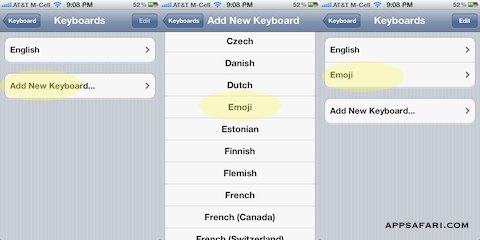
Go to
1) Settings
2) General
3) Keyboard
4) International Keyboards
5) Add New Keyboard
6) Emoji
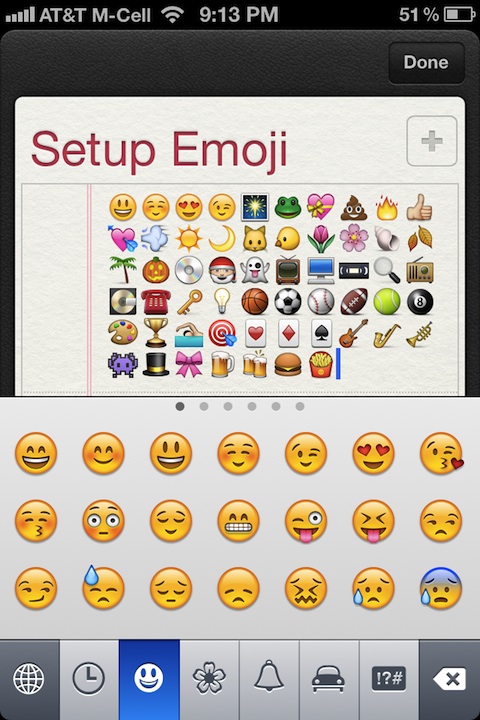
Now when you view a keyboard, tap the world icon on the keyboard and you will see the new Emoji character keyboard. Tap the world icon again to go back to the English keyboard.


Can’t get this to work
Posted on March 13th, 2012 at 5:41 am byNotice: Only variables should be assigned by reference in /var/www/html/wp-content/plugins/subscribe-to-comments/subscribe-to-comments.php on line 591
Shawn
Follow the instructions to the “T” Emoji keyboard reappeared instantly. Thanks
Posted on September 23rd, 2012 at 9:20 am byNotice: Only variables should be assigned by reference in /var/www/html/wp-content/plugins/subscribe-to-comments/subscribe-to-comments.php on line 591
Raymond
thanks
Posted on April 5th, 2013 at 1:22 pm byNotice: Only variables should be assigned by reference in /var/www/html/wp-content/plugins/subscribe-to-comments/subscribe-to-comments.php on line 591
layan194
Why is it so hard to re-install iOS apps on iPhone 3Gs
Posted on February 19th, 2015 at 9:34 pm byNotice: Only variables should be assigned by reference in /var/www/html/wp-content/plugins/subscribe-to-comments/subscribe-to-comments.php on line 591
Flo
Bj
Posted on August 8th, 2015 at 12:13 am byNotice: Only variables should be assigned by reference in /var/www/html/wp-content/plugins/subscribe-to-comments/subscribe-to-comments.php on line 591
H
This Imoj is good
Posted on November 2nd, 2016 at 11:41 pm byNotice: Only variables should be assigned by reference in /var/www/html/wp-content/plugins/subscribe-to-comments/subscribe-to-comments.php on line 591
Ibrahim Hassan