Yellowbook iPhone review


 Loading...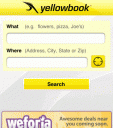
The yellowbook.com iPhone and iPod touch application is ready to help you find local businesses and more while you’re on the go. Explore businesses to find addresses and phone numbers. Just tap the Safari browser button on your home page and enter yellowbook.com in the address bar. To find the product or service that you want, just tap it into the Product/Service or Name of Business box. The search box suggests as you type. Tap on the Call button and be connected right away. Use the map button to get directions to the business.

Features:
– Local yellow pages search
– GPS location feature finds where you are to deliver businesses closest to you
– Locate businesses on maps and get driving directions
– View business websites and videos
– Save business detail to your Contacts
– Sort alphabetically or by distance

The app is called US Yellow Pages Search and can be downloaded for free from the App Store. The download is a universal binary and works on both the iPhone and iPad.
AppSafari Rating: /5

Leave Comment
About AppSafari
Popular App Review Categories
- Games
- Featured apps
- iPad apps
- Free apps
- Cydia apps
- App Lists
- Music
- Utilities
- Reference
- Social
- Chat
- Video
- Productivity
- Notes
- Fun
- GPS
- Files
- Augmented reality
- Shopping
- Education
- Finance
- Travel
- Food
- Sports
- News
- Weather
- Health
- Movies
- Photos
- VOIP
- Calendar
- Contacts
- Auto
- Dating
- Books
- Web apps
- All categories >>
Recent iPhone App Reviews
- Elevate – Brain Training May 28th, 14
- UpTo Calendar – Syncs with Google Calendar, iCloud, Outlook and more May 28th, 14
- Quip May 23rd, 14
- Marco Polo: Find Your Phone by Shouting MARCO! May 22nd, 14
- Ku – creative social network May 13th, 14
- Personal Zen May 9th, 14
- Fiasco! Free May 9th, 14
- Forza Football (formerly Live Score Addicts) Apr 29th, 14
