Dropbox iPhone app review


 Loading...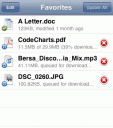
The free Dropbox app for iPhone and iPod touch is finally here, giving Dropbox users yet another reason to be excited about the wonderfully simple and powerful Dropbox service. You will need to upgrade to the 3.1 software update for you iPhone or iPod touch to download the Dropbox app, so if you haven’t done so already, do that first.
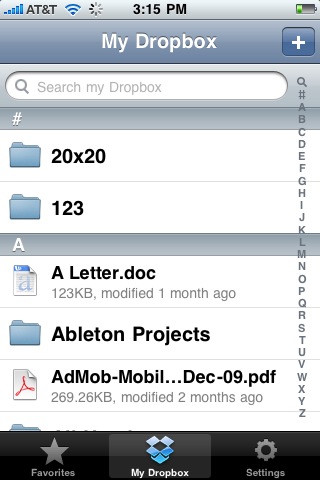
Dropbox iPhone app gives you full access your Dropbox from your iPhone, including your photos, videos, and documents. Once you open the app you will enter your account info and see a nice alphabetical list of all your PC or MAC files on your iPhone or iPod touch, with matching icons that display the file types. You can add or remove files to to a list of favorites which get download for viewing offline later. The Dropbox app is smart enough to know if a downloaded file has changed when you sync (hit Update All) and will get you the latest version of your favorites automatically. Syncing can be a great way to take notes, or create to do lists on your PC and view them on your iPhone at any time.
You can also now take your Videos and Photos with you where ever you go without storing them to your iPhone. Syncing photos and videos in Dropbox is probably the greatest feature of the Dropbox app for iPhone users. You can do 2 way sync with them. So you can view your backed up photos on your iPhone in a gallery format, or take photos and videos on your iPhone and sync them to your Dropbox. Sharing is also a snap as always, making it easy to send invitation links to files in your Dropbox to anyone.
Dropbox is an established award winning start-up that offers users one of most innovative and easier ways to sync your files online and across computers, and share them with people. So if you already have Dropbox you’ll love this iPhone app, and if you don’t GetDropbox now. It is one of the most useful and easy to use file sharing services out there today by far. You will regret not having had it sooner. You get 2GB for free and can get additional space for referring friends. The company also sells paid storage plans if you want to go bigger up to 100GB. Dropbox works across any computer with any OS, including Windows, Mac OS X or Linux and can be good for securely backing up your files online and sharing them with friends and relatives.
If you want any of your files stored locally on your device, tap the star button. The Dropbox app then will keep a local copy of the file for offline viewing or playing in case of music or video files.
Note: Previous to the app release users were able to use the DropBox web application on their iPhone or iPod touch by going to this url in Safari http://www.getdropbox.com/iphone/
Here is a video demo of the Dropbox iPhone app app on the iPhone
AppSafari Rating: /5

4 Comments to “Dropbox iPhone app”
Leave Comment
About AppSafari
Popular App Review Categories
- Games
- Featured apps
- iPad apps
- Free apps
- Cydia apps
- App Lists
- Music
- Utilities
- Reference
- Social
- Chat
- Video
- Productivity
- Notes
- Fun
- GPS
- Files
- Augmented reality
- Shopping
- Education
- Finance
- Travel
- Food
- Sports
- News
- Weather
- Health
- Movies
- Photos
- VOIP
- Calendar
- Contacts
- Auto
- Dating
- Books
- Web apps
- All categories >>
Recent iPhone App Reviews
- Elevate – Brain Training May 28th, 14
- UpTo Calendar – Syncs with Google Calendar, iCloud, Outlook and more May 28th, 14
- Quip May 23rd, 14
- Marco Polo: Find Your Phone by Shouting MARCO! May 22nd, 14
- Ku – creative social network May 13th, 14
- Personal Zen May 9th, 14
- Fiasco! Free May 9th, 14
- Forza Football (formerly Live Score Addicts) Apr 29th, 14

Dropbox ipod itouch
Posted on August 4th, 2009 at 8:07 pm byNotice: Only variables should be assigned by reference in /var/www/html/wp-content/plugins/subscribe-to-comments/subscribe-to-comments.php on line 591
Josefina
Dropbox iPhone app
Posted on August 21st, 2009 at 6:02 pm byNotice: Only variables should be assigned by reference in /var/www/html/wp-content/plugins/subscribe-to-comments/subscribe-to-comments.php on line 591
Mike
GET 250 MB MORE WITH THIS REFERRAL
https://www.getdropbox.com/referrals/NTU5MjY0Mjk
WORKS WITH ALL PLATFORM PC, OSX, LINUX, AND IPHONE
THANKS
Posted on September 8th, 2009 at 2:04 pm byNotice: Only variables should be assigned by reference in /var/www/html/wp-content/plugins/subscribe-to-comments/subscribe-to-comments.php on line 591
joe
wished the dropbox iphone app let us save pics to the camera roll.
Posted on October 4th, 2009 at 4:09 am byNotice: Only variables should be assigned by reference in /var/www/html/wp-content/plugins/subscribe-to-comments/subscribe-to-comments.php on line 591
jack fright