Picasa Web review


 Loading...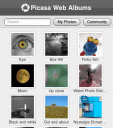
Picasa Web Albums from Google is a great way to store and share your photos online and now with this iPhone / iPod touch optimized version you can take those photos on the road via your iPod touch or iPhone.
You can view your photo albums and start a slideshow in any album. In any photo you can view the full sized photo by tapping on the zoom in button on top. Tapping any photo to the right or left moves to the photos around it in the album. You can also view your “My Favorites” photos and albums from your iPhone.
At the moment Picasa Web Albums for iPhone users, is limited to 100 Photos per album, for albums that contain more than 100 photos, only the first 100 pics will be shown.
Update: The folks at Google have just updated the GUI for Picasa web with an even more sleek interface. “Today, I’m happy to tell you that we’ve just released this new iPhone interface for Picasa. After you go to Picasa on your iPhone and log in, you can quickly see all your albums that you’ve uploaded to Picasa Web. If you click on any of the albums, you can get a full view of your picture with comments from your friends. Or you can click on Slideshow, sit back and watch the pictures scroll. You can also search for photos in your album or through community photos. Finally, with one of my favorite features, you can view your friends’ albums through favorites.”
You must be using an iPhone to see the iPhone version of this app. Try it here
Deprecated: strlen(): Passing null to parameter #1 ($string) of type string is deprecated in /var/www/html/wp-content/themes/apps/single.php on line 80

29 Comments to “Picasa Web”
Leave Comment
About AppSafari
Popular App Review Categories
- Games
- Featured apps
- iPad apps
- Free apps
- Cydia apps
- App Lists
- Music
- Utilities
- Reference
- Social
- Chat
- Video
- Productivity
- Notes
- Fun
- GPS
- Files
- Augmented reality
- Shopping
- Education
- Finance
- Travel
- Food
- Sports
- News
- Weather
- Health
- Movies
- Photos
- VOIP
- Calendar
- Contacts
- Auto
- Dating
- Books
- Web apps
- All categories >>
Recent iPhone App Reviews
- Test post title Aug 10th, 26
- Test post title Aug 10th, 26
- hello world Jul 15th, 26
- Elevate – Brain Training May 28th, 14
- UpTo Calendar – Syncs with Google Calendar, iCloud, Outlook and more May 28th, 14
- Quip May 23rd, 14
- Marco Polo: Find Your Phone by Shouting MARCO! May 22nd, 14
- Ku – creative social network May 13th, 14

Why does this application limit the picasa library to 100 pics? I can’t see the majority of my pics most of this time due to the limitation.
Posted on March 26th, 2008 at 7:15 am byNotice: Only variables should be assigned by reference in /var/www/html/wp-content/plugins/subscribe-to-comments/subscribe-to-comments.php on line 591
Sunbuddha
I also want know why my Picasa album view is limited to 180. Is the only way round this to split the album, or will there be a solution soon?
Posted on September 21st, 2008 at 11:30 pm byNotice: Only variables should be assigned by reference in /var/www/html/wp-content/plugins/subscribe-to-comments/subscribe-to-comments.php on line 591
Mike
Sorry that should have been 100 pics only.
Posted on September 22nd, 2008 at 1:00 am byNotice: Only variables should be assigned by reference in /var/www/html/wp-content/plugins/subscribe-to-comments/subscribe-to-comments.php on line 591
Mike
Looks like you have in fact found a new limitation in Picasa Web Albums. Do you have a paid account for free account?
Posted on September 22nd, 2008 at 10:57 am byNotice: Only variables should be assigned by reference in /var/www/html/wp-content/plugins/subscribe-to-comments/subscribe-to-comments.php on line 591
Appmin
No I don’t have a paid for account.
Posted on September 22nd, 2008 at 11:24 am byNotice: Only variables should be assigned by reference in /var/www/html/wp-content/plugins/subscribe-to-comments/subscribe-to-comments.php on line 591
Mike
it would be good to hear from someone with a paid Picasa account about iPhone limitations. As for free accounts looks like 100 is the limit per album for iPhone users.
Posted on September 22nd, 2008 at 11:55 am byNotice: Only variables should be assigned by reference in /var/www/html/wp-content/plugins/subscribe-to-comments/subscribe-to-comments.php on line 591
Appmin
I hear what you say, but why would Google limit it to 100? They are quite generous in many other directions. Apart from Apple’s built in limitations as with Flash, I am not aware of other sites having limitations.
Posted on September 22nd, 2008 at 12:02 pm byNotice: Only variables should be assigned by reference in /var/www/html/wp-content/plugins/subscribe-to-comments/subscribe-to-comments.php on line 591
Mike
I have a paid storage account with google, which doesn’t make a difference with the iPhone interface. Either way, it is App issue, not a google issue i suspect, because I can go to html Picasa interface and see all my pics, it is just a pain in the but to navigate that way. So can’t the App be modified?
Posted on September 22nd, 2008 at 12:50 pm byNotice: Only variables should be assigned by reference in /var/www/html/wp-content/plugins/subscribe-to-comments/subscribe-to-comments.php on line 591
Sunbuddha
I’m guessing maybe because download speed for iPhone users, but really it doesn’t make sense. As a side note even for the regular web version they limit free users to 250 albums and 500 photos per album. I wonder if there is a limit to number of albums shown on iPhone as well?
Posted on September 22nd, 2008 at 12:55 pm byNotice: Only variables should be assigned by reference in /var/www/html/wp-content/plugins/subscribe-to-comments/subscribe-to-comments.php on line 591
Appmin
How do you go to HTML interface, if I enter the picasaweb address it defaults to the interface with limitations?
Posted on September 22nd, 2008 at 12:56 pm byNotice: Only variables should be assigned by reference in /var/www/html/wp-content/plugins/subscribe-to-comments/subscribe-to-comments.php on line 591
Mike
I have a paid account and it will only show me 100 pics in an album. More annoyingly, it will only show me a certain number of my albums, so any of the pics before a year ago, I can’t even access… Sooooo annoying!
Posted on September 26th, 2008 at 5:31 pm byNotice: Only variables should be assigned by reference in /var/www/html/wp-content/plugins/subscribe-to-comments/subscribe-to-comments.php on line 591
mzbradford
Also in album view, only 30 albums can be viewed. I have 39 albums currently in Picasa, it only displays the first 30
Posted on September 28th, 2008 at 2:27 pm byNotice: Only variables should be assigned by reference in /var/www/html/wp-content/plugins/subscribe-to-comments/subscribe-to-comments.php on line 591
BMa
I am more and more disappointed with the limitations of this app. Originally I was impressed, but the interface seems to be intentionally designed with so many limitations, it is less and less interesting to me. Perhaps Flikr has a better mobile app?
Posted on September 29th, 2008 at 4:11 pm byNotice: Only variables should be assigned by reference in /var/www/html/wp-content/plugins/subscribe-to-comments/subscribe-to-comments.php on line 591
Sunbuddha
I find the iphone picasa app infuriating. The limitations are quite ridiculous and seem completely un-called for unless of course google were to launch their own iphone competitor and hope to make the google experience frustrating enough to put potential buyers off iphone.
Do google have plans for such a device? they could call it something like android!
Posted on November 9th, 2008 at 10:32 am byNotice: Only variables should be assigned by reference in /var/www/html/wp-content/plugins/subscribe-to-comments/subscribe-to-comments.php on line 591
slim
No I don’t is a double negative. He’s saying he does have a paid account.
Posted on May 29th, 2009 at 6:32 am byNotice: Only variables should be assigned by reference in /var/www/html/wp-content/plugins/subscribe-to-comments/subscribe-to-comments.php on line 591
Ray
There is a limit to the number of albums…the more I realize the limitations of this app, the more I dislike it!
Posted on May 29th, 2009 at 5:45 pm byBTW, if it was Google’s intention to do this they are breaking their Mission Statement…”DO NO EVIL”, this is just EVIL.
Notice: Only variables should be assigned by reference in /var/www/html/wp-content/plugins/subscribe-to-comments/subscribe-to-comments.php on line 591
Sunbuddha
i found an amazing photos app for iphone
http://www.pushtuck.com/ads/photoskins/
Posted on September 8th, 2009 at 12:03 am byNotice: Only variables should be assigned by reference in /var/www/html/wp-content/plugins/subscribe-to-comments/subscribe-to-comments.php on line 591
marie
The new app for picasa cannot save or download images anymore. I can only save the thumbnail picture when viewing the album. Am I doing something wrong
Posted on September 9th, 2009 at 6:34 pm byNotice: Only variables should be assigned by reference in /var/www/html/wp-content/plugins/subscribe-to-comments/subscribe-to-comments.php on line 591
Chasity
yeah… what Chastity says!
Posted on September 17th, 2009 at 1:37 am byNotice: Only variables should be assigned by reference in /var/www/html/wp-content/plugins/subscribe-to-comments/subscribe-to-comments.php on line 591
Richard
I tried to use the picasaweb for iphone application, but when I try to use features like “favorites” it tells me it can’t do this unless it has a network connection, then it can’t make the connection, even if I have WiFi. Has anyone else experienced anything like this?
Posted on December 5th, 2009 at 2:58 pm byNotice: Only variables should be assigned by reference in /var/www/html/wp-content/plugins/subscribe-to-comments/subscribe-to-comments.php on line 591
Raman Singh
I like this website
Posted on December 9th, 2009 at 1:13 pm byNotice: Only variables should be assigned by reference in /var/www/html/wp-content/plugins/subscribe-to-comments/subscribe-to-comments.php on line 591
Temo
iPicasa in the app store is a really cool app. It takes care of all aspects of picasa. add/delete photos, albums. Stores locally to view offline. multiple accounts and automatic sync that can be turned on and off.
iPicasa in the iPhone app store
Posted on December 13th, 2009 at 8:25 am byNotice: Only variables should be assigned by reference in /var/www/html/wp-content/plugins/subscribe-to-comments/subscribe-to-comments.php on line 591
Vijay
theres a brand new app on the app store called Web Albums (www.webalbumsapp.com) so far it seems way better than the picasa web app, you get to browse your photos in the exact same interface as the native iphone apps and is way smoother and quicker than anything that could run in safari.
Posted on January 9th, 2010 at 10:13 pm byNotice: Only variables should be assigned by reference in /var/www/html/wp-content/plugins/subscribe-to-comments/subscribe-to-comments.php on line 591
Skeeter
Also take a look at iPicasso (www.uvento.com/ipicasso), I’ve been using it since the day it came out and it’s only getting better. I can do pretty much anything that I can do via the web interface. IMO the best Picasa app at the moment.
Posted on February 14th, 2010 at 3:34 pm byNotice: Only variables should be assigned by reference in /var/www/html/wp-content/plugins/subscribe-to-comments/subscribe-to-comments.php on line 591
Nate
I just tried the picasa-web app and the 100 album limit is still in effect. It even states as much in the help section of the app.
Posted on April 27th, 2010 at 2:52 pm byNotice: Only variables should be assigned by reference in /var/www/html/wp-content/plugins/subscribe-to-comments/subscribe-to-comments.php on line 591
Larry Feldhaus
This is an awesome site, helped to get me directed and connected
Posted on July 18th, 2010 at 9:37 am byNotice: Only variables should be assigned by reference in /var/www/html/wp-content/plugins/subscribe-to-comments/subscribe-to-comments.php on line 591
Karin falcone
Sounds great, can I use it on my iphone 3G
Posted on August 23rd, 2010 at 2:05 pm byNotice: Only variables should be assigned by reference in /var/www/html/wp-content/plugins/subscribe-to-comments/subscribe-to-comments.php on line 591
Sheikh Farrukh
All my albums have more that 100 pics on them…. I want to show them to my friends and family using my Iphone 4 but that is not possible… Does anyone knows if Google ever going to change the 100 pics per album limit?
Posted on November 6th, 2010 at 2:26 am byNotice: Only variables should be assigned by reference in /var/www/html/wp-content/plugins/subscribe-to-comments/subscribe-to-comments.php on line 591
JoseG
Please email be instructions how to transfer pictures from Picasa to iTunes and then download to my Nano Ipod.
Thank you
Posted on April 13th, 2011 at 12:18 pm byNotice: Only variables should be assigned by reference in /var/www/html/wp-content/plugins/subscribe-to-comments/subscribe-to-comments.php on line 591
Bob Young