Veency


 Loading...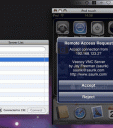
Would you love to type notes from your computer directly into your iPhone? Or write emails, create calendars events and take pictures in your iPhone using your Mac or PC keyboard and mouse? Looking for a VNC Server for your iPhone? Jay Freeman, the creator of the infamous Cydia installer and Cycorder comes the Veency app. You can isntall it using Cydia on your iPhone. Veency runs a VNC server that allows you to get to your iPhone from your Mac or PC using a VNC client.
Reboot your iPhone after Veency is installed for the service to start. Then you can connect with a VNC client. When you establish a new connection a prompt will appear on the iPhone asking if you want to accept the connection. To find your iPhone IP address just go to Settings/Wi-Fi Networks and click the blue arrow next to your Wi-Fi network connection. Your IP address is listed there.
Here are some popular VNC clients for Mac and PC users.
Mac VNC Software:
Apple Remote Desktop
Chicken of the VNC
PC VNC Software:
RealVNC
TightVNC
Here is a video demo of Veency for iPhone
Use iPhone mods and hacks at your own risk! Installing 3rd Party iPhone apps requires you to jailbreak the iPhone before installing the native software and apps. You can use Installer.app for Mac OSX and iBrickr for Windows PC to do this. Browse the full list of all iPhone and iPod touch native 3rd party apps filed under the software category.
Get it via Cydia
Deprecated: strlen(): Passing null to parameter #1 ($string) of type string is deprecated in /var/www/html/wp-content/themes/apps/single.php on line 80

16 Comments to “Veency”
Leave Comment
About AppSafari
Popular App Review Categories
- Games
- Featured apps
- iPad apps
- Free apps
- Cydia apps
- App Lists
- Music
- Utilities
- Reference
- Social
- Chat
- Video
- Productivity
- Notes
- Fun
- GPS
- Files
- Augmented reality
- Shopping
- Education
- Finance
- Travel
- Food
- Sports
- News
- Weather
- Health
- Movies
- Photos
- VOIP
- Calendar
- Contacts
- Auto
- Dating
- Books
- Web apps
- All categories >>
Recent iPhone App Reviews
- Elevate – Brain Training May 28th, 14
- UpTo Calendar – Syncs with Google Calendar, iCloud, Outlook and more May 28th, 14
- Quip May 23rd, 14
- Marco Polo: Find Your Phone by Shouting MARCO! May 22nd, 14
- Ku – creative social network May 13th, 14
- Personal Zen May 9th, 14
- Fiasco! Free May 9th, 14
- Forza Football (formerly Live Score Addicts) Apr 29th, 14

Great app!
Posted on October 6th, 2008 at 6:17 am byThanks ;-))
Notice: Only variables should be assigned by reference in /var/www/html/wp-content/plugins/subscribe-to-comments/subscribe-to-comments.php on line 591
Guido
Works just like a charm. If you have ever used any VNC app then this will be very easy for you. It’s easy even if you haven’t used a VNC app before. Shows the entire face of the iPhone on my PC and lets me do whatever I want. Thanks for getting it to us.
Posted on October 8th, 2008 at 5:40 pm byNotice: Only variables should be assigned by reference in /var/www/html/wp-content/plugins/subscribe-to-comments/subscribe-to-comments.php on line 591
kimtyson
This is exactly the application I need on my iPhone so I can click the buttons on the lower half of my screen, since the touchscreen is half gone, the only problem is, I need it so I can click on the buttons on the lower half of my screen to install it….is there some way someone who has installed it can pull all of the files off their iPhone (2G) zip them up, and send them to me so I can use ibrickr to add them manually?
Posted on November 25th, 2008 at 3:03 pm byNotice: Only variables should be assigned by reference in /var/www/html/wp-content/plugins/subscribe-to-comments/subscribe-to-comments.php on line 591
Paradox
You can install it via pwnage by adding it in a custom ipsw, that’s how i’m doing it right now,
one problem i foresee, not too sure i can hit accept on the iphone … as my screen is gone too..
Boz
Posted on November 25th, 2008 at 3:43 pm byNotice: Only variables should be assigned by reference in /var/www/html/wp-content/plugins/subscribe-to-comments/subscribe-to-comments.php on line 591
Boz
just FYI, multi fingers does not work… also you can connect via the 3G network… brand new, instead of using a wifi or cable to connect to port 5900 you can use an SSH command from the iPhone’s terminal to crate a reverse tunnel over the 3G network to your SSH server at home… meaning, you can connect to it anywhere it goes… even if its stolen… now all we need is an app that can launch terminal commands at bootup for the iPhone
Posted on July 8th, 2009 at 6:40 am byNotice: Only variables should be assigned by reference in /var/www/html/wp-content/plugins/subscribe-to-comments/subscribe-to-comments.php on line 591
mike
god
Posted on January 23rd, 2010 at 5:50 pm byNotice: Only variables should be assigned by reference in /var/www/html/wp-content/plugins/subscribe-to-comments/subscribe-to-comments.php on line 591
reynaldo
ok so i instaled veency. the only problem is that i use mywi to to get internet. i dont know if they will work together because i think veency uses the wireless network your computer and iphone/ipod touch is on. if anyone knows anything about this or how to figure it out please help. thank you
Posted on April 23rd, 2010 at 9:17 am byNotice: Only variables should be assigned by reference in /var/www/html/wp-content/plugins/subscribe-to-comments/subscribe-to-comments.php on line 591
taylor
So I get Apple to mail a wifi IPad to my 87 year old mother in England. (Her windows netbook currently has a blue screen so LogMeIn won’t connect). Then, with minimal need for my mum’s trembling hands and poor eyesight at her end, I can email her photos of her granddaughter here in Toronto and even play tic-tac-toe with her. Will this work? Videos even? Will make for a much happier grandma, thanks. Keith
Posted on May 17th, 2010 at 8:29 am byNotice: Only variables should be assigned by reference in /var/www/html/wp-content/plugins/subscribe-to-comments/subscribe-to-comments.php on line 591
Keith
Veency sounds and looks like a good useful thing to use, but I cannot seem to get my Mac or PC to show anything but a black screen. I can still control everything, but cannot see anything I do.
Posted on May 20th, 2010 at 8:40 am by(iPod Touch 2G with 3.1.3 firmware)
Notice: Only variables should be assigned by reference in /var/www/html/wp-content/plugins/subscribe-to-comments/subscribe-to-comments.php on line 591
Tyler
RE:
May 20th, 2010 at 8:40 am Tyler says:
Veency sounds and looks like a good useful thing to use, but I cannot seem to get my Mac or PC to show anything but a black screen. I can still control everything, but cannot see anything I do.
(iPod Touch 2G with 3.1.3 firmware)
Me too!!!! i have the same fw
Posted on May 21st, 2010 at 9:54 pm byNotice: Only variables should be assigned by reference in /var/www/html/wp-content/plugins/subscribe-to-comments/subscribe-to-comments.php on line 591
Brandon
Figured out the problem. I posted it on my website. Here is how I fixed this: http://bit.ly/aQ16Oi
Posted on May 23rd, 2010 at 9:20 am byNotice: Only variables should be assigned by reference in /var/www/html/wp-content/plugins/subscribe-to-comments/subscribe-to-comments.php on line 591
Tyler
Sorry, the link above is broken. Try this link: http://bit.ly/cpsLrQ
Posted on September 12th, 2010 at 9:47 am byNotice: Only variables should be assigned by reference in /var/www/html/wp-content/plugins/subscribe-to-comments/subscribe-to-comments.php on line 591
Tyler
Please i want
Posted on October 8th, 2010 at 7:32 pm bythis app
Notice: Only variables should be assigned by reference in /var/www/html/wp-content/plugins/subscribe-to-comments/subscribe-to-comments.php on line 591
Inngwag
Hi, I tested the app, which worked fine (congratulations for the developer) except for the one and only thing I needed it for : taking a picture through the iPhone from the Mac. I can launch the Cam app, but its inner screen stays black, and the control button remains dead : I can’t see what I’d like to take a picture of, nor can I actually take the picture anyway. Am I the only one ? thanks for your replies.
i-Moi
Posted on August 3rd, 2011 at 5:58 am byNotice: Only variables should be assigned by reference in /var/www/html/wp-content/plugins/subscribe-to-comments/subscribe-to-comments.php on line 591
i-Moi
I downloaded veency and tightvnc and then added my IP address i found on my ipod to tightvnc and it took a while to connect but after a while, there was a message that poped up that said, failed to connect! Please help!
Posted on September 20th, 2011 at 9:12 pm byNotice: Only variables should be assigned by reference in /var/www/html/wp-content/plugins/subscribe-to-comments/subscribe-to-comments.php on line 591
BobbIe
Good for me
Posted on October 4th, 2011 at 9:27 am byNotice: Only variables should be assigned by reference in /var/www/html/wp-content/plugins/subscribe-to-comments/subscribe-to-comments.php on line 591
Badr