Snapture 2.0


 Loading...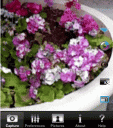
Snapture is an excellent and Free 3rd party native app for the iPhone that extends the functionality of the basic iPhone camera.
Update: Snapture is now available in the App Store.
Snapture currently provides all these missing features to your iPhone for free:
- Self Photo – Tap anywhere on the iPhone screen or use the volume button to take a photo!
- Digital Zoom- 3x max digital zoom
- Multishot Mode – capture three frames in a row
- Multiple Image Sizes – 3 sizes: Large (1600×1200), Medium (1280×960) and Small (960×720)
- Color Modes – Color or Grayscale
- Delay Timer – Take Group photos with your iPhone using the 5 second delay
- Toggle Auto Rotation – Photos rotated automatically
- Collapse Menu – remove unnecessary clutter
- Quiet Mode – turning off snap sound
- Level Aid – visual guide for taking photos at different angles
Snapture is an enhanced camera app for the iPhone. Snapture 2.0 brings all the features of an advanced digital camera to the iPhone, and our new QuickView system now allows users to view and delete recent pictures directly on the viewfinder, a feature that cuts the average photo taking session in half.
You can get a free version of Snapture or upgrade to a full version for $7.99 which enables the QuickView system allowing you to view and delete recent pictures directly on the viewfinder.
Snapture is available in Installer.app in the Utilities category. You can also find Snapture in your Cydia installer.
Here is a video demo of Snapture
Use iPhone mods and hacks at your own risk! Installing 3rd Party iPhone apps requires you to jailbreak the iPhone before installing the native software and apps. You can use Installer.app for Mac OSX and iBrickr for Windows PC to do this. Browse the full list of all iPhone and iPod touch native 3rd party apps filed under the software category.
More info here

One Comment to “Snapture 2.0”
About AppSafari
Popular App Review Categories
- Games
- Featured apps
- iPad apps
- Free apps
- Cydia apps
- App Lists
- Music
- Utilities
- Reference
- Social
- Chat
- Video
- Productivity
- Notes
- Fun
- GPS
- Files
- Augmented reality
- Shopping
- Education
- Finance
- Travel
- Food
- Sports
- News
- Weather
- Health
- Movies
- Photos
- VOIP
- Calendar
- Contacts
- Auto
- Dating
- Books
- Web apps
- All categories >>
Recent iPhone App Reviews
- Elevate – Brain Training May 28th, 14
- UpTo Calendar – Syncs with Google Calendar, iCloud, Outlook and more May 28th, 14
- Quip May 23rd, 14
- Marco Polo: Find Your Phone by Shouting MARCO! May 22nd, 14
- Ku – creative social network May 13th, 14
- Personal Zen May 9th, 14
- Fiasco! Free May 9th, 14
- Forza Football (formerly Live Score Addicts) Apr 29th, 14

Great app, but I expected the tap to White balance of the standard iPhone camera app. Why was this left out?!?!? Pls add this feature into the app.
Posted on October 4th, 2009 at 4:25 pm by Ramón