Gmail review


 Loading...
Zoom
User Reviews
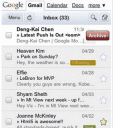
Try Google’s Gmail service to send and read emails on your iPhone or iPod touch using the Safari web browser. The web based version of the Gmail has been revamped many times over the past couple of years to give it a more app like feel.
Most recently Google has added swipe gesture support in the web based version of Gmail. While reading email messages, swipe left to see the red Archive button, and swipe again to remove the button.
Other powerful features of the Gmail webapp include email search, compose, mass delete, mass archive, mute, report spam, mass label, mark as read, mark as unread, and many more.
Just visit gmail.com on your iPhone’s Safari browser.
Try with TestiPhone
Deprecated: strlen(): Passing null to parameter #1 ($string) of type string is deprecated in /var/www/html/wp-content/themes/apps/single.php on line 80

30 Comments to “Gmail”
Leave Comment
About AppSafari
Looking for the best iPhone, iPad & iPod touch apps? Reviews of the best new iPhone apps daily since 2007. The App Store is a jungle. Go on a safari of over 7263 iPhone, iPod touch & iPad apps & discover new iOS apps.
Popular App Review Categories
- Games
- Featured apps
- iPad apps
- Free apps
- Cydia apps
- App Lists
- Music
- Utilities
- Reference
- Social
- Chat
- Video
- Productivity
- Notes
- Fun
- GPS
- Files
- Augmented reality
- Shopping
- Education
- Finance
- Travel
- Food
- Sports
- News
- Weather
- Health
- Movies
- Photos
- VOIP
- Calendar
- Contacts
- Auto
- Dating
- Books
- Web apps
- All categories >>
Recent iPhone App Reviews
- Elevate – Brain Training May 28th, 14
- UpTo Calendar – Syncs with Google Calendar, iCloud, Outlook and more May 28th, 14
- Quip May 23rd, 14
- Marco Polo: Find Your Phone by Shouting MARCO! May 22nd, 14
- Ku – creative social network May 13th, 14
- Personal Zen May 9th, 14
- Fiasco! Free May 9th, 14
- Forza Football (formerly Live Score Addicts) Apr 29th, 14

Hey, thanks a lot for making this app. i was almost going back to hotmail just so i could send mail on my ipod touch!
Posted on October 5th, 2007 at 2:21 pm byNotice: Only variables should be assigned by reference in /var/www/html/wp-content/plugins/subscribe-to-comments/subscribe-to-comments.php on line 591
Simon
Hi!
I am thinking about getting the touch, but what has been stopping me is that there is no email application. Does this app work as a stand alone mail application? I.e. can you write mails while you are offline and send them when you have a wifi net again?
Thanks
Posted on October 5th, 2007 at 11:09 pm bySeb
Notice: Only variables should be assigned by reference in /var/www/html/wp-content/plugins/subscribe-to-comments/subscribe-to-comments.php on line 591
Seb
Hey Seb, not currently, I think you need to have Wi-Fi for web apps to work. There are rumors flying around that offline storage is coming with new version of Safari in the next update. After it does come, it will be up to Google to implement those features as well.
Posted on October 6th, 2007 at 2:25 pm byNotice: Only variables should be assigned by reference in /var/www/html/wp-content/plugins/subscribe-to-comments/subscribe-to-comments.php on line 591
gio
I’m an idiot. How do I hook this app up to my Ipod Touch so I can send Gmail? Thanks. : )
Posted on October 9th, 2007 at 4:47 pm byNotice: Only variables should be assigned by reference in /var/www/html/wp-content/plugins/subscribe-to-comments/subscribe-to-comments.php on line 591
Scott
Hey Scott, You can get to any app on here by clicking its thumbnail.
To do it mannually, Open Safari on your iPod touch, touch the address bar on top, type in the URL of the app, in this case https://mail.google.com/mail/x/ and press enter.
You can also visit appSafari.com from your iPod touch.
Posted on October 9th, 2007 at 6:03 pm byNotice: Only variables should be assigned by reference in /var/www/html/wp-content/plugins/subscribe-to-comments/subscribe-to-comments.php on line 591
Appmin
I’ve installed mail to my touch. I can receive mail on my touch thru gmail, however, I’m unable to send mail. I’ve setup the outgoing server with smtp.gmail.com and with smtp.googlemail.com, but to no avail.
Has anyone succesfully, got gmail to work, sending and receiving mail? If so, how did you configure the outgoing server?
Posted on November 4th, 2007 at 10:30 pm bythanks
Notice: Only variables should be assigned by reference in /var/www/html/wp-content/plugins/subscribe-to-comments/subscribe-to-comments.php on line 591
Diego Rivera
Have you tried the instruction listed here: http://appsafari.com/email/1380/imap-for-gmail/
Posted on November 5th, 2007 at 1:33 am byNotice: Only variables should be assigned by reference in /var/www/html/wp-content/plugins/subscribe-to-comments/subscribe-to-comments.php on line 591
Appmin
hey, does this mean i can just go 2 google and click the gmail icon and send emails?
Posted on April 13th, 2008 at 11:29 am byNotice: Only variables should be assigned by reference in /var/www/html/wp-content/plugins/subscribe-to-comments/subscribe-to-comments.php on line 591
Azn0wner
for some reason my iPod touch refuses to open emails from my gmail inbox!I tried thru this application as well but no use. All other websites work fine I don’t understand where the problem is.please help me 🙁 Thanx
Posted on May 10th, 2008 at 4:51 pm byNotice: Only variables should be assigned by reference in /var/www/html/wp-content/plugins/subscribe-to-comments/subscribe-to-comments.php on line 591
fatima
hey once u jailbreak u can find much apps under installer with offline storage and u don’t need to spend the 20 bucks on the new apps(mine came with them)
Posted on May 10th, 2008 at 7:59 pm byNotice: Only variables should be assigned by reference in /var/www/html/wp-content/plugins/subscribe-to-comments/subscribe-to-comments.php on line 591
touchmaster
can anyone put this app on the archos 605 wifi?
Posted on July 24th, 2008 at 7:03 pm byNotice: Only variables should be assigned by reference in /var/www/html/wp-content/plugins/subscribe-to-comments/subscribe-to-comments.php on line 591
archos kid
I am going crazy trying to shut my GMAIL box. It remains open, because there doesn’t appear to be a LOG OFF. I am quite concerned about confidentiality, and am pulling my hair out trying to figure this out. HELP.
Posted on July 24th, 2008 at 8:42 pm byNotice: Only variables should be assigned by reference in /var/www/html/wp-content/plugins/subscribe-to-comments/subscribe-to-comments.php on line 591
Noreen
Hi Noreen,
I just found out how to log-off from Mail. Go to settings, select ‘mail, contacts, calendars’, in that go to ‘accounts’, and select your account, scroll down and it says ‘delete account’, tap on that – and BINGO! its gone 🙂
Nest time try using safari to access your gmail – thats what i’m going to do!!
Best,
Posted on July 31st, 2008 at 7:13 am byRamya
Notice: Only variables should be assigned by reference in /var/www/html/wp-content/plugins/subscribe-to-comments/subscribe-to-comments.php on line 591
Ramya
Hi Noreen,
One more thing, if you are using safari to get to gmail, there is an option called ‘Menu’ on top left corner in gmail, tap that and on right bottom it’ll show the ‘sign out’ sign.
Enjoy!
Posted on July 31st, 2008 at 7:16 am by~Ramya
Notice: Only variables should be assigned by reference in /var/www/html/wp-content/plugins/subscribe-to-comments/subscribe-to-comments.php on line 591
Ramya
I have successfully setup my gmail in my iPod touch. However, unlike the original gmail, I can’t seem to do a search for any old emails that I have. Am I missing out anything?
Posted on November 3rd, 2008 at 9:03 am byNotice: Only variables should be assigned by reference in /var/www/html/wp-content/plugins/subscribe-to-comments/subscribe-to-comments.php on line 591
rexy
I have tried everything to setup my gmail account on my iPod Touch. I always get message “connection to the server failed”. I setup using GMail icon at Add Account from Settings App. I setup Yahoo mail account no problem.
Posted on December 15th, 2008 at 9:09 am byNotice: Only variables should be assigned by reference in /var/www/html/wp-content/plugins/subscribe-to-comments/subscribe-to-comments.php on line 591
JerryinBatonRouge
Is there another way to do this so you can maintain the convenience of clicking on your mail button in the menu screen? If you can’t log off can someone compromise your contacts list?
Posted on January 2nd, 2009 at 1:43 pm byNotice: Only variables should be assigned by reference in /var/www/html/wp-content/plugins/subscribe-to-comments/subscribe-to-comments.php on line 591
J
I use Gmail on my iphone 3g..and it always worked fine, until all of a sudden it stopped working. It would not update my email and just say “connecting….” and then “cannot connect to imap.google.com”. It was so frustrating! I tried several things, none of which worked. Finally I got a tip from someone online to just go into gmail on my computer and change my password to something more secure. Up until then my password had just been a simple word, but after changing it to something with a number and longer word in it, gmail worked on my phone again. But gosh it was so frustrating when it wasn’t working.
Posted on February 17th, 2009 at 5:05 pm byNotice: Only variables should be assigned by reference in /var/www/html/wp-content/plugins/subscribe-to-comments/subscribe-to-comments.php on line 591
Portable Air Conditioners.net
Good posting.Do u want to see online reviews ? u can visit my blog friend :D.ow yeah your blog has alread bookmarked by me
Posted on February 24th, 2009 at 7:30 am byNotice: Only variables should be assigned by reference in /var/www/html/wp-content/plugins/subscribe-to-comments/subscribe-to-comments.php on line 591
online reviews
I am a new Ipod touch customer and do not know how to get e-mail…someone needs to walk me through the whole process….not to smart when it comes to gadgets. thanks
Posted on April 6th, 2009 at 5:15 am byNotice: Only variables should be assigned by reference in /var/www/html/wp-content/plugins/subscribe-to-comments/subscribe-to-comments.php on line 591
Doris
Hello. Great job. This is a great story. Thanks!
Posted on April 8th, 2009 at 1:56 pm byNotice: Only variables should be assigned by reference in /var/www/html/wp-content/plugins/subscribe-to-comments/subscribe-to-comments.php on line 591
Elizabeth
I tried to signup for your RSS feed but it didn’t work. How can I do this?
Posted on April 19th, 2009 at 12:02 pm byNotice: Only variables should be assigned by reference in /var/www/html/wp-content/plugins/subscribe-to-comments/subscribe-to-comments.php on line 591
Book
I cannot set up my e-mail on my new Ipod Touch, please walk me through it. Do you have to be hooked up to the computor? Help…Doris
Posted on April 20th, 2009 at 11:47 am byNotice: Only variables should be assigned by reference in /var/www/html/wp-content/plugins/subscribe-to-comments/subscribe-to-comments.php on line 591
Doris
I have a similar question as Seb:
Ideally, I would like to be able to sync my google calendar/gmail/gmail tasks list on my laptop to one of these devices so that I can work between the two easily. My concern with the ipod touch is that I may not always have an internet connection, but would like to still be able to see & manipulate this information. I notice that Gmail labs has an option for using gmail “offline”. Will this also work on an ipod touch? Also, will other gmail lab features like “tasks” work on the ipod touch? Does this answer change if I’m using an iphone?
thanks in advance, m.
Posted on June 15th, 2009 at 6:22 pm byNotice: Only variables should be assigned by reference in /var/www/html/wp-content/plugins/subscribe-to-comments/subscribe-to-comments.php on line 591
m
I never ever post but this time I will,Thanks alot for the great blog.
Posted on August 30th, 2009 at 12:50 pm byNotice: Only variables should be assigned by reference in /var/www/html/wp-content/plugins/subscribe-to-comments/subscribe-to-comments.php on line 591
Peter
amazing stuff thanks 🙂
Posted on October 11th, 2009 at 10:19 am byNotice: Only variables should be assigned by reference in /var/www/html/wp-content/plugins/subscribe-to-comments/subscribe-to-comments.php on line 591
Forex Correlation Code Review
Ok I just need to know the price of this fine app! Can any one help me!?
Posted on November 20th, 2009 at 8:17 pm byNotice: Only variables should be assigned by reference in /var/www/html/wp-content/plugins/subscribe-to-comments/subscribe-to-comments.php on line 591
Danika
ummmm how much is it?????
Posted on December 24th, 2009 at 11:50 am byNotice: Only variables should be assigned by reference in /var/www/html/wp-content/plugins/subscribe-to-comments/subscribe-to-comments.php on line 591
Sadiexyz10
can not get on ipad touch
Posted on June 3rd, 2010 at 1:46 pm byNotice: Only variables should be assigned by reference in /var/www/html/wp-content/plugins/subscribe-to-comments/subscribe-to-comments.php on line 591
Tom
Kak Pobedit Zaikanie?(FREE) http://www.marksharabrin.ru/curse/
Posted on September 20th, 2011 at 3:45 am byNotice: Only variables should be assigned by reference in /var/www/html/wp-content/plugins/subscribe-to-comments/subscribe-to-comments.php on line 591
Mike