Color Dial review
 (No Ratings Yet)
 Loading...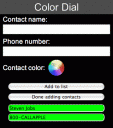
On iPhone, you have to look at the screen to pick a contact or dial a number, but with the Color Dial app you make a list of up to 6 color-coded contacts. The screen flashes a different color, and when it shows the color for the contact you want, you tap the screen to make the call.
You shouldn’t be making calls while driving or doing other tasks that demand your concentration, but Color Dial does make it easy to make a call while holding the phone somewhere in your field of view, and not right in front of your face.
You tap the screen when the right color comes up, then tap the “Call” button, which is always in the middle of the screen, so it’s easy to find without looking. That’s all there is to it.
For the app to really be useful, leave it open in Safari on your iPhone, so you don’t have to search through your bookmark list to find it, which would defeat the purpose. Try with TestiPhone
Deprecated: strlen(): Passing null to parameter #1 ($string) of type string is deprecated in /var/www/html/wp-content/themes/apps/single.php on line 80

Leave Comment
About AppSafari
Popular App Review Categories
- Games
- Featured apps
- iPad apps
- Free apps
- Cydia apps
- App Lists
- Music
- Utilities
- Reference
- Social
- Chat
- Video
- Productivity
- Notes
- Fun
- GPS
- Files
- Augmented reality
- Shopping
- Education
- Finance
- Travel
- Food
- Sports
- News
- Weather
- Health
- Movies
- Photos
- VOIP
- Calendar
- Contacts
- Auto
- Dating
- Books
- Web apps
- All categories >>
Recent iPhone App Reviews
- Elevate – Brain Training May 28th, 14
- UpTo Calendar – Syncs with Google Calendar, iCloud, Outlook and more May 28th, 14
- Quip May 23rd, 14
- Marco Polo: Find Your Phone by Shouting MARCO! May 22nd, 14
- Ku – creative social network May 13th, 14
- Personal Zen May 9th, 14
- Fiasco! Free May 9th, 14
- Forza Football (formerly Live Score Addicts) Apr 29th, 14
