Weather Channel review


 Loading...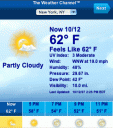
The Weather Channel is now fully iPhone optimized and works on the iPod touch as well and is quite an improvement over the original mobile version of weather.com. You need to use a Safari browser if you want to take it for a test drive on your PC or Mac. After entering your city or Zip Code you are shown the current conditions in a nicely designed iPhone format. On the bottom of the page you see the forecast for today broken down by hour. Also on the bottom you have buttons for loading Weather Maps in Road, Hybrid or Arial modes. Finally there is a button for loading the 10 day forecast table.
On top you have a drop down with all your cities. From here you can also edit your locations and change your temperature display settings for either English or Metric formats. On the top there are also navigation buttons that allow you to move to the next and previous days data. Overall quite impressive and is sure to become a favorite amongst iPhone and iPod touch fans.
You must be using an iPhone to see the iPhone version of this app. Try it here
Deprecated: strlen(): Passing null to parameter #1 ($string) of type string is deprecated in /var/www/html/wp-content/themes/apps/single.php on line 80

18 Comments to “Weather Channel”
Leave Comment
About AppSafari
Popular App Review Categories
- Games
- Featured apps
- iPad apps
- Free apps
- Cydia apps
- App Lists
- Music
- Utilities
- Reference
- Social
- Chat
- Video
- Productivity
- Notes
- Fun
- GPS
- Files
- Augmented reality
- Shopping
- Education
- Finance
- Travel
- Food
- Sports
- News
- Weather
- Health
- Movies
- Photos
- VOIP
- Calendar
- Contacts
- Auto
- Dating
- Books
- Web apps
- All categories >>
Recent iPhone App Reviews
- Elevate – Brain Training May 28th, 14
- UpTo Calendar – Syncs with Google Calendar, iCloud, Outlook and more May 28th, 14
- Quip May 23rd, 14
- Marco Polo: Find Your Phone by Shouting MARCO! May 22nd, 14
- Ku – creative social network May 13th, 14
- Personal Zen May 9th, 14
- Fiasco! Free May 9th, 14
- Forza Football (formerly Live Score Addicts) Apr 29th, 14

Website no longer works. Redirects to plain mobile weather.com
Posted on July 20th, 2008 at 8:00 pm byNotice: Only variables should be assigned by reference in /var/www/html/wp-content/plugins/subscribe-to-comments/subscribe-to-comments.php on line 591
dan
hey dan, thanks for the heads up. looks like they’ve changed the requirements, now it only works from the Safari browser. We’ve marked this app under the iphone-only category accordingly.
Posted on July 20th, 2008 at 8:39 pm byNotice: Only variables should be assigned by reference in /var/www/html/wp-content/plugins/subscribe-to-comments/subscribe-to-comments.php on line 591
Appmin
cannot access the app from a bookmark or a home page icon as the website redirects to the plain mobile app built for blackberry’s, etc. Only way to get this app to work is to go every time to the iphone link on the traditional weather.com website. Bookmarking http://www.weather.com/iphone does not work as user is redirected.
Posted on July 28th, 2008 at 2:37 pm byNotice: Only variables should be assigned by reference in /var/www/html/wp-content/plugins/subscribe-to-comments/subscribe-to-comments.php on line 591
Scott
This is The Weather Channel’s iphone website, not application. You must download TWC iPhone application off of iTunes like the rest of the applications.
weather.com/iphone will work on your safari browser on your computer or on your iPhone.
Posted on November 12th, 2008 at 6:44 am byNotice: Only variables should be assigned by reference in /var/www/html/wp-content/plugins/subscribe-to-comments/subscribe-to-comments.php on line 591
MisterKnowledge
How do I delete a location on The Weather Channel
Posted on November 22nd, 2008 at 2:06 pm byiPhone app? Is it possible to do?
Thanks
Notice: Only variables should be assigned by reference in /var/www/html/wp-content/plugins/subscribe-to-comments/subscribe-to-comments.php on line 591
Rich
I had the worst time with this one, so here’s how I’ve been doing it.
Set your location to one other than the one you wish to remove. Go back to the locations and double-tap on the little blue > on the one you want to delete. A menu show come up allowing you to delete the location.
Posted on December 21st, 2008 at 4:29 pm byNotice: Only variables should be assigned by reference in /var/www/html/wp-content/plugins/subscribe-to-comments/subscribe-to-comments.php on line 591
Billy
I’m able to do it a little differently than Billy. I’m able to bring up the menu by tapping once just barely to the left of the blue circle. It looks like maybe the programmer intended for us to tap the blue circle but got his location a little off.
Posted on January 8th, 2009 at 11:49 pm byNotice: Only variables should be assigned by reference in /var/www/html/wp-content/plugins/subscribe-to-comments/subscribe-to-comments.php on line 591
David
This works…thanks
Posted on January 12th, 2009 at 4:32 pm byNotice: Only variables should be assigned by reference in /var/www/html/wp-content/plugins/subscribe-to-comments/subscribe-to-comments.php on line 591
Peter
THANK YOU for figuring this out… bugging me forever. I just couldn’t get it. Double tap. Of course… a few items in the “Tips and Tricks” section might be to tell you how to actually go about using the app.
Posted on January 12th, 2009 at 9:56 pm byNotice: Only variables should be assigned by reference in /var/www/html/wp-content/plugins/subscribe-to-comments/subscribe-to-comments.php on line 591
Michelle
Thank God you guys figured out how to delete a “favorite” location. I ended up with 2 of the unwanted locations (South China, ME) just from trying to delete it.
Posted on January 27th, 2009 at 6:37 am byNotice: Only variables should be assigned by reference in /var/www/html/wp-content/plugins/subscribe-to-comments/subscribe-to-comments.php on line 591
Knightcraft
Holdfinger on arrow next to location for a couple of seconds then release. It will then give you a chance to delete.
Posted on July 14th, 2009 at 6:41 pm byNotice: Only variables should be assigned by reference in /var/www/html/wp-content/plugins/subscribe-to-comments/subscribe-to-comments.php on line 591
Tom James
How do I change from standard to metric system? Can’t find it under location like the “Tips and Tricks” says, any idea on how to do this?
Thanks
Posted on August 6th, 2009 at 10:44 am byNotice: Only variables should be assigned by reference in /var/www/html/wp-content/plugins/subscribe-to-comments/subscribe-to-comments.php on line 591
biosapio
Anyone getting erroneous temperature readings for their location? On a daily basis, it will show a temperature reading approximately 7 to 8 degrees below what other sources (TV, NWS, etc) say it is. Other than that, I love the app.
Posted on August 24th, 2009 at 11:20 am byNotice: Only variables should be assigned by reference in /var/www/html/wp-content/plugins/subscribe-to-comments/subscribe-to-comments.php on line 591
Mark C.
I am able to delete favorites from the list, but how do I delete the ‘Recents’ ?
Posted on December 12th, 2009 at 5:10 am byNotice: Only variables should be assigned by reference in /var/www/html/wp-content/plugins/subscribe-to-comments/subscribe-to-comments.php on line 591
Gene Ezell
How do I install or update The Weather Channel on my IPod Touch?!
Posted on January 3rd, 2010 at 8:53 pm byNotice: Only variables should be assigned by reference in /var/www/html/wp-content/plugins/subscribe-to-comments/subscribe-to-comments.php on line 591
Aurelia Martinez
You can no longer share the current weather on you Facebook wall
Posted on October 24th, 2010 at 9:10 am byNotice: Only variables should be assigned by reference in /var/www/html/wp-content/plugins/subscribe-to-comments/subscribe-to-comments.php on line 591
Neal
I like the social weather but some how it will not record history anymore when I post my current weather I look up on the clock and it stopped recording don’t know how to fix or delete old recordings other than that it’s a good app I use it more than once a day
Posted on June 17th, 2015 at 3:47 pm byNotice: Only variables should be assigned by reference in /var/www/html/wp-content/plugins/subscribe-to-comments/subscribe-to-comments.php on line 591
Jeff skinnell
Open weather channel for Fairview, Missouri,64842
Posted on October 22nd, 2016 at 5:29 pm byNotice: Only variables should be assigned by reference in /var/www/html/wp-content/plugins/subscribe-to-comments/subscribe-to-comments.php on line 591
Roy Glore