Lockbox


 Loading...
Zoom
User Reviews
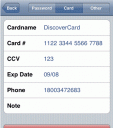
Lockbox is a password & secret information storage native 3rd party app for the iPhone. You can add, edit, remove, and view your password list. It stores passwords for websites (or any system), credit card info, or any secret information you need to keep ready at hand, encrypted on your iPhone. Lockbox stores your passwords by encrypting them via AES128.
Use iPhone mods and hacks at your own risk! Installing 3rd Party iPhone apps requires you to jailbreak the iPhone before installing the native software and apps. You can use Installer.app for Mac OSX and iBrickr for Windows PC to do this. Browse the full list of all iPhone and iPod touch native 3rd party apps filed under the software category.
More info and source code here
Deprecated: strlen(): Passing null to parameter #1 ($string) of type string is deprecated in /var/www/html/wp-content/themes/apps/single.php on line 80
AppSafari
review of
Lockbox
was written by
Joe Seifi
on
September 26th, 2007 and categorized under
Cydia Apps, Notes, Utilities.
Page viewed 15397 times, 1 so far today.
Need help on using these apps? Please read the Help Page.

21 Comments to “Lockbox”
Leave Comment
About AppSafari
Looking for the best iPhone, iPad & iPod touch apps? Reviews of the best new iPhone apps daily since 2007. The App Store is a jungle. Go on a safari of over 7266 iPhone, iPod touch & iPad apps & discover new iOS apps.
Popular App Review Categories
- Games
- Featured apps
- iPad apps
- Free apps
- Cydia apps
- App Lists
- Music
- Utilities
- Reference
- Social
- Chat
- Video
- Productivity
- Notes
- Fun
- GPS
- Files
- Augmented reality
- Shopping
- Education
- Finance
- Travel
- Food
- Sports
- News
- Weather
- Health
- Movies
- Photos
- VOIP
- Calendar
- Contacts
- Auto
- Dating
- Books
- Web apps
- All categories >>
Recent iPhone App Reviews
- Test post title Aug 10th, 26
- Test post title Aug 10th, 26
- hello world Jul 15th, 26
- Elevate – Brain Training May 28th, 14
- UpTo Calendar – Syncs with Google Calendar, iCloud, Outlook and more May 28th, 14
- Quip May 23rd, 14
- Marco Polo: Find Your Phone by Shouting MARCO! May 22nd, 14
- Ku – creative social network May 13th, 14

I really like this app! Sure it is still in a quite limited and primitive stage right now, but it has great potential to be an “eWallet” for your iPhone/iPod touch. Keep developing! More categories, formats and graphics would be great. And a way to backup to the computer… 😀
Posted on October 15th, 2007 at 6:23 am byNotice: Only variables should be assigned by reference in /var/www/html/wp-content/plugins/subscribe-to-comments/subscribe-to-comments.php on line 591
Lecudas
Excellent App, I am keeping up with the version I see lot of potentials and soon it would be on every iphone. Must-have for all iphone owners.
Posted on November 3rd, 2007 at 7:41 pm byNotice: Only variables should be assigned by reference in /var/www/html/wp-content/plugins/subscribe-to-comments/subscribe-to-comments.php on line 591
Murtuza T
Slight problem for me with Lockbox.
First, it arbitrarily decided to simply disappear about five listings. Just gone.
Second, decided to stop recognizing my password. Yep, locked.
Third, simply deleted all of my listings.
So, yeah.
A FEW issues with this app. My suggestion is write down or store your listings in this “lockbox” elsewhere to make sure you don’t suffer the same fate as me.
Am using Lockbox v0.5 on 1.1.1 iPod touch 8 GB.
As you might imagine, am a little bit pissed right now.
Posted on November 13th, 2007 at 9:04 am byNotice: Only variables should be assigned by reference in /var/www/html/wp-content/plugins/subscribe-to-comments/subscribe-to-comments.php on line 591
iPod touch user
is this really a safe and secure way of saving sensitive data?
Posted on November 22nd, 2007 at 6:06 pm byApart from the potential data loss, is there a possibity the data could be accessed maliciously ?
Notice: Only variables should be assigned by reference in /var/www/html/wp-content/plugins/subscribe-to-comments/subscribe-to-comments.php on line 591
joe
My lockbox just wont recognize my password anymore, i have no way to access it. Can anyone tell me what i can do to get it to open please? I would really appreciate it, there should be an application where you can click on if you forgot password..
Posted on December 3rd, 2007 at 3:33 pm byNotice: Only variables should be assigned by reference in /var/www/html/wp-content/plugins/subscribe-to-comments/subscribe-to-comments.php on line 591
steve
Well, I enjoy the app itself but I can’t seem to add anything to it. How exactly do you do this. I have BDS Subsystem installed and obviously my touch is jailbroken (1.1.2) so can someone give me a heads up.
Posted on January 3rd, 2008 at 12:34 pm byNotice: Only variables should be assigned by reference in /var/www/html/wp-content/plugins/subscribe-to-comments/subscribe-to-comments.php on line 591
Jordan
The applicatin worked fined until it decided to lock me out just for the sake of it.
Avoid using this at all cost!.
Posted on January 17th, 2008 at 1:06 pm byNotice: Only variables should be assigned by reference in /var/www/html/wp-content/plugins/subscribe-to-comments/subscribe-to-comments.php on line 591
Paulo
Bad Thing. Some day this app begans to not recognize my key… i left the iphone for a minutes and i tried again … i could in into LockBox … but all my keys missed …
Posted on February 20th, 2008 at 7:24 am byNotice: Only variables should be assigned by reference in /var/www/html/wp-content/plugins/subscribe-to-comments/subscribe-to-comments.php on line 591
Ricardo Ruiz
I got to the root of the data loss issue guys. Give 0.7.1 a try. Apologies that you lost data! It has import now too.
Posted on March 5th, 2008 at 9:58 pm byNotice: Only variables should be assigned by reference in /var/www/html/wp-content/plugins/subscribe-to-comments/subscribe-to-comments.php on line 591
Nathan
Looks Neet, but not useful.
Posted on April 9th, 2008 at 9:57 pm byNotice: Only variables should be assigned by reference in /var/www/html/wp-content/plugins/subscribe-to-comments/subscribe-to-comments.php on line 591
kad
I updated my version of Lockbox and lost all my listings. I had been using it with no problems so didn’t expect everything to be lost with the upgrade. Might I suggest a save to csv function.
Posted on April 25th, 2008 at 2:53 pm byNotice: Only variables should be assigned by reference in /var/www/html/wp-content/plugins/subscribe-to-comments/subscribe-to-comments.php on line 591
Reg
good news, another poster at another site said that the location of the data file changed in the new version.
if your data is missing after the upgrade then you can move it to the new location by typing the following at the shell prompt.
mv /private/var/root/Library/Lockbox/*.dat /private/var/mobile/Library/Lockbox
That worked for me.
Posted on April 25th, 2008 at 3:11 pm byNotice: Only variables should be assigned by reference in /var/www/html/wp-content/plugins/subscribe-to-comments/subscribe-to-comments.php on line 591
Reg
Wipes recently input data if phone power turned off or incoming call answered (only saves if exit application to homepage). otherwise great app
Posted on September 7th, 2008 at 12:46 am byNotice: Only variables should be assigned by reference in /var/www/html/wp-content/plugins/subscribe-to-comments/subscribe-to-comments.php on line 591
asfdsd
i’ve seen the lockbox – its free????? so how do we know this isn’t a form of trojan horse to transmit all our account and password information over to someone for them to have?
Posted on September 15th, 2008 at 10:49 pm byNotice: Only variables should be assigned by reference in /var/www/html/wp-content/plugins/subscribe-to-comments/subscribe-to-comments.php on line 591
brian
To backup your data, using finder navigate to /private/var/mobile/Library/Lockbox
Select the folder and email to your address.
To avoid data from being lost, always exit the Lockbox view before your device goes into standby
Am on 0.71 and it still does that but since i started doing that, it stopped. Pretty Cool app thanks
Posted on October 5th, 2008 at 12:39 am byNotice: Only variables should be assigned by reference in /var/www/html/wp-content/plugins/subscribe-to-comments/subscribe-to-comments.php on line 591
cube
Lock box update lost all my info. This sucks
Posted on September 4th, 2009 at 4:56 pm byNotice: Only variables should be assigned by reference in /var/www/html/wp-content/plugins/subscribe-to-comments/subscribe-to-comments.php on line 591
John
Needed to restore my itouch. I backed it up first. On restart my lock box is empty. Is there a way to retrieve the data??
Posted on October 20th, 2009 at 9:41 pm byNotice: Only variables should be assigned by reference in /var/www/html/wp-content/plugins/subscribe-to-comments/subscribe-to-comments.php on line 591
Sara
Had the same problem as many have described above; sone-of-a-bitch stopped recognising my password. I think I may have updated it, not sure as I hadn’t used it in a few weeks, but when I went back to retrieve something I couldn’t get in. I was well confused until I read others have had the same problem. Thought I was losing my shit when I couldn’t guess the password. What I did learn throught this process though is that you have unlimited attempts to get the code right. This is definitely a security issue. Between the locking-out issue and this, I’m sorry I rated it well. Pretty serious issues, they are.
Posted on March 11th, 2010 at 12:46 am byNotice: Only variables should be assigned by reference in /var/www/html/wp-content/plugins/subscribe-to-comments/subscribe-to-comments.php on line 591
Mrakuna
I downloaded the free app on my iPhone and liked it so much I upgraded to Pro. I also have the free app on my iPad and want to know how to upgrade on the iPad without paying again.
Posted on July 20th, 2010 at 10:34 am byNotice: Only variables should be assigned by reference in /var/www/html/wp-content/plugins/subscribe-to-comments/subscribe-to-comments.php on line 591
Terry DellaVecchia
I just upgrade to iphone ver 4.0, after that all my data in lockbox gone, how can I recover the data. Before upgrade I have backup up ff in PC.
Posted on August 11th, 2010 at 9:03 am byNotice: Only variables should be assigned by reference in /var/www/html/wp-content/plugins/subscribe-to-comments/subscribe-to-comments.php on line 591
charles
Didn’t realize that the data didn’t transfer, had erased old iPhone before exporting Lockbox
Posted on November 8th, 2011 at 12:10 am byI did a restore on the old iPhone and got the program and information back
OK connected for upload fine from my Iphone4 and saved the file
Tried to connect with new iPhone 4s and couldn’t connect to the browser. The answer was to keep shutting down and restarting the phone until I got an address that looked normal like 192.168.xxxxx
Then it connected and I was able to import the old file.
Had the wife screaming four a while !
Notice: Only variables should be assigned by reference in /var/www/html/wp-content/plugins/subscribe-to-comments/subscribe-to-comments.php on line 591
John