Gmail iPhone Sync review


 Loading...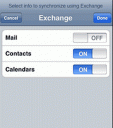
Do you want a wireless sync feature for your iPhone? If you have an iPhone and use Google Calendar and Gmail Contacts you will be happy to know that you can now seamlessly and continuously sync your iPhone to your Google account.
Using the Exchange features of the iPhone, with added support for Microsoft Exchange ActiveSync protocol, you can setup a new Exchange accout on your iPhone that connects to your Google account which does a 2 way sync and populates your iPhone Contacts and Calendar apps.
The steps for setting up Gmail to iPhone sync are:
Important! Before you begin:
Make sure your device has version 2.2 firmware or above
Back up your Contacts and Calendar events on your iPhone. When setting up a new Exchange ActiveSync account on your iPhone, all existing Contacts and Calendar events will be deleted from your iPhone. Please make sure to back up any important data before you set up Google Sync.
1. Open the Settings application on your device’s home screen.
2. Open Mail, Contacts, Calendars.
3. Tap Add Account….
4. Select Microsoft Exchange.
5. In the Email field, enter the name of the account (anything you’d like).
6. Leave the Domain field blank.
7. Enter your full Google Account email address as the Username.
8. Enter your Google Account password as the Password.
9. Tap Next at the top of your screen.
10. A new Server field will appear. Enter m.google.com.
11. Press Next at the top of your screen again.
12. Select the Google services you want to sync. Currently only Contacts and Calendar are supported. Make sure that you have uploaded your data before proceeding.
13. Press Sync twice when warned about data loss.
Synchronization will begin automatically if you have Push enabled on your phone. From now on every time you open the Calendar or Contacts app your information will be synced wireless after a few seconds. Don’t enable email on the Exchange account as this will not work with Google. You can add an IMAP account for your Gmail account on the iPhone which is a good alternative to POP3.
Here is a video demo of Gmail iPhone Syn using Exchange
Try with TestiPhone
Deprecated: strlen(): Passing null to parameter #1 ($string) of type string is deprecated in /var/www/html/wp-content/themes/apps/single.php on line 80

20 Comments to “Gmail iPhone Sync”
Leave Comment
About AppSafari
Popular App Review Categories
- Games
- Featured apps
- iPad apps
- Free apps
- Cydia apps
- App Lists
- Music
- Utilities
- Reference
- Social
- Chat
- Video
- Productivity
- Notes
- Fun
- GPS
- Files
- Augmented reality
- Shopping
- Education
- Finance
- Travel
- Food
- Sports
- News
- Weather
- Health
- Movies
- Photos
- VOIP
- Calendar
- Contacts
- Auto
- Dating
- Books
- Web apps
- All categories >>
Recent iPhone App Reviews
- Elevate – Brain Training May 28th, 14
- UpTo Calendar – Syncs with Google Calendar, iCloud, Outlook and more May 28th, 14
- Quip May 23rd, 14
- Marco Polo: Find Your Phone by Shouting MARCO! May 22nd, 14
- Ku – creative social network May 13th, 14
- Personal Zen May 9th, 14
- Fiasco! Free May 9th, 14
- Forza Football (formerly Live Score Addicts) Apr 29th, 14

can you do all this configuration for a hosted google account?? because i tried but always ask me for the password and i cant see my calendar…
Posted on July 8th, 2009 at 12:05 pm byNotice: Only variables should be assigned by reference in /var/www/html/wp-content/plugins/subscribe-to-comments/subscribe-to-comments.php on line 591
andres
Nice blog adding this to my twitter now
Posted on September 13th, 2009 at 3:32 pm byNotice: Only variables should be assigned by reference in /var/www/html/wp-content/plugins/subscribe-to-comments/subscribe-to-comments.php on line 591
Free Mobile Phone
Mail is now supported: I was told on Google
Posted on December 21st, 2009 at 3:51 pm byNotice: Only variables should be assigned by reference in /var/www/html/wp-content/plugins/subscribe-to-comments/subscribe-to-comments.php on line 591
Salvastor
Why would it ever be OK for all your contacts on your iphone to be wiped out? Is there no other way??
Posted on June 5th, 2010 at 10:13 am byNotice: Only variables should be assigned by reference in /var/www/html/wp-content/plugins/subscribe-to-comments/subscribe-to-comments.php on line 591
Jas
Works with iPad?
Posted on June 23rd, 2010 at 7:32 am byNotice: Only variables should be assigned by reference in /var/www/html/wp-content/plugins/subscribe-to-comments/subscribe-to-comments.php on line 591
Dario
Yeah! I have been looking for something like this for a while. However, it seems when I enter an event in my ipod Calendar, it shows up in my Google calendar at a different time (off by 4 hours). Any ideas?
Posted on August 18th, 2010 at 8:17 am byNotice: Only variables should be assigned by reference in /var/www/html/wp-content/plugins/subscribe-to-comments/subscribe-to-comments.php on line 591
kirsten
I just downloaded this. I was hoping the 2 way sync would work as stated. What happened instead is that I have a second native calendar app on my iPhone! This calendar doesn’t sync with my iPhone calendar. So the info on my iPhone calendar never synced to my new google calendar! Anyone else have this problem?
Posted on August 25th, 2010 at 7:49 am byNotice: Only variables should be assigned by reference in /var/www/html/wp-content/plugins/subscribe-to-comments/subscribe-to-comments.php on line 591
Shibu
This is fantastic! Works like a charm. Thanks! Now I have all my contacts and calendar on my iPad without having to own a Windows PC or Mac. Linux rules! 😉 Well, would be nice to have iTunes version for Linux though :~/
Posted on September 9th, 2010 at 10:51 am byNotice: Only variables should be assigned by reference in /var/www/html/wp-content/plugins/subscribe-to-comments/subscribe-to-comments.php on line 591
DaveGK
How do you the get the contacts that are already on your iPhone back again?
Posted on September 21st, 2010 at 2:52 am byDo I restore the contacts fra the backup I toke before setting up the Exchange sync, on to the iPhone which have just sync the contacts from min Gmail account?
Notice: Only variables should be assigned by reference in /var/www/html/wp-content/plugins/subscribe-to-comments/subscribe-to-comments.php on line 591
Poul
If found it better explained here
Posted on September 30th, 2010 at 3:58 am byhttp://www.sync-iphone.com/contacts-calendars-email/sync-iphone-with-gmail.html
Notice: Only variables should be assigned by reference in /var/www/html/wp-content/plugins/subscribe-to-comments/subscribe-to-comments.php on line 591
Mark
Nice and easy! Now I have Gmail, Google Cintacta, and Google Calendar! Thanks for sharing this info.
Matt
Posted on November 6th, 2010 at 12:05 am byNotice: Only variables should be assigned by reference in /var/www/html/wp-content/plugins/subscribe-to-comments/subscribe-to-comments.php on line 591
Matt S
Finally found a way to get this working on my iPad!
Posted on November 8th, 2010 at 5:10 am byGreat, thanks a lot!
Notice: Only variables should be assigned by reference in /var/www/html/wp-content/plugins/subscribe-to-comments/subscribe-to-comments.php on line 591
astrid
Hi, I tried this and it works nicely. However, when i try to search emails off the server, it always says connection to the server failed. Can you help me with this?
Posted on January 6th, 2011 at 6:50 am byNotice: Only variables should be assigned by reference in /var/www/html/wp-content/plugins/subscribe-to-comments/subscribe-to-comments.php on line 591
Navjot
Thank you very much. This was exactly what I needed!
Posted on March 25th, 2011 at 9:06 am byNotice: Only variables should be assigned by reference in /var/www/html/wp-content/plugins/subscribe-to-comments/subscribe-to-comments.php on line 591
Bill Horn
AWESOME. Thanks for a good solution! It synced calendar, contacts and mail. No tasks but I have remember the milk for that.
Posted on April 20th, 2011 at 7:03 am byNotice: Only variables should be assigned by reference in /var/www/html/wp-content/plugins/subscribe-to-comments/subscribe-to-comments.php on line 591
Jason
perfect for iPad! thankyouthankyou!
Posted on August 6th, 2011 at 8:19 am byNotice: Only variables should be assigned by reference in /var/www/html/wp-content/plugins/subscribe-to-comments/subscribe-to-comments.php on line 591
judith gelt
I am trying to set up an iPad for a friend. I have no previous experience with either an iPhone or an iPad, and limited experience with an iPod.
I have set my friend up with a gmail account and it works fine on the iPad. He has 774 contacts which I can see on his computer. After following your instructions exactly I cannot seem to sync these 774 gmail contacts to his iPad.
The iPad is Wi-Fi connected through a router connected to a local ISP.
I set up only one contact, myself, on the iPad to see if the sync was working both ways.
How long should it take to sync these contacts? After about 4 hours of waiting, nothing arrived on the iPad addresses and nothing has arrived on the gmail address book.
What am I missing? I have followed your various advises but I cannot see what I’m missing. I would greatly appreciate your help.
Posted on October 29th, 2011 at 9:34 pm byNotice: Only variables should be assigned by reference in /var/www/html/wp-content/plugins/subscribe-to-comments/subscribe-to-comments.php on line 591
Andrew Croll
Thank you!
Posted on December 24th, 2011 at 7:40 am byNotice: Only variables should be assigned by reference in /var/www/html/wp-content/plugins/subscribe-to-comments/subscribe-to-comments.php on line 591
Dave Sgro
That would be nice I do not win things often
Posted on June 10th, 2012 at 2:54 am byNotice: Only variables should be assigned by reference in /var/www/html/wp-content/plugins/subscribe-to-comments/subscribe-to-comments.php on line 591
Rebecca
It Works in my iPad -BUT I also get Adressen which are Not in my contacts. Before I Trier this I Trier to sync with iTunes with the Same effect. Can someone give me a tipp?
Posted on July 16th, 2012 at 10:14 pm byThnx
Chris
Notice: Only variables should be assigned by reference in /var/www/html/wp-content/plugins/subscribe-to-comments/subscribe-to-comments.php on line 591
Chris