Speed Dial WebClip review


 Loading...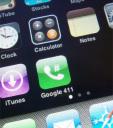
Since the new iPhone 1.1.3 firmware allows you to put icons on your home screen, Nate from cre.ations.net has come up with a clever way to put Speed Dial icons on your home screen.
- Enter http://18004664411.tel.QLNK.net into the address bar of Safari on your 1.1.3 iPhone.
Change the number to whatever number you would like to use.This will redirect your iPhone to qlnk.net which makes a request to tel://18005551212 on your iPhone to call the phone number you specify.
- To assign your own speed-dial WebClip icon just add “?picurl=http://path.to/photo” to the end of the URL.
The icon should be a 57×57 PNG file
- Lastly, When the page loads in Safari, Hit the + button, and save it as a bookmark on your Home Screen.
That’s it! Now you have Google 411 on your Home Screen as a speed dial. You can change the number and icon and create as many new speed dial shortcuts as you wish on your iPhone home screen, or even have a special page dedicated to them.
Privacy warning: Due to the nature of this hack, your phone will contact the qlnk.net server EVERY TIME you use a speed dial icon on your home screen. Nate assures us that he will not use the data AT ALL FOR ANY REASON. Also it is entirely possible to put a similar script on your own web server, which will do the same thing without sending out any information; that course of action is recommended if you are at all concerned about your privacy.
Get more information the speed dial WebClip hack at Nate True’s blog here
Deprecated: strlen(): Passing null to parameter #1 ($string) of type string is deprecated in /var/www/html/wp-content/themes/apps/single.php on line 80

Leave Comment
About AppSafari
Popular App Review Categories
- Games
- Featured apps
- iPad apps
- Free apps
- Cydia apps
- App Lists
- Music
- Utilities
- Reference
- Social
- Chat
- Video
- Productivity
- Notes
- Fun
- GPS
- Files
- Augmented reality
- Shopping
- Education
- Finance
- Travel
- Food
- Sports
- News
- Weather
- Health
- Movies
- Photos
- VOIP
- Calendar
- Contacts
- Auto
- Dating
- Books
- Web apps
- All categories >>
Recent iPhone App Reviews
- Elevate – Brain Training May 28th, 14
- UpTo Calendar – Syncs with Google Calendar, iCloud, Outlook and more May 28th, 14
- Quip May 23rd, 14
- Marco Polo: Find Your Phone by Shouting MARCO! May 22nd, 14
- Ku – creative social network May 13th, 14
- Personal Zen May 9th, 14
- Fiasco! Free May 9th, 14
- Forza Football (formerly Live Score Addicts) Apr 29th, 14
