Mail a Buddy review


 Loading...
Zoom
User Reviews
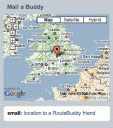
Go to any location using Google Maps on your iPhone and you can then tap on the “email: location to a RouteBuddy friend” at the bottom of the screen, to then send that location via email to your friends. The email itself adds a RouteBuddy URL link in the body of the mail allowing the recipient of the email to view the same location in RouteBuddy on their Mac.
In summery this is a cool way of sharing locations on the move, with your friends that use RouteBuddy on their Mac’s, by harnessing the power of the web on your iPhone.
note: the receiver of the email, must have RouteBuddy installed on their Mac. Try with TestiPhone
Deprecated: strlen(): Passing null to parameter #1 ($string) of type string is deprecated in /var/www/html/wp-content/themes/apps/single.php on line 80

Leave Comment
About AppSafari
Looking for the best iPhone, iPad & iPod touch apps? Reviews of the best new iPhone apps daily since 2007. The App Store is a jungle. Go on a safari of over 7263 iPhone, iPod touch & iPad apps & discover new iOS apps.
Popular App Review Categories
- Games
- Featured apps
- iPad apps
- Free apps
- Cydia apps
- App Lists
- Music
- Utilities
- Reference
- Social
- Chat
- Video
- Productivity
- Notes
- Fun
- GPS
- Files
- Augmented reality
- Shopping
- Education
- Finance
- Travel
- Food
- Sports
- News
- Weather
- Health
- Movies
- Photos
- VOIP
- Calendar
- Contacts
- Auto
- Dating
- Books
- Web apps
- All categories >>
Recent iPhone App Reviews
- Elevate – Brain Training May 28th, 14
- UpTo Calendar – Syncs with Google Calendar, iCloud, Outlook and more May 28th, 14
- Quip May 23rd, 14
- Marco Polo: Find Your Phone by Shouting MARCO! May 22nd, 14
- Ku – creative social network May 13th, 14
- Personal Zen May 9th, 14
- Fiasco! Free May 9th, 14
- Forza Football (formerly Live Score Addicts) Apr 29th, 14
