Forex Quotes review


 Loading...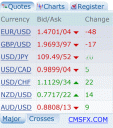
Wanna stay informed of current price while you are on the go? Want some Currency Exchange Tools for the iPhone? Try the Forex live quotes and charts app. Decipher market movements visually with online charts. Display up to 14 currency pairs. Change time periods with ease to view both short and long term charts.
From the forex innovators that brought you chart-based trading, comes iPhoneForex – a suite of currency tools for iPhone users (iphoneforex.com from your iPhone). Now forex traders can use their new gadget to navigate through exchange rates and charts for 19 major and secondary currency pairs.
Information displayed by iPhoneForex is based on CMS Forex’s esteemed advanced trading software VT Trader (cmsfx.com) and is updated in real time. VT Trader is already available as a mobile trading application VT Mobile beta, compatible with most widely used phone models based on Java, Windows and even i-Mode. Now CMS Forex is developing VT iPhone, so none of its customers feel left out of the mobile trading craze. Live trading is expected to be available on the iPhone in September 2007.
CMS Forex’s immediate plans include adding a currency conversion calculator, a pip calculator and interactive educational applications for beginner traders. But for now, also use your iPhone to download CMS’s forex-related news podcasts (keyword: cmsfx) straight to your phone through iTunes.
Sign up for a free practice account or a live account and use your iPhone to stay ahead of the curve. Visit www.iphoneforex.com from your iPhone.
You must be using an iPhone to see the iPhone version of this app. Try it here
Deprecated: strlen(): Passing null to parameter #1 ($string) of type string is deprecated in /var/www/html/wp-content/themes/apps/single.php on line 80

8 Comments to “Forex Quotes”
Leave Comment
About AppSafari
Popular App Review Categories
- Games
- Featured apps
- iPad apps
- Free apps
- Cydia apps
- App Lists
- Music
- Utilities
- Reference
- Social
- Chat
- Video
- Productivity
- Notes
- Fun
- GPS
- Files
- Augmented reality
- Shopping
- Education
- Finance
- Travel
- Food
- Sports
- News
- Weather
- Health
- Movies
- Photos
- VOIP
- Calendar
- Contacts
- Auto
- Dating
- Books
- Web apps
- All categories >>
Recent iPhone App Reviews
- Elevate – Brain Training May 28th, 14
- UpTo Calendar – Syncs with Google Calendar, iCloud, Outlook and more May 28th, 14
- Quip May 23rd, 14
- Marco Polo: Find Your Phone by Shouting MARCO! May 22nd, 14
- Ku – creative social network May 13th, 14
- Personal Zen May 9th, 14
- Fiasco! Free May 9th, 14
- Forza Football (formerly Live Score Addicts) Apr 29th, 14

thanks for Forex Quotes
Posted on August 4th, 2008 at 6:27 am byNotice: Only variables should be assigned by reference in /var/www/html/wp-content/plugins/subscribe-to-comments/subscribe-to-comments.php on line 591
secret
Check out the “Forex On The Go” program on the App Store — it is much better. Look at the video on their website at http://www.forexonthego.com
Posted on November 19th, 2008 at 8:29 am byNotice: Only variables should be assigned by reference in /var/www/html/wp-content/plugins/subscribe-to-comments/subscribe-to-comments.php on line 591
Joe Talsman
Super-Duper site! I am loving it!! Will come back again – taking you feeds also, Thanks.
Posted on March 5th, 2009 at 7:39 am byNotice: Only variables should be assigned by reference in /var/www/html/wp-content/plugins/subscribe-to-comments/subscribe-to-comments.php on line 591
Thomas
I usually don?t post in Blogs but your blog forced me to, amazing work.. beautiful ?
Posted on March 5th, 2009 at 7:40 am byNotice: Only variables should be assigned by reference in /var/www/html/wp-content/plugins/subscribe-to-comments/subscribe-to-comments.php on line 591
Belvendarn
This is really a nice app
Posted on December 30th, 2009 at 3:09 pm byI use it
Only 1 draw back – you can’t trade with it
If you want one you can trade with, go to http://www.forexyard.com
They have a trading app for forex for the iphone
Notice: Only variables should be assigned by reference in /var/www/html/wp-content/plugins/subscribe-to-comments/subscribe-to-comments.php on line 591
Lee
Can’t find this app in the App Store!
Posted on May 28th, 2010 at 10:56 am byNotice: Only variables should be assigned by reference in /var/www/html/wp-content/plugins/subscribe-to-comments/subscribe-to-comments.php on line 591
Sam
I downloaded this free app called “Swiss Forex” and I must say that it is very good. Don’t be turned off by the “Swiss” in the name. It is not specific to Switzerland and is in English. The app has great looking graphs and very good news videos that are 1 to 2 minutes each and updated several times a day. It’s like watching CNBC without the worthless interviews and talks.
I just wish I could trade directly from that app and that could display more than one indicator/oscillator on a graph.
Posted on November 4th, 2010 at 9:53 am byNotice: Only variables should be assigned by reference in /var/www/html/wp-content/plugins/subscribe-to-comments/subscribe-to-comments.php on line 591
Sylvain Guinepain
Amazing! Its actually remarkable paragraph, I have got much clear idea about from this post.
Posted on February 28th, 2017 at 6:17 am byNotice: Only variables should be assigned by reference in /var/www/html/wp-content/plugins/subscribe-to-comments/subscribe-to-comments.php on line 591
forex forum