iPhone Color Picker review


 Loading...
Zoom
User Reviews
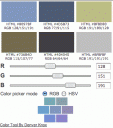
If you’re a web designer with an iPhone, use the iPhone color palette to discover new color palettes on your iPhone without the need for a laptop. The three RGB numbers can be used to apply actual HEX values for a client web site, assuring a perfect match with the client wish. This is great for coming up with color themes to use in your web design projects. You can enter the values by hand or drag the sliders to mix and match the colors you want. Try with TestiPhone
Deprecated: strlen(): Passing null to parameter #1 ($string) of type string is deprecated in /var/www/html/wp-content/themes/apps/single.php on line 80
AppSafari
review of
iPhone Color Picker
was written by
Joe Seifi
on
January 22nd, 2008 and categorized under
Developers.
Page viewed 8838 times, 1 so far today.
Need help on using these apps? Please read the Help Page.

3 Comments to “iPhone Color Picker”
Leave Comment
About AppSafari
Looking for the best iPhone, iPad & iPod touch apps? Reviews of the best new iPhone apps daily since 2007. The App Store is a jungle. Go on a safari of over 7263 iPhone, iPod touch & iPad apps & discover new iOS apps.
Popular App Review Categories
- Games
- Featured apps
- iPad apps
- Free apps
- Cydia apps
- App Lists
- Music
- Utilities
- Reference
- Social
- Chat
- Video
- Productivity
- Notes
- Fun
- GPS
- Files
- Augmented reality
- Shopping
- Education
- Finance
- Travel
- Food
- Sports
- News
- Weather
- Health
- Movies
- Photos
- VOIP
- Calendar
- Contacts
- Auto
- Dating
- Books
- Web apps
- All categories >>
Recent iPhone App Reviews
- Elevate – Brain Training May 28th, 14
- UpTo Calendar – Syncs with Google Calendar, iCloud, Outlook and more May 28th, 14
- Quip May 23rd, 14
- Marco Polo: Find Your Phone by Shouting MARCO! May 22nd, 14
- Ku – creative social network May 13th, 14
- Personal Zen May 9th, 14
- Fiasco! Free May 9th, 14
- Forza Football (formerly Live Score Addicts) Apr 29th, 14

hm. these webapps, are they really compatible with the iphone touch-screen? can’t slide those color-buttons on my phone, for sure (had the same problem with imaps). gotta type in the rgb-values manually on the right, which makes the app pretty worthless… any solutions?
Posted on January 23rd, 2008 at 6:23 am byNotice: Only variables should be assigned by reference in /var/www/html/wp-content/plugins/subscribe-to-comments/subscribe-to-comments.php on line 591
fredo
Tap the bars left and right of the grabber.
Posted on January 23rd, 2008 at 10:38 am byNotice: Only variables should be assigned by reference in /var/www/html/wp-content/plugins/subscribe-to-comments/subscribe-to-comments.php on line 591
Chris
The browser version under
http://www.knoxing.com/iphone-color/
is not working, any thing that needs to be installed? Running OS X 10.6.3 and Safari 4.05 also tried with Firefox and Google Chrome with same results. Also tried it with testphone and same results. Loved this little API any hope of seeing up and runnig? thanks and regards
Posted on April 11th, 2010 at 4:59 pm byNotice: Only variables should be assigned by reference in /var/www/html/wp-content/plugins/subscribe-to-comments/subscribe-to-comments.php on line 591
Elisa