Installer.app


 Loading...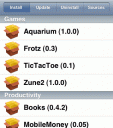
Installer.app (aka AppTapp) downloads packages over WiFi (wireless networking) or EDGE for installing, updating and uninstalling 3rd party native applications on your iPhone. Warning! use at your own risk. There are both a version for Mac with OSX and one for Windows. There is currently also a catalogue of available apps available maintained by a couple of repository and listings websites.
Hint: Once you have installed Installer.app be sure to install the app called “Community Sources”. This app adds a few of the popular 3rd party application lists (Conceited Software and Ste Packaging) to your sources section, which has the affect of dramatically increasing the number of apps you can install. Here is a full list of all Installer.app sources.
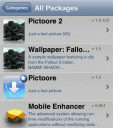 Update: A brand new version of Installer has been released under the name Installer 4.0 which now supports the new 2.0 iPhone software and 3G iPhones. The 4.0 version delivers a brand new user interface and added functionality similar to that of Cydia. This verion of installer is in beta mode but you can install it manually at this time using these steps.
1. Jailbreak your iPhone 2.0 software if you have not already using either redsn0w (for Windows & Mac), GreenPois0n (for Windows & Mac), QuickPwn for Windows or PwnageTool for Mac.
2. Download Installer 4.0 here and unzip it
3. SCP the Installer.app folder into your /Applications folder.
4. Change Permissions by running these 2 commands:
chmod -R 777 /Applications/Installer.app

chmod a+srx /Applications/Installer.app/Installer
5. Turn off your iPhone or iPod Touch and turn it back on and should now see the new Installer 4.0 app on your home screen.
Once you have Installer 4.0 installed, you can add some new apps using the following Installer 4.0 source URLs.
More details on Installer 4.0 to come.
The fastest and easiest way to install Installer on your iPhone is using QuickPwn. Also take a look at this entertaining video by by David Pogue from the The New York Times. He takes you on a tour of using Installer.app to get third-party programs running on the iPhone.
There is another similar Mac OSX software called independence which can also be used to jailbreak your iPhone. The Windows PC equivalent of Installer.app is iBrickr.
Note: As of now Installer.app does not work on iPod touch, or iPhone updated with 1.1.1.
Update: To jailbreak your iPod touch you can use iJailBreak (Mac) or touchFree (Win).
Update: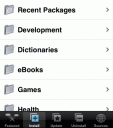 Installer.app version 3.1 has been released which includes a fully redesigned user interface to match the iPhone look and feel, collapsible groups, and firmware auto-sensing. Now you can also add/remove sources easily and easily install all available updates. This version still does not work if you have already upgraded to iPhone v1.1.1. before jail breaking. Also this version requires that you upgrade to 1.1.1 after you get it installed on your 1.0.2, for it to work smoothly.
Update: If you have a virgin iPhone with the 1.1.1 updates you can use iNdependence (Mac) or iDemocracy (Win).
Survey
Have you installed 3rd party apps on your iPhone?
- Sure did, I use Installer.app (49%, 661 Votes)
- No, I'm scared (23%, 310 Votes)
- I'm thinking about it (11%, 152 Votes)
- I am going to soon... (11%, 150 Votes)
- Yep! I'm using iBrickr (4%, 48 Votes)
- No, I just don't care to (2%, 24 Votes)
Total Voters: 1,345
 Loading ...
Browse the full list of all iPhone and iPod touch native 3rd party apps filed under the software category. Please use these iPhone mods and hacks at your own risk!
Deprecated: strlen(): Passing null to parameter #1 ($string) of type string is deprecated in /var/www/html/wp-content/themes/apps/single.php on line 80

392 Comments to “Installer.app”
Leave Comment
About AppSafari
Popular App Review Categories
- Games
- Featured apps
- iPad apps
- Free apps
- Cydia apps
- App Lists
- Music
- Utilities
- Reference
- Social
- Chat
- Video
- Productivity
- Notes
- Fun
- GPS
- Files
- Augmented reality
- Shopping
- Education
- Finance
- Travel
- Food
- Sports
- News
- Weather
- Health
- Movies
- Photos
- VOIP
- Calendar
- Contacts
- Auto
- Dating
- Books
- Web apps
- All categories >>
Recent iPhone App Reviews
- Elevate – Brain Training May 28th, 14
- UpTo Calendar – Syncs with Google Calendar, iCloud, Outlook and more May 28th, 14
- Quip May 23rd, 14
- Marco Polo: Find Your Phone by Shouting MARCO! May 22nd, 14
- Ku – creative social network May 13th, 14
- Personal Zen May 9th, 14
- Fiasco! Free May 9th, 14
- Forza Football (formerly Live Score Addicts) Apr 29th, 14

A new Installer.app software has been develped by “lg” called Summerboard which cusomizes “SpringBoard”, the home screen application you see every time you power on your iPhone. It allows you to scroll your apps list icons. A demo video is available. You can install it using Installer.app
Posted on September 3rd, 2007 at 6:09 pm byNotice: Only variables should be assigned by reference in /var/www/html/wp-content/plugins/subscribe-to-comments/subscribe-to-comments.php on line 591
Dino
Version 3 of Installer.app has been released.
Posted on September 7th, 2007 at 1:51 am byNotice: Only variables should be assigned by reference in /var/www/html/wp-content/plugins/subscribe-to-comments/subscribe-to-comments.php on line 591
Appmin
hey will this work on my iPod touch????
if so can someone tell me what to do because its definitely not working at all… i let it go for 50 mins and then i got tired of waiting…
ANY TIPS??
Posted on September 23rd, 2007 at 4:20 pm byNotice: Only variables should be assigned by reference in /var/www/html/wp-content/plugins/subscribe-to-comments/subscribe-to-comments.php on line 591
MattyDee
I would try this tip from the Installer.app site: “NOTICE for version 2.4: If you find that the install hangs, you may want to remove the iPhone from the Dock and reinsert it. This occurs because iTunes sometimes interferes with the operation. This issue has been fixed in the new 3.0 installer for iTunes 7.4.”
And also make sure you have the right matching version of iTunes.
Posted on September 23rd, 2007 at 5:05 pm byNotice: Only variables should be assigned by reference in /var/www/html/wp-content/plugins/subscribe-to-comments/subscribe-to-comments.php on line 591
Kerry
WARNING: don’t use until they have a version STRICTLY STATING that it’s for the iPod Touch. i tried that version 3 and it ended up crashing mine. consequently, i lost all my data and had to do a factory restore.
thankfully, there wasn’t much to lose on it.
Posted on September 25th, 2007 at 10:42 pm byNotice: Only variables should be assigned by reference in /var/www/html/wp-content/plugins/subscribe-to-comments/subscribe-to-comments.php on line 591
Jordan
On Sept. 24th Apple released this statement “Apple has discovered that many of the unauthorized iPhone unlocking programs available on the Internet cause irreparable damage to the iPhone’s software, which will likely result in the modified iPhone becoming permanently inoperable when a future Apple-supplied iPhone software update is installed. Apple plans to release the next iPhone software update, containing many new features including the iTunes Wi-Fi Music Store (www.itunes.com), later this week. Apple strongly discourages users from installing unauthorized unlocking programs on their iPhones. Users who make unauthorized modifications to the software on their iPhone violate their iPhone software license agreement and void their warranty. The permanent inability to use an iPhone due to installing unlocking software is not covered under the iPhone’s warranty.”
Are referring to installing apps or to people who are actually unlocking and changing the carrier and all?
Posted on September 25th, 2007 at 11:38 pm byNotice: Only variables should be assigned by reference in /var/www/html/wp-content/plugins/subscribe-to-comments/subscribe-to-comments.php on line 591
tonemax
Does installer.app and all that stuff work on ipod touch? has aybody tried? please reply asap.
Posted on October 13th, 2007 at 2:20 am byNotice: Only variables should be assigned by reference in /var/www/html/wp-content/plugins/subscribe-to-comments/subscribe-to-comments.php on line 591
Leigh
Not without some additional hacking at this point:
There is a program called TouchFree (one-click jailbreak for Windows) for iPod touch you might want to try.
http://forums.macrumors.com/showthread.php?t=367947
Also take a look at
Posted on October 13th, 2007 at 2:02 pm byhttp://www.touchdev.net/wiki/Talk:Jailbreak_Guide under the topic: Install Installer.app – An Easier Way
Notice: Only variables should be assigned by reference in /var/www/html/wp-content/plugins/subscribe-to-comments/subscribe-to-comments.php on line 591
Bejin
I tried installing this but once i get past the part where it says continue i get the loading bar that says 2-3 mintues, please be patient… for ever
Posted on October 13th, 2007 at 8:40 pm byNotice: Only variables should be assigned by reference in /var/www/html/wp-content/plugins/subscribe-to-comments/subscribe-to-comments.php on line 591
tobyweber
ipodhacks.calcomserv.com for a tutorial on how to add iphone apps to your itouch and the tools needed
Posted on October 21st, 2007 at 7:59 pm byNotice: Only variables should be assigned by reference in /var/www/html/wp-content/plugins/subscribe-to-comments/subscribe-to-comments.php on line 591
GAT3We
Sorry that’s a 404 URL, for iPod touch owners I recommend using these GUI tools iJailBreak(MAC) or touchFree(WIN).
Posted on October 21st, 2007 at 8:21 pm byNotice: Only variables should be assigned by reference in /var/www/html/wp-content/plugins/subscribe-to-comments/subscribe-to-comments.php on line 591
Appmin
I tried installing twice, first on version 1.02, and then on version 1.1. Each time it did not get past the install 2-3 minutes window. And did I wait? YES, 2 hours… What is going on? I have yet to see a clearer explanation, but now I have to find one that works.
Posted on October 24th, 2007 at 8:29 am byNotice: Only variables should be assigned by reference in /var/www/html/wp-content/plugins/subscribe-to-comments/subscribe-to-comments.php on line 591
jeb
touchFree (see above) worked fantastically for me on my iPod Touch, no problems at all. If you’re having trouble, try totally resetting your iPod and then running touchFree (if you use windows, that is!). TouchFree installs Apptapp, summerboard, and OpenSSH automatically, so you’ll never need iBrickr or command lines.
Posted on October 30th, 2007 at 5:24 pm byNotice: Only variables should be assigned by reference in /var/www/html/wp-content/plugins/subscribe-to-comments/subscribe-to-comments.php on line 591
jbr
My iphone stalled it just froze up on the home screen. it will not turn off and I can not hit any buttons. does anyone know how to fix this problem. and please don’t say I have to reset it or something because mine is an unlocked version.
Posted on November 1st, 2007 at 1:13 pm byNotice: Only variables should be assigned by reference in /var/www/html/wp-content/plugins/subscribe-to-comments/subscribe-to-comments.php on line 591
Roxanne
HI: I really need your help, my phone is not working at all, it only shows a warning simbol saying please connect to the itunes but I don’t want to restore it because it may lock again to AT&T.
I tried to install the installer.app on my hacked iphone version 1.0.2 I followed everything and when the screen that says “this will take 2-3 minutes, please be patient… an Error screens pups up and it says ” ERROR – BOOTSTRAP FAILED, SE CONSOLE LOG!” what can I DO?????
PLEASE HELP ME.
THANKS
RENE
Posted on November 6th, 2007 at 2:30 pm byNotice: Only variables should be assigned by reference in /var/www/html/wp-content/plugins/subscribe-to-comments/subscribe-to-comments.php on line 591
Rene
hey
i got the same problem as rene got
pleeeeeeeeeease help us!!!!
Posted on November 11th, 2007 at 12:40 am byNotice: Only variables should be assigned by reference in /var/www/html/wp-content/plugins/subscribe-to-comments/subscribe-to-comments.php on line 591
robin
I just installed it and its been saying refreshing sources for a while. Is this normal?
Posted on November 11th, 2007 at 10:01 am byNotice: Only variables should be assigned by reference in /var/www/html/wp-content/plugins/subscribe-to-comments/subscribe-to-comments.php on line 591
Jeff
if u update ur touch on a computer it takes this off and thiers no other way to instal it.. U just have to hack it the cool way haha
Posted on November 15th, 2007 at 7:59 am byNotice: Only variables should be assigned by reference in /var/www/html/wp-content/plugins/subscribe-to-comments/subscribe-to-comments.php on line 591
nixk
First of all, let me congratulate you guys for an awesome app for the iphone!! unfortunately I’ve been having some issues in order to install the program on my iphone again. I tried two ways, first, using safari on my iphone, I go to jailbreakme.com, follow steps but it doesn’t install program, then I followed the instructions using My mAc on http://iphone/nullriver.com/beta; after following instructions in detail, these messages appeared: THE APPLICATION IPHONECOMM QUIT UNEXPECTEDLY, (I Clicked Relaunch) , and another window appeared telling me: ERROR: BOOTSTRAP FAILED, SEE CONSOLE TAG, and then kicked me off and my iphone requested to be restored again.
I hope you can help us to solve this issue soon,
Posted on November 15th, 2007 at 1:56 pm byNotice: Only variables should be assigned by reference in /var/www/html/wp-content/plugins/subscribe-to-comments/subscribe-to-comments.php on line 591
MAURICE
I’m having the same problem with the bootstrap !! I ended up having to restore to 1.02 and now my iphone is locked again !!! Grrrrrrrrr what happened ??? Why didn’t it work ??
Posted on November 20th, 2007 at 11:49 pm byNotice: Only variables should be assigned by reference in /var/www/html/wp-content/plugins/subscribe-to-comments/subscribe-to-comments.php on line 591
Nada
What happened , Bootstrap???
Yah mine too. I will never attempt this bullshit appcrapp crap again. 3rd time.
had to restore.
Nevermind.
Dont even answer the question!
Posted on November 21st, 2007 at 4:04 am byNotice: Only variables should be assigned by reference in /var/www/html/wp-content/plugins/subscribe-to-comments/subscribe-to-comments.php on line 591
nynex
I have had my iPhone in for about 12 hours now and is says please wait 2-3 minutes for somethin to copy. on my iPhone it says please connect o iTunes. wat do i do?
Posted on November 22nd, 2007 at 9:35 am byNotice: Only variables should be assigned by reference in /var/www/html/wp-content/plugins/subscribe-to-comments/subscribe-to-comments.php on line 591
jon
After successfully installing installer.app, i installed a few application. The problem is that those applications have now occupied all the space in my home screen (springboard) and i cannot see my installer icon anymore. How do I access the installer again?! .. so i can remove the applications or atleast install a launcher or a new version of springboard so i can scroll through the installed applications. But to do any of that, i need to access my installer, which i don?t know how to. Please help. Thanks.
Posted on November 23rd, 2007 at 7:29 am byNotice: Only variables should be assigned by reference in /var/www/html/wp-content/plugins/subscribe-to-comments/subscribe-to-comments.php on line 591
yasi
Hi. I downloaded the installer.app 3.1 like instructed but that seems to be only for mac, and i run windows. I tried the other, version v0.92 but it got stuck and poped up a message of “close itunes” but it was closed already! My iphone got stuck too displaying a “plug” graphic. i had to restore the iphone. Can anyone please give me advise? Thanks. -Luis
Posted on November 23rd, 2007 at 3:46 pm byNotice: Only variables should be assigned by reference in /var/www/html/wp-content/plugins/subscribe-to-comments/subscribe-to-comments.php on line 591
Luis
I go to jailbreakme.com and jailbreak.toc2rta.com and safari won’t crash i just get a new untiled page with a little blue box. I will donate to you if you can solve it. Thanks
Posted on November 24th, 2007 at 1:34 pm byNotice: Only variables should be assigned by reference in /var/www/html/wp-content/plugins/subscribe-to-comments/subscribe-to-comments.php on line 591
Erik
My iphone is displaying a picture of connector and an itunes icon on my iphone display,(not connected)
Posted on November 25th, 2007 at 3:00 pm byOn computer: the error
says bootstrap failed,see console log.Is this one of the warnings you mentioned we would see?The top of the error message seems to read” app tapp installer”or it is just lined up well with the top grey bar with app tap installer on the installer progress window.TJ
Notice: Only variables should be assigned by reference in /var/www/html/wp-content/plugins/subscribe-to-comments/subscribe-to-comments.php on line 591
terry kelley
Hi, i’m trying right now installing the apptapp, but how long I have to wait for that, I’m worried that I’m waiting too long and the programm maybe is going wrong.
Thanks…
Posted on November 27th, 2007 at 10:42 am byNotice: Only variables should be assigned by reference in /var/www/html/wp-content/plugins/subscribe-to-comments/subscribe-to-comments.php on line 591
Kyliam
For the people who get the yellow triangle and a message that says you are in recovery mode. You should not have to restore. All you need to do is run independence or the one for windows and your phone will come out of the recovery mode. Hope that helps a little.
Posted on November 27th, 2007 at 11:44 am byNotice: Only variables should be assigned by reference in /var/www/html/wp-content/plugins/subscribe-to-comments/subscribe-to-comments.php on line 591
feilipu
I had appsnap on my ipod touch but it did not show up as if it was taking any memory on my ipod which was very agrevating and made me irate. then I updated to version 1.1.2 which is steve jobs way of saying F you app snapp
Posted on November 30th, 2007 at 3:43 pm byNotice: Only variables should be assigned by reference in /var/www/html/wp-content/plugins/subscribe-to-comments/subscribe-to-comments.php on line 591
scott
I just got my iphone I have version 1.1.2 can I use this program to add apps to my iphone. Or is there another version I can use to add apps.
Posted on December 5th, 2007 at 8:01 am byNotice: Only variables should be assigned by reference in /var/www/html/wp-content/plugins/subscribe-to-comments/subscribe-to-comments.php on line 591
txsaturn
following the last comment on the forum, i also have 1.1.2 iphone and i would like to install app tap but there is no news on if it will work?!?! someone please inform us!
Many thanks
Posted on December 5th, 2007 at 1:00 pm byNotice: Only variables should be assigned by reference in /var/www/html/wp-content/plugins/subscribe-to-comments/subscribe-to-comments.php on line 591
daniel
i saw in the app list …that there is a tweak that fixes crash if an unlocked iphone is updated to 1.1.2. If i update from 1.1.1 to 1.1.2, will that software shift things back to normal?
Posted on December 6th, 2007 at 11:07 pm byNotice: Only variables should be assigned by reference in /var/www/html/wp-content/plugins/subscribe-to-comments/subscribe-to-comments.php on line 591
jake
Really need your help…I tried to install the installer.app on my hacked iphone version 1.0.2 and I followed every instructions from http://iphone.nullriver.com/beta/ and watch the video on http://www.dev.appsafari.com/maps/825/installerapp/. When the screen that says “this will take 2-3 minutes, please be patient… an Error screens pops up and it says ” ERROR – BOOTSTRAP FAILED, SE CONSOLE LOG!” what can I DO??
I aborted the installation and now my iPhone still has the “Please connect to Itunes” words on the screen. I opened iTunes and it suggested that I restore my iPhone but it will update the latest firmware….PLEASE HELP ME!
Thanks…..Chris
Posted on December 7th, 2007 at 8:45 am byNotice: Only variables should be assigned by reference in /var/www/html/wp-content/plugins/subscribe-to-comments/subscribe-to-comments.php on line 591
Chris
DONT USE this – it also crashed and bricked my iphone!
Posted on December 7th, 2007 at 1:44 pm byNotice: Only variables should be assigned by reference in /var/www/html/wp-content/plugins/subscribe-to-comments/subscribe-to-comments.php on line 591
Johny Jones
thanks johnny jones for the info truly appreciate you took the time for us
Posted on December 7th, 2007 at 1:46 pm byNotice: Only variables should be assigned by reference in /var/www/html/wp-content/plugins/subscribe-to-comments/subscribe-to-comments.php on line 591
txsaturn
i had to erase everything on my ipod and almost all my stuff on the installer was erased except the summer board themes will someone plese help me!!!! how do i get everything back on the installer
Posted on December 10th, 2007 at 5:04 pm byNotice: Only variables should be assigned by reference in /var/www/html/wp-content/plugins/subscribe-to-comments/subscribe-to-comments.php on line 591
Britney
Hi i purchased my iphone on november 23rd just to give you guys a date on how old it is.
anyways i installed app then when it was installing i got the BOOTSTRAP/LOG stupid thing and it aborted??
is there something out there that fixed this? i followed the steps on that stupid video.
i had to restore my iphone….
Posted on December 11th, 2007 at 7:34 pm byNotice: Only variables should be assigned by reference in /var/www/html/wp-content/plugins/subscribe-to-comments/subscribe-to-comments.php on line 591
pat
i downloaded a game off apps installer on my iphone but when i exited the installer the apps installer icon dissapeared and was replaced by the game, how do i get the installer icon back ? :S
Posted on December 12th, 2007 at 4:08 am byNotice: Only variables should be assigned by reference in /var/www/html/wp-content/plugins/subscribe-to-comments/subscribe-to-comments.php on line 591
Edd M
hey I upgrade my iPhone 1.1.1 to 1.1.2 and I install the apps but is not working properly is not installing the apps only games !!!! Can somebody help me!!! Please!!!!
Posted on December 15th, 2007 at 2:22 pm byNotice: Only variables should be assigned by reference in /var/www/html/wp-content/plugins/subscribe-to-comments/subscribe-to-comments.php on line 591
ricky
Does anyone know how to delete all apps of fully reset your ipod
Posted on December 16th, 2007 at 2:38 pm byNotice: Only variables should be assigned by reference in /var/www/html/wp-content/plugins/subscribe-to-comments/subscribe-to-comments.php on line 591
Matt
To reset your ipod plug it in to your computer and open itunes if it doesn’t open up automatically. Then click on your ipod on the left side and go to the summary tab. Click Restore. That should do it.
Posted on December 18th, 2007 at 12:12 am byNotice: Only variables should be assigned by reference in /var/www/html/wp-content/plugins/subscribe-to-comments/subscribe-to-comments.php on line 591
John
After successfully installing installer.app, i installed a few application. The problem is that those applications have now occupied all the space in my home screen (springboard) and i cannot see my installer icon anymore. How do I access the installer again?! .. so i can remove the applications or atleast install a launcher or a new version of springboard so i can scroll through the installed applications. But to do any of that, i need to access my installer, which i don?t know how to. My phone is a hacked one. Please help. Thanks.
Posted on December 20th, 2007 at 3:25 pm byNotice: Only variables should be assigned by reference in /var/www/html/wp-content/plugins/subscribe-to-comments/subscribe-to-comments.php on line 591
Hisham
Hisham, on mine, I can just scroll down by flicking the springboard up/down and the icons scroll. If flicking is not working for you, I recommend a restore using the method mentioned by John.
Posted on December 22nd, 2007 at 6:51 pm byNotice: Only variables should be assigned by reference in /var/www/html/wp-content/plugins/subscribe-to-comments/subscribe-to-comments.php on line 591
Luke
luke i have the same problem as hisham (my installer icon dissapeared because i downloaded too many app.) and im afraid to restore my iphone!!! will it get unhacked if i restore it???????
Posted on December 25th, 2007 at 6:20 am byNotice: Only variables should be assigned by reference in /var/www/html/wp-content/plugins/subscribe-to-comments/subscribe-to-comments.php on line 591
badie
this messed my whole ipod touch up i have to reboot it know
Posted on December 26th, 2007 at 8:16 am byNotice: Only variables should be assigned by reference in /var/www/html/wp-content/plugins/subscribe-to-comments/subscribe-to-comments.php on line 591
Jack Schofield
Thanks for the posts guys… sounds like a few people have had problems with the itouch.
I think I might just wait until february for apple to release some authorized ones.
Posted on December 26th, 2007 at 11:07 pm byNotice: Only variables should be assigned by reference in /var/www/html/wp-content/plugins/subscribe-to-comments/subscribe-to-comments.php on line 591
Tom
when will an installer app come out for the 1.1.2 firmware ??????
Posted on December 27th, 2007 at 11:06 am byNotice: Only variables should be assigned by reference in /var/www/html/wp-content/plugins/subscribe-to-comments/subscribe-to-comments.php on line 591
ed thurlow
I NEED HELP!
I bought a 1.1.1 iphone on December and the store unlocked it for me.
Couple of weeks later I found out I gotta have intaller to get all the cool stuff on the iphone, and my iphone doesnt have it.
I tried to install trough the safari on the app snap null river website and it doesnt work. HOW DO I DO IT?!!! PLEASE HELP!!!
Posted on December 28th, 2007 at 10:57 am byNotice: Only variables should be assigned by reference in /var/www/html/wp-content/plugins/subscribe-to-comments/subscribe-to-comments.php on line 591
Beatriz
ok i was thinking about getting this on my ipod touch but after hearing those others guys comments about thiers crashing after getting it. are there people that have this on their ipod touch and theres is just fine?
Posted on December 30th, 2007 at 9:46 pm byNotice: Only variables should be assigned by reference in /var/www/html/wp-content/plugins/subscribe-to-comments/subscribe-to-comments.php on line 591
Mike
HELP
I have upgraded my iphone from 1.0.2 to 1.1.1 to finally 1.1.2 and now i am trying to install app tapp.
But i keep getting a blue question mark by the screen and nothing is loading or downloading.
Can anyone help me??? I miss all my apps, please someone rescue me
Posted on December 31st, 2007 at 11:45 pm byNotice: Only variables should be assigned by reference in /var/www/html/wp-content/plugins/subscribe-to-comments/subscribe-to-comments.php on line 591
Julie
when i try to go to the website who has the installer.app it says safari cant open it? what do i do?
Posted on January 1st, 2008 at 12:05 pm byNotice: Only variables should be assigned by reference in /var/www/html/wp-content/plugins/subscribe-to-comments/subscribe-to-comments.php on line 591
Phill
hi peeps not sure what all the probs are about I put my iPhone I’m restore mode installed 1.1.1 then used ibrickr to boot phone (red screen) then did that dial code to set up jailbreak on 1.1.1 then installed appsnapp , ash install at this stage activation done then installed some more progs with installer 3 then used anysim 1.2.1u I also used winscp once all done plug into iTunes and update to 1.1.2 fully unlocked and up to date all free software to hope this helps some of u .
Posted on January 1st, 2008 at 4:35 pm byNotice: Only variables should be assigned by reference in /var/www/html/wp-content/plugins/subscribe-to-comments/subscribe-to-comments.php on line 591
darren
If its true that when u jailbreak ur iPod via http://www.jailbreakme.com it opens a tiff file on ur iPod and eztracts the codes or whatever. But what I want to ask is as much as I know thar tiff is an image format. Isnt it possible to have that tiff file on your computer and synch it onto ur iPod through iTunes? Would that work?? On 1.1.2
Posted on January 2nd, 2008 at 12:23 am byNotice: Only variables should be assigned by reference in /var/www/html/wp-content/plugins/subscribe-to-comments/subscribe-to-comments.php on line 591
hashim
need help I have the installer on my iphone 1.1.2 but download the apps but is not installing the apps ???
Posted on January 2nd, 2008 at 5:27 am byNotice: Only variables should be assigned by reference in /var/www/html/wp-content/plugins/subscribe-to-comments/subscribe-to-comments.php on line 591
ricky
what are you trying to install ?
Posted on January 2nd, 2008 at 6:19 am byNotice: Only variables should be assigned by reference in /var/www/html/wp-content/plugins/subscribe-to-comments/subscribe-to-comments.php on line 591
darren
I’m trying to install the games programs like Apollo , iradio things like that !!!! But right now with the themes I don’t have any problem!!! Can u help me!!!
Posted on January 2nd, 2008 at 6:26 am byNotice: Only variables should be assigned by reference in /var/www/html/wp-content/plugins/subscribe-to-comments/subscribe-to-comments.php on line 591
ricky
do you have installer 3 ? Is it only the games that won’t install or everything ?
Posted on January 2nd, 2008 at 6:46 am byNotice: Only variables should be assigned by reference in /var/www/html/wp-content/plugins/subscribe-to-comments/subscribe-to-comments.php on line 591
darren
yes have the installer 3 !! And at the begining it was working fine I download a couple app but now is not working only download themes !!!
Posted on January 2nd, 2008 at 6:52 am byNotice: Only variables should be assigned by reference in /var/www/html/wp-content/plugins/subscribe-to-comments/subscribe-to-comments.php on line 591
ricky
Ok sound strange works fine all the time ok mine could you reinstall it ?
Posted on January 2nd, 2008 at 6:54 am byNotice: Only variables should be assigned by reference in /var/www/html/wp-content/plugins/subscribe-to-comments/subscribe-to-comments.php on line 591
darren
you know I try to install perl is located on development and since then I start having all this problems and this is the second time that I have install the installer
Posted on January 2nd, 2008 at 7:02 am byNotice: Only variables should be assigned by reference in /var/www/html/wp-content/plugins/subscribe-to-comments/subscribe-to-comments.php on line 591
ricky
do you need perl ? Not sure what it is ? Try removing it via installer uninstall then try another download let me know
Posted on January 2nd, 2008 at 7:05 am byNotice: Only variables should be assigned by reference in /var/www/html/wp-content/plugins/subscribe-to-comments/subscribe-to-comments.php on line 591
darren
u know when I was installing perl I saw a error message and is not on my list of programs so I can not uninstall , it is on my iphone but I guess is not runing !!!
Posted on January 2nd, 2008 at 7:12 am byNotice: Only variables should be assigned by reference in /var/www/html/wp-content/plugins/subscribe-to-comments/subscribe-to-comments.php on line 591
ricky
Sounds like its running in the background to me stopping your installs maybe remove it with ibrickr if you can find it !
Posted on January 2nd, 2008 at 7:16 am byNotice: Only variables should be assigned by reference in /var/www/html/wp-content/plugins/subscribe-to-comments/subscribe-to-comments.php on line 591
darren
Hey bro thank so much I’m going to try that and I let u know
Posted on January 2nd, 2008 at 7:18 am byNotice: Only variables should be assigned by reference in /var/www/html/wp-content/plugins/subscribe-to-comments/subscribe-to-comments.php on line 591
ricky
Hi, I’m almost in the last part of apptapp installer but i have an error message that saids Bootstrap failed, see Console log!
could you help me please
angel
Posted on January 5th, 2008 at 6:52 pm byNotice: Only variables should be assigned by reference in /var/www/html/wp-content/plugins/subscribe-to-comments/subscribe-to-comments.php on line 591
angel
what… ok i just did this… is my iphone going to like crash or break? because im going to flip out.
Posted on January 6th, 2008 at 10:57 am byNotice: Only variables should be assigned by reference in /var/www/html/wp-content/plugins/subscribe-to-comments/subscribe-to-comments.php on line 591
alex
Everyone, I thought that I was f***** just like you guys when that bootstrap thing came up but then I restored my iPhone using iTunes and then followed the instructions at lifehacker and everything is okay now. Do it.
Posted on January 6th, 2008 at 3:58 pm byNotice: Only variables should be assigned by reference in /var/www/html/wp-content/plugins/subscribe-to-comments/subscribe-to-comments.php on line 591
Dylan
does it work with iPod touch version 1.1.2 and where is the download link?
Posted on January 8th, 2008 at 7:16 pm byNotice: Only variables should be assigned by reference in /var/www/html/wp-content/plugins/subscribe-to-comments/subscribe-to-comments.php on line 591
joe
for gba roms
Posted on January 10th, 2008 at 3:14 pm byNotice: Only variables should be assigned by reference in /var/www/html/wp-content/plugins/subscribe-to-comments/subscribe-to-comments.php on line 591
juan
could somone answer joe’s question?
Posted on January 10th, 2008 at 5:11 pm bymy ipod locked up…so i had to restore it and version 1. 1.2 came with it…the games and other apps were sweet and i want them back…
Notice: Only variables should be assigned by reference in /var/www/html/wp-content/plugins/subscribe-to-comments/subscribe-to-comments.php on line 591
matt
i downloaded a game off apps installer on my iphone but when i exited the installer the apps installer icon dissapeared and was replaced by the game, how do i get the installer icon back ? :S
Posted on January 11th, 2008 at 10:19 pm byanyways i tried hisham way i couldnot do it i am very confused about how i can unnstall these app :S
Notice: Only variables should be assigned by reference in /var/www/html/wp-content/plugins/subscribe-to-comments/subscribe-to-comments.php on line 591
William
I am also unable to see the installer . Email me please at draytonwilliams@hotmail.com
Posted on January 13th, 2008 at 1:06 am byNotice: Only variables should be assigned by reference in /var/www/html/wp-content/plugins/subscribe-to-comments/subscribe-to-comments.php on line 591
drayton
I uninstalled the installer by miskate but the icon is still showing, but when I press on it, it doesn’t load and goes back to my home screen
Posted on January 13th, 2008 at 8:19 am bywhat should I do….please help
Notice: Only variables should be assigned by reference in /var/www/html/wp-content/plugins/subscribe-to-comments/subscribe-to-comments.php on line 591
almass
@drayton :
you need to extend your springboard. Delete the game by using independence and install summerboard to extend the springboard. than you can add so many apps you want.
Posted on January 15th, 2008 at 8:30 am byNotice: Only variables should be assigned by reference in /var/www/html/wp-content/plugins/subscribe-to-comments/subscribe-to-comments.php on line 591
gregor
but does independence work for version 1.0.2 ? actually i m very new with this phone so explain me how to do this i mean the installing and which apps i should use
Posted on January 15th, 2008 at 8:40 am byNotice: Only variables should be assigned by reference in /var/www/html/wp-content/plugins/subscribe-to-comments/subscribe-to-comments.php on line 591
William
same thing does independence work for the 1.0.2 firware?
Posted on January 16th, 2008 at 5:09 pm byNotice: Only variables should be assigned by reference in /var/www/html/wp-content/plugins/subscribe-to-comments/subscribe-to-comments.php on line 591
Jimenez
I installed it the other week but now want it off my touch, is there any way of deleting without restoring it and will restoring it or getting the latest update(1.1.3)”brick” it???
Posted on January 17th, 2008 at 1:04 pm byNotice: Only variables should be assigned by reference in /var/www/html/wp-content/plugins/subscribe-to-comments/subscribe-to-comments.php on line 591
Jonny
I have a work around for those with Macs who get the bootstrap error message when trying to install Installer.app for ver. 1.0.2 where you have to download the installer package. It’s brutally simple. First, you need to download iNdependence http://code.google.com/p/independence/ . Plug your iPhone into your computer. I’m assuming your phone is jailbroken and has SSH installed. (If not iNdependence is the best kept secret on how to go about doing this). Go to Customize, Applications, User. Next find and right click the Installer.app and click on Show Package Contents. Go into the Resources folder and find the actual Installer.app. Drag it to the Applications/User window of iNdependence and drop it in. You’re done. Installer.app is now on your iPhone.
Posted on January 19th, 2008 at 1:50 pm byNotice: Only variables should be assigned by reference in /var/www/html/wp-content/plugins/subscribe-to-comments/subscribe-to-comments.php on line 591
Steven
i cannot see my installer icon anymore. How do I access the installer again?!
Posted on January 20th, 2008 at 11:44 pm byNotice: Only variables should be assigned by reference in /var/www/html/wp-content/plugins/subscribe-to-comments/subscribe-to-comments.php on line 591
Musaliar
on the 21 of January i update the installer app on my iphone 1.1.1 and it stop working, can anyone help me.
Posted on January 21st, 2008 at 9:33 am byNotice: Only variables should be assigned by reference in /var/www/html/wp-content/plugins/subscribe-to-comments/subscribe-to-comments.php on line 591
Paulo Rodrigues
i update the installer app on 1.1.1. and installer icon disappeared. Any one can help me to retrieve the icon???
Posted on January 21st, 2008 at 11:05 am byNotice: Only variables should be assigned by reference in /var/www/html/wp-content/plugins/subscribe-to-comments/subscribe-to-comments.php on line 591
Musaliar
this app can crash your iPod or iPhone and make you have to restore it not mentioning it makes your warranty worth nothing
That’s right it will make you have to replace your iPod if you install
Posted on January 21st, 2008 at 12:20 pm byNotice: Only variables should be assigned by reference in /var/www/html/wp-content/plugins/subscribe-to-comments/subscribe-to-comments.php on line 591
borts
how r u suppose to install it from the computer i cant see an opening which i can download a file in to the i phone i really cant download from the safari? can anyone explain me what is going on and how am i suppose to download app.v3.1 on my iphone
Posted on January 21st, 2008 at 1:15 pm byNotice: Only variables should be assigned by reference in /var/www/html/wp-content/plugins/subscribe-to-comments/subscribe-to-comments.php on line 591
William
Is there a Manual install of installer.app via SSH for 1.1.1 ???
i was in the process of updating installer.app running 1.1.1 and was not sure if it updated. after a shutdown and restart of the iPhone installer launches for 1 second nothing appears and then goes back to springboard.
I tried going to jailbreakme.com and selected install AppSnapp so as to re-install, but i only get the blue question mark, but I have never ran the tiff exploit fix.??
i have about 95 apps dirs installed when i SSH into my phone but all was running fine before this.
I do not want to have to restore.
How can i manually install installer.app via SSH? Any links to the download or tutorial?
Posted on January 22nd, 2008 at 2:10 am byNotice: Only variables should be assigned by reference in /var/www/html/wp-content/plugins/subscribe-to-comments/subscribe-to-comments.php on line 591
MrCyberdude
i have the same problem! i need help
Posted on January 22nd, 2008 at 2:22 am byNotice: Only variables should be assigned by reference in /var/www/html/wp-content/plugins/subscribe-to-comments/subscribe-to-comments.php on line 591
Marcelino Teixeira
I hv iphone with 1.0.2 version. hv installer version 2.63…its not getting updated and i m nt able to download different softwares ..kindly reply back …
Posted on January 22nd, 2008 at 8:13 am byNotice: Only variables should be assigned by reference in /var/www/html/wp-content/plugins/subscribe-to-comments/subscribe-to-comments.php on line 591
ankush
OK i have a solution that worked for me….
Posted on January 23rd, 2008 at 8:21 am byI am not sure how it happened, either from the installer or my own mistake but when i SSH’d into my iPhone i discovered that i had my entire Application Directory replicated within the Application directory. Very strange..
..
Before i discovered this i could not successfully copy the Installer.app folder into the Application directory. After removing the duplicate directory i had no problems at all and next reboot all was well…
..
It is possible that if the folder Installer.app is replicated anywhere else within the Applications folder this may cause issues.
..
I have 1.1.1 using WinXP via wifi and used the http://hackthatphone.com/downloads/Installer.zip for a fresh copy of Installer_3.09b.
My settings for copying with winscp406.exe were to copy with settings on binary and permissions set to 0755.
..
Hope that helps.
..
MrCyberdude.
Notice: Only variables should be assigned by reference in /var/www/html/wp-content/plugins/subscribe-to-comments/subscribe-to-comments.php on line 591
MrCyberdude
hello, i have open ssh instaled in my iphone, and i downloaded winscp406.exe and tried to execute, but i can`t conect, in the host name i put the ip that show`s in the iphone? what the step to conect in winscp406 and in iphone, please help.
Posted on January 23rd, 2008 at 9:08 am byit says time out, cant conect
Notice: Only variables should be assigned by reference in /var/www/html/wp-content/plugins/subscribe-to-comments/subscribe-to-comments.php on line 591
Marcelino Teixeira
in installer when i try to download a app when it gets to insalling it goes blank then to home screen
Posted on January 23rd, 2008 at 4:57 pm byNotice: Only variables should be assigned by reference in /var/www/html/wp-content/plugins/subscribe-to-comments/subscribe-to-comments.php on line 591
jimmy
Hi i am running version 1.0.2 and whilst using the installer my installer icon too has dissapeared, restoring will make a unhacked software be loaded, is there any way around this, or do i have to restore and try hack the phone again, and is it difficult for me with limited experience??? Please help
Posted on January 26th, 2008 at 2:31 am byNotice: Only variables should be assigned by reference in /var/www/html/wp-content/plugins/subscribe-to-comments/subscribe-to-comments.php on line 591
Russel
hey I’m having a problemwith installer. When I try to download something it just gives me a blank black screen then goes to the home screen and nothing gets installed. Also when I finally do download something nothing shows up on my home screen. Can someone please help me?
Thanks in advance for any help.
Posted on January 29th, 2008 at 6:22 pm byNotice: Only variables should be assigned by reference in /var/www/html/wp-content/plugins/subscribe-to-comments/subscribe-to-comments.php on line 591
douglas
What i also found that helped was to ssh in
and start deleting a couple of the Applications
folders that i did not need… Try this first to
make some more space in the system area.
Then hunt down an app called BossTool
from ModMyiFone.com
This will give you the option to move things
like Fonts and Ringtones and that automaticly
gave me back around 80MB on the original
300Mb OS partition.
There is even an option to move all Applications
Posted on January 29th, 2008 at 11:47 pm byto the 7440MB partition
Notice: Only variables should be assigned by reference in /var/www/html/wp-content/plugins/subscribe-to-comments/subscribe-to-comments.php on line 591
MrCyberdude
Hey I have a version 1.1.3 iPhone and I have no clue how to get this installer app onto my phone can anyone help me or direct me to a tutorial or manual??
Posted on January 30th, 2008 at 9:29 am byNotice: Only variables should be assigned by reference in /var/www/html/wp-content/plugins/subscribe-to-comments/subscribe-to-comments.php on line 591
Brian B
Steven, Thank you for the fix for the Bootstrap Failed problem. Worked like a charm.
Posted on February 1st, 2008 at 1:03 pm byNotice: Only variables should be assigned by reference in /var/www/html/wp-content/plugins/subscribe-to-comments/subscribe-to-comments.php on line 591
Hassan
i have V 1.1.3 and i cant figure out how to put installer on my phone. its been 3 days and i still cant figure it out. can anyone PLEASE HELP ME! thanks
Posted on February 1st, 2008 at 5:06 pm byNotice: Only variables should be assigned by reference in /var/www/html/wp-content/plugins/subscribe-to-comments/subscribe-to-comments.php on line 591
kat
i have v1.1.3 and i dont know how to install any of this i need some step by step directions
Posted on February 3rd, 2008 at 1:53 am byNotice: Only variables should be assigned by reference in /var/www/html/wp-content/plugins/subscribe-to-comments/subscribe-to-comments.php on line 591
juan
how do i install installer.app on my version of itouch and iphone. thank you
Posted on February 3rd, 2008 at 1:12 pm byNotice: Only variables should be assigned by reference in /var/www/html/wp-content/plugins/subscribe-to-comments/subscribe-to-comments.php on line 591
jane
Well I have an ipod touch with the january update but i want to get installer and customize and i need some step by step instructions but i dont want to delete my music and videos
Posted on February 3rd, 2008 at 6:33 pm byNotice: Only variables should be assigned by reference in /var/www/html/wp-content/plugins/subscribe-to-comments/subscribe-to-comments.php on line 591
gabriel aya
UGH! its been 3 days but i have FINALLY figured it out. for people with V1.1.3
Posted on February 4th, 2008 at 2:32 am byok… go to http://www.modmyifone.com and click on DL. then click on firmware. then click iphone firmware 1.1.1. save that to your desk top. then google “apptapp Installer.” i dont remember where i got that from but its not hard to find.
now you are ready…
connect your phone to itunes. press the power button and the home key to put your phone in recovery mode. (a plug and itunes picture will appear on your phone) then click on the iphone. there you will see a button “RESTORE”
hold down shift key (PC users, mac useres ALT) hold shift and click restore while holding down shift. look for the 1.1.1 resore file you DLed earlier click open. and then itunes should restore the phone. after it restores it will give you an error (error number 1505 or something like that) then don not close itunes. open apptapp, click continue, and click on V1.0.2 and then install. then the phone will do a couple of thngs and then it will go back into normal mode. slide the phone to make an emergency call. dial *#301# you will call yourself. then pick up, press hold, then hang up. then click on contacts, add new contact, new URL then type in “prefs:” without the “”. then save. then new URL then type in jailbreakme.com then save, then save again. and press home. unlock th ephone to make an emergency call again and dial 0 and call. pick up put on hold and then hang up. then click contactss. then it will say “no name” click on that and click on prefs: and then click ok auto lock, set that to NEVER and then go back to setteings and click on wifi and set up your wifi then press home. then go back to the emergency screen and unlock. dial 0 again, answer, put on hold, and hang up. click ok the no name file and now click on jailbreakme.com. once you get to there. go all the way down and clicl on the last thing. after that your phone will restart and BWALA you have installer! if you have questions write back. i will tell youexactly what to do. this took me 3 days! i kept having trouble. good luck
Notice: Only variables should be assigned by reference in /var/www/html/wp-content/plugins/subscribe-to-comments/subscribe-to-comments.php on line 591
kat
oh yea one more thing…. and when you DL the apptapp at the end it will give you an error. “sending to iphone failed: IGNORE THAT and follow the steps. hope those steps are clear. its 5am and ive been trying to do this alll night.
Posted on February 4th, 2008 at 2:38 am byNotice: Only variables should be assigned by reference in /var/www/html/wp-content/plugins/subscribe-to-comments/subscribe-to-comments.php on line 591
kat
Installer icon disappeared from my iphone 1.1.1 How can I restore it. Help me on this!!
Posted on February 7th, 2008 at 12:30 pm byNotice: Only variables should be assigned by reference in /var/www/html/wp-content/plugins/subscribe-to-comments/subscribe-to-comments.php on line 591
Musaliar
After updating the installer on my iphone 1.0.2 and downloading some things the applications i had on the home screen were replaced by the new applications until the installer dissapeared. how can i restore it? where can i find it?
Posted on February 13th, 2008 at 10:58 am byNotice: Only variables should be assigned by reference in /var/www/html/wp-content/plugins/subscribe-to-comments/subscribe-to-comments.php on line 591
Raluca Moldovan
After installing App.Tapp it does not list Summerboard for 1.0.2
Or can i use any other listed app for extending the springboard.
How can i get it, please assist.
Posted on February 13th, 2008 at 7:16 pm byNotice: Only variables should be assigned by reference in /var/www/html/wp-content/plugins/subscribe-to-comments/subscribe-to-comments.php on line 591
abhi
help! i need to install installer on my iphone version 1.0.2 but dont know which website has it . i tried nullriver but the phone said safari cannot download this file!!
Posted on February 14th, 2008 at 2:06 am byNotice: Only variables should be assigned by reference in /var/www/html/wp-content/plugins/subscribe-to-comments/subscribe-to-comments.php on line 591
helpneeded
After successfully installing installer.app, i installed a few application. The problem is that those applications have now occupied all the space in my home screen (springboard) and i cannot see my installer icon anymore. How do I access the installer again?! .. so i can remove the applications or atleast install a launcher or a new version of springboard so i can scroll through the installed applications. But to do any of that, i need to access my installer, which i don?t know how to. Please help. Thanks.
i have the same problem as the guy above, do i have to restore my iphone?. its not a big problem cuz i have the 1.1.2 otb version which isnt hacked yet, only jailbreaked.
Posted on February 22nd, 2008 at 7:13 pm byNotice: Only variables should be assigned by reference in /var/www/html/wp-content/plugins/subscribe-to-comments/subscribe-to-comments.php on line 591
david
The same thing happened to me yestwerday.There is a way how to do that, but it didnt work for me. I have 1.1.2. too. Here is link with the guide.
http://hypertext.azrul.com/iphone-installer-icon-disapper-the-ultimate-fix.html
But in my directory, there is no DisplayOrder file in SpringBoard.app
Let me know how it worked, Im trying to look for more solutions…
Posted on February 24th, 2008 at 2:28 am byNotice: Only variables should be assigned by reference in /var/www/html/wp-content/plugins/subscribe-to-comments/subscribe-to-comments.php on line 591
Jack
I have installed some themes from the installer and I have no idea how can I use them. The themes are showing in the uninstall list but how should I use them.
Posted on February 24th, 2008 at 4:37 am byNotice: Only variables should be assigned by reference in /var/www/html/wp-content/plugins/subscribe-to-comments/subscribe-to-comments.php on line 591
Manu
this app.crap is just that. crashed my phone and i had to do a restore.
Posted on February 26th, 2008 at 5:09 am byif you can’t make some shit work right with the iphone don’t bother writing it at all.
Notice: Only variables should be assigned by reference in /var/www/html/wp-content/plugins/subscribe-to-comments/subscribe-to-comments.php on line 591
gunwitch
problems in the life
Posted on March 1st, 2008 at 2:03 am byNotice: Only variables should be assigned by reference in /var/www/html/wp-content/plugins/subscribe-to-comments/subscribe-to-comments.php on line 591
tuvia
Hey, i jailbreaked my ipod touch 1.1.2 and installed a few apps, i restored the touch to when i got it and jailbreaked it again but, i cannot install the apps i had before i restored the touch. i cannot even install openssh to connect to it via my pc
Posted on March 4th, 2008 at 2:28 am byNotice: Only variables should be assigned by reference in /var/www/html/wp-content/plugins/subscribe-to-comments/subscribe-to-comments.php on line 591
Jack pazz
We Need To Be Able To Instal RIngtones On Installer!!!!!!
Posted on March 4th, 2008 at 4:39 pm byasap
Notice: Only variables should be assigned by reference in /var/www/html/wp-content/plugins/subscribe-to-comments/subscribe-to-comments.php on line 591
King Polo III
hello
hi can any body help me out.
i am facing a problem, actually the thing is i have unlocked iphone,in the beginning it was working fine but now its not showing me any installer information but i know i have installer v3.0b8 but i don’t know how to check firmware as well as how to update it i downloaded the stuffs but those are not able to install and the other thing is if i update the installer will it gona lock my phone again and i don’t know how to unlock it again.
please help me out i will be greatful to you.
Thanking YOu
Posted on March 4th, 2008 at 8:13 pm byNotice: Only variables should be assigned by reference in /var/www/html/wp-content/plugins/subscribe-to-comments/subscribe-to-comments.php on line 591
sabahat
hello, its very easy to unlock now, go to http://www.ziphone.org and download ziphone 2.4c, and then go to http://iphone.unlock.no and download the file of the restore to version 1.1.4, after that go to itunes make a restore (not upgrade) press the shift button while clicking in restore button and restore it, after finishing, close itunes and make ctrl+alt+del and close itunes helper, execute ziphone and click do it all, and you have your iphone ready to use, unlocked and already with the installer
Posted on March 5th, 2008 at 2:49 am byNotice: Only variables should be assigned by reference in /var/www/html/wp-content/plugins/subscribe-to-comments/subscribe-to-comments.php on line 591
Marcelino Teixeira
i just bought unloacked i phone it was working fine until i install some hirparty softwares through installer, now i dont see installer n my spring board and y phone doesnt recieve any calls niether i can do any text messaginf rest is working fine, dialingbrowsing etc.
tell me what to do.. i also tries to download installer through safari but its says SAFARI CANNOT DOWNLOAD THIS FILE ????
what to do please guide
Posted on March 7th, 2008 at 7:28 am byNotice: Only variables should be assigned by reference in /var/www/html/wp-content/plugins/subscribe-to-comments/subscribe-to-comments.php on line 591
Hambal
i bought ipod touch around 2 weeks ago. i wanted to install the installer.app on ipod touch so using my ipod i browsed to site jailbreakme.com and clicked on the icon to install app. on clicking the page changed to new page and then it stopped and nothning happened. is that something to do with new ipod software.. plz help how can i install installer.app on it
Posted on March 12th, 2008 at 7:38 pm byNotice: Only variables should be assigned by reference in /var/www/html/wp-content/plugins/subscribe-to-comments/subscribe-to-comments.php on line 591
mohit
hey i had installer.app on my iphone its version 1.1.2 and then i downloaded some applications and now my installer is gone what do i do to get it back?
Posted on March 16th, 2008 at 11:34 pm byplease help thanks
Notice: Only variables should be assigned by reference in /var/www/html/wp-content/plugins/subscribe-to-comments/subscribe-to-comments.php on line 591
Brandon
Hi, if anyone is having problem with installing app tapp just give me an email and i will talk you through the whole process. i have the perfect way to set it up and upgrade your iphone to 1.1.4 at the same time! overall process takes ten minutes! email me on daniel_james5@hotmail.com or send me a SMS on 07974551610
Kind regards
Posted on March 17th, 2008 at 3:19 am byDaniel
Notice: Only variables should be assigned by reference in /var/www/html/wp-content/plugins/subscribe-to-comments/subscribe-to-comments.php on line 591
daniel
I WANT TO UNINSTALL THE INSTALLER APP PLEASE HELP HELP HELP HELP I TRIED TO DO IT THE COVENTIONAL WAY BUT ONCE I CLICK TO UNINSTALL THE NEXT SCREEN DOESNT EVEN GIVE ME THE OPTION IT ONLY SAYS REINSTALL
Posted on March 17th, 2008 at 9:15 pm byNotice: Only variables should be assigned by reference in /var/www/html/wp-content/plugins/subscribe-to-comments/subscribe-to-comments.php on line 591
DESIREE
How do I reinstall installer?
every time I try is giving me a blue question mark in the left upper corner….
Please anyone give me all of the steps I need to follow.
The version on my iphone is 1.1.4
Thank you
Posted on March 19th, 2008 at 9:52 pm byNotice: Only variables should be assigned by reference in /var/www/html/wp-content/plugins/subscribe-to-comments/subscribe-to-comments.php on line 591
Tanya E
Hello everyone,
Posted on March 20th, 2008 at 1:10 pm byI have an iPod Touch and I just don’t know what to do to install the installer.app. It’s currntly on the 1.1.4 version.
Notice: Only variables should be assigned by reference in /var/www/html/wp-content/plugins/subscribe-to-comments/subscribe-to-comments.php on line 591
Rodrigo
yes I want to know if I can customize my iPod touch when I have my itouch january edition and you don’t have to jail break it .please help me
Posted on March 20th, 2008 at 7:04 pm byNotice: Only variables should be assigned by reference in /var/www/html/wp-content/plugins/subscribe-to-comments/subscribe-to-comments.php on line 591
Joe
Hello, I am responding to everybody trying to uninstall apps .you would go to iTunes and plug in your itouch and click restore.I hope this helps you ,but remember ownly to itouch owers this message reffers to .I know youtube helps you a lot
Posted on March 21st, 2008 at 6:17 am byNotice: Only variables should be assigned by reference in /var/www/html/wp-content/plugins/subscribe-to-comments/subscribe-to-comments.php on line 591
Joe
HELP ME !!!! I have an Ipod Touch I wanna to delete sources from the installer but I dont want to restore my touch and it keeps crashing to the home screen is there a way to delete the sources without going through installer if there is email me tomisawsome15@aim.com
Posted on March 22nd, 2008 at 6:34 am byNotice: Only variables should be assigned by reference in /var/www/html/wp-content/plugins/subscribe-to-comments/subscribe-to-comments.php on line 591
Tom
hii please someone help me!!! SOS!!!
Posted on March 28th, 2008 at 2:07 pm byi used the installer from the iphone and it was working for about 4 months without any problems… until a week ago they told me that there is an update for the installer so thats what i did.. but then my iphone just froze!! it puts the loading image or thingy that shows that its updating for about 3 mins then the phonejust restarts and that is what is happening since then… i tried to do the press the home and top button but it didnt work please help me im desperate!!!
Notice: Only variables should be assigned by reference in /var/www/html/wp-content/plugins/subscribe-to-comments/subscribe-to-comments.php on line 591
hessa
yea I sorta messed up the plist file in installer when I sshed it and now my installer app won’t wrk when I click on it also I have version 1.1.3 so if any on can post the text file help me ty
Posted on March 30th, 2008 at 7:32 pm byNotice: Only variables should be assigned by reference in /var/www/html/wp-content/plugins/subscribe-to-comments/subscribe-to-comments.php on line 591
ferlandy
How can I compeltely remove the App.Tapp installer function from my phone? I have already uninstalled all the apps but I want the installer funtcion off also; is this possible?
Posted on April 7th, 2008 at 5:58 am byNotice: Only variables should be assigned by reference in /var/www/html/wp-content/plugins/subscribe-to-comments/subscribe-to-comments.php on line 591
Jason
I just bought my iphone and I have windows, so I chose to use ziphone because it is easy with windows to install. I have summerboard 3.2 on there. I can’t get it to scroll or anything. Know what apps I have to install to work with that? Also is there a comprehensive/ detailed list of the apps and what they do? Or maybe just a suggested list of ones I should have on the phone itself (not games or anything). Thanks!
Posted on April 11th, 2008 at 8:09 pm byNotice: Only variables should be assigned by reference in /var/www/html/wp-content/plugins/subscribe-to-comments/subscribe-to-comments.php on line 591
corey
Can someone please help! I have my iPhone unlocked, running with Version 1.1.2 and running it with T-Mobile. Now I had the installer icon on my screen, but like many other people on this blog have done, I downloaded 3 games and my installer icon is now gone. I have no way to access it. Can someone please help me out? Really appreciate anyones help.
Posted on April 18th, 2008 at 9:45 am byNotice: Only variables should be assigned by reference in /var/www/html/wp-content/plugins/subscribe-to-comments/subscribe-to-comments.php on line 591
Hex
If you have the customize app.,go into it then into icon display order then manual reorder and check if there is a eye beside the installer icon,if not click up in the top right corner(on the eye) and then on the installer app. hope it helps
Posted on April 24th, 2008 at 1:49 pm byNotice: Only variables should be assigned by reference in /var/www/html/wp-content/plugins/subscribe-to-comments/subscribe-to-comments.php on line 591
blake
After successfully installing installer.app, i installed a few application. The problem is that those applications have now occupied all the space in my home screen,also some of the apps i installed were not placed on the home screen and i cannot use them(springboard) and i cannot see my installer icon anymore. How do I access the installer again?! .. so i can remove the applications or atleast install a launcher or a new version of springboard so i can scroll through the installed applications. But to do any of that, i need to access my installer, which i don?t know how to. Please help. Thanks.
Posted on April 28th, 2008 at 12:43 am byNotice: Only variables should be assigned by reference in /var/www/html/wp-content/plugins/subscribe-to-comments/subscribe-to-comments.php on line 591
oluadre oladoye
Your installer should be located on your second home scrren. Just use your finger on the home screen and slide it horizontally towards the left. Hope this helps.
Posted on April 30th, 2008 at 11:38 am byNotice: Only variables should be assigned by reference in /var/www/html/wp-content/plugins/subscribe-to-comments/subscribe-to-comments.php on line 591
howard
i got an iphone last week ,, through installer i downloaded some apps.. now my installer icon is missing ,, i cannot even slide the screen ,,,and i cannot even delete an icon on the home screen…when i hold a button for sometimes it does not even do that shaking,,, pls duded help me out ……
Posted on May 1st, 2008 at 9:36 am byNotice: Only variables should be assigned by reference in /var/www/html/wp-content/plugins/subscribe-to-comments/subscribe-to-comments.php on line 591
hatchy
Okay…so I don’t have a customize icon on my iPhone. My iPhone does not have a second screen because when I use my finger to try and slide it to the side, nothing happens. I touch the icons on my home for a couple second and no shaking occurs…I still cannot access my installer icon. Does anyone know of any way to access the installer icon again without having to restore the iPhone completely again? I would appreciate anyones help.
Posted on May 1st, 2008 at 3:54 pm byNotice: Only variables should be assigned by reference in /var/www/html/wp-content/plugins/subscribe-to-comments/subscribe-to-comments.php on line 591
Hex
the new jailbreak for the 1.1.4 firmware is called ziphone. this worked the best for me and all my friends use it. it is a very fast process, and i do not know anyone who has crashed their ipod or iphone using this yet. this program will jailbreak your ipod very easily, and all you have to do is update your ipod to the latest firmware, plug it in, sync it, and open up this program. do the jailbreak, and u are all set! VERY IMPORTANT! IF YOUR IPOD OR IPHONE BY ANY CHANCE FREEZES AND U CANT DO ANYTHING, SET IT INTO FACTORY RESTORE MODE BY HOLDING THE HOME AND POWER BUTTON! keep holding them, and your ipod will restart with the logo that u see when u first get your ipod. this erases all of your data, but gets rid of any problems giving you a fresh new ipod. hope this helps 😀
Posted on May 6th, 2008 at 7:06 pm byNotice: Only variables should be assigned by reference in /var/www/html/wp-content/plugins/subscribe-to-comments/subscribe-to-comments.php on line 591
Brandon
The new featured program Kate just bricked my Iphone.
Beware. I can open programs but do nothing else. Anyone else have this problem?
Posted on May 6th, 2008 at 9:23 pm byNotice: Only variables should be assigned by reference in /var/www/html/wp-content/plugins/subscribe-to-comments/subscribe-to-comments.php on line 591
John
yes, people beware of the kate app… it froze my ipod and some other people i know as well. iono why. im trying to figure it out. I wouldnt install this app until its tested more. if you have already done this and gotten stuck hold the home and power button until the icon appears (the same icon as when you turn on your ipod for the first time). this will erase everything but solve your problem.
Posted on May 7th, 2008 at 7:11 am byNotice: Only variables should be assigned by reference in /var/www/html/wp-content/plugins/subscribe-to-comments/subscribe-to-comments.php on line 591
Brandon
sorry i forgot to write this in my last post. once you get the icon on your screen you will need to plug it into your computer and it will lead you into a restore mode and then resync your ipod. then just jailbreak it again and you are good to go 🙂 good luck
Posted on May 7th, 2008 at 7:13 am byNotice: Only variables should be assigned by reference in /var/www/html/wp-content/plugins/subscribe-to-comments/subscribe-to-comments.php on line 591
Brandon
Newbie:-
Posted on May 8th, 2008 at 2:13 am byI recently purchased and unlocked an iPhone using iLiberty+ (1.1.4) with no problems.
I am looking at adding additional applications but cannot find a simple tutorial on how to add an installer to the iPhone!
Any help would be appreciated
Thanks
Notice: Only variables should be assigned by reference in /var/www/html/wp-content/plugins/subscribe-to-comments/subscribe-to-comments.php on line 591
Robo-robbie
Robo Robbie,
use the ziphone program which i talked about a couple posts earlier. it can jailbreak and add installer to either the ipod touch or the iphone. if you really want a tutorial, i think that http://youtube.com/watch?v=aqvQI9jvDYo does a pretty good job of explaining it. good luck 🙂
-Brandon
Posted on May 8th, 2008 at 4:43 pm byNotice: Only variables should be assigned by reference in /var/www/html/wp-content/plugins/subscribe-to-comments/subscribe-to-comments.php on line 591
Brandon
Brandon
Posted on May 8th, 2008 at 11:50 pm byThanks for the informtion!
Working with Windows for so long my concern is a conflict between th iLiberty+ used to unlock the iPhone and then installing ziphone afterwards!
Thanks again for yur assistance!
Notice: Only variables should be assigned by reference in /var/www/html/wp-content/plugins/subscribe-to-comments/subscribe-to-comments.php on line 591
Robo Robbie
I have already downloaded the Ziphone to jailbreak but my iphone is frozen and it is not detected in the program…. what do i do plz someone help me!!!!
Posted on May 11th, 2008 at 12:37 pm byNotice: Only variables should be assigned by reference in /var/www/html/wp-content/plugins/subscribe-to-comments/subscribe-to-comments.php on line 591
Hessa92
If anyone knows how to unfreeze my iphone plz email me : h.alabdulhadi@hotmail.com… plz if you know how to help me plz do cuz im desperate!!
Posted on May 11th, 2008 at 12:44 pm byNotice: Only variables should be assigned by reference in /var/www/html/wp-content/plugins/subscribe-to-comments/subscribe-to-comments.php on line 591
Hessa92
hessa92,
hold down the home and power buttons until it resets. it should have the same icon that it did when you first got it. do that and then plug into your computer and it will restore it. good luck 🙂
Posted on May 11th, 2008 at 3:39 pm byNotice: Only variables should be assigned by reference in /var/www/html/wp-content/plugins/subscribe-to-comments/subscribe-to-comments.php on line 591
Brandon
HELP! INSTALLER won’t load anymore! starts up, breifly tries to update sources then resets back to summerboard.??
Posted on May 13th, 2008 at 9:24 pm byHISTORY: i’ve had my ipod touch for since december and jailbroke it right away. Didn’t have any problems downloading games and useful apps. i kept my version at 1.1.2. to avoid problems with itunes trying to lock me out of my 3rd party apps. BUT recently i’ve had more and more trouble downloading the applications(mostly games) that i wanted.
First i would get an error msg “download failed: can;t connect to host” fair enough
Next i’d try to install games and the package would download but instead of sliding back to packages screen, installer would crash and reset back to summerboard.
Finally now when i try to open Installer it just crashes, and occationally it will open? but then i try to download an app, crashes, back at square one.
If anyone has any info on at least what is happening and how i can fix this it would be much appriciated, even with a donation.
Notice: Only variables should be assigned by reference in /var/www/html/wp-content/plugins/subscribe-to-comments/subscribe-to-comments.php on line 591
LENO
hey LENO. my advice… restore your ipod… update to 1.1.4, and use my above post, and download ziphone. then jailbreak your ipod. i kno its a hassle to reinstall everything but its worth it. a lot of stuff in incompatible with 1.1.2. i did the same thing u did for a while but it was annoying that I couldnt download stuff. so ya… my advice is to restore your ipod, update to 1.1.4, and jailbreak using ziphone. it works great. if you are unsure on how to do this, there is a youtube video. good luck. leave another comment if you still need help 🙂
Posted on May 13th, 2008 at 9:32 pm byNotice: Only variables should be assigned by reference in /var/www/html/wp-content/plugins/subscribe-to-comments/subscribe-to-comments.php on line 591
Brandon
Hi Brandon i have a problem i installed the installer on my iphone but i didnt know that it was anumber of apps by page and i installed alot of without installing the app tha allows u to get more pages of apps and now i cant see the installer because there were to much things that the last thing taht i install it overwrite the installer or something like that what do i have to do
Posted on May 14th, 2008 at 7:00 pm byNotice: Only variables should be assigned by reference in /var/www/html/wp-content/plugins/subscribe-to-comments/subscribe-to-comments.php on line 591
Gonzalo
i dont have the application that lets you have more pages of apps. i use the categories application so that i can group all of my apps so it takes up only one page. i have about 50 apps, and i havent gotten the app for more pages. for your situation, i guess the best thing to do is to reboot your ipod in restore mode and start over. can you access apps on your ipod right now? and what replaced installer?
Posted on May 14th, 2008 at 7:29 pm byNotice: Only variables should be assigned by reference in /var/www/html/wp-content/plugins/subscribe-to-comments/subscribe-to-comments.php on line 591
Brandon
but yeah… i would just use categories in the future. it makes it much easier to manage your apps. the simplest way to solve your problem is to reboot your ipod, restore, and rejailbreak.
Posted on May 14th, 2008 at 7:34 pm byNotice: Only variables should be assigned by reference in /var/www/html/wp-content/plugins/subscribe-to-comments/subscribe-to-comments.php on line 591
Brandon
have msn to talk by there or aim this is like useless idk well yh the apps works and it was replaced by a game i dont remember the game but the problem of reboot is that my iphone is unblocked to use it in other contries im from venezuela im scared that my ihone can get blocked 4ever
Posted on May 14th, 2008 at 7:36 pm byNotice: Only variables should be assigned by reference in /var/www/html/wp-content/plugins/subscribe-to-comments/subscribe-to-comments.php on line 591
Gonzalo
i dont have a chat client, but ziphone is a program that unblocks your iphone too. idk tho… ive never had your problem. i gotta go. good luck
Posted on May 14th, 2008 at 7:40 pm byNotice: Only variables should be assigned by reference in /var/www/html/wp-content/plugins/subscribe-to-comments/subscribe-to-comments.php on line 591
Brandon
HElP PlZ ANYONE i have jailbroken my iphone using ziphone everything was working fine i stared installing some app and it stared telling me that i am running out of disk space so i looked trew my installer and found a program that said it will take away the problem of it saying running out of disk space i tried installing but it failed and after dat my installer icon disappeard any suggestion on how to get my installer back with out having 2 redo everything……anyone thank you
Posted on May 16th, 2008 at 2:21 pm byNotice: Only variables should be assigned by reference in /var/www/html/wp-content/plugins/subscribe-to-comments/subscribe-to-comments.php on line 591
kenny
HElP PlZ ANYONE i have jailbroken my iphone using ziphone everything was working fine i stared installing some app and it stared telling me that i am running out of disk space so i looked trew my installer and found a program that said it will take away the problem of it saying running out of disk space i tried installing but it failed and after dat my installer icon disappeard any suggestion on how to get my installer back with out having 2 redo everything……anyone thank you
Posted on May 16th, 2008 at 2:26 pm byNotice: Only variables should be assigned by reference in /var/www/html/wp-content/plugins/subscribe-to-comments/subscribe-to-comments.php on line 591
sonny
Ive jailbroken my iPod Touch . and i have installer on it. but the thing is that i cant install anything except i can ony install themes. and when i to install a game or something. it goes straight to main menu. and it doesn’t install. last time i used to be able to install anything… but now i cant. any suggestions … can you plzzz help me
Posted on May 16th, 2008 at 5:14 pm byNotice: Only variables should be assigned by reference in /var/www/html/wp-content/plugins/subscribe-to-comments/subscribe-to-comments.php on line 591
Loic
Hi every one. Pease help I installed mobilefinder then my installer went under it not knowing mistakenly I uninstalled mobilefinder then my installer disappeared how do I get it back or how do I reinstall it,PLs help.and can I do it without using a computer,that is by using my I phone to reinstall it?
Posted on May 24th, 2008 at 7:30 am byNotice: Only variables should be assigned by reference in /var/www/html/wp-content/plugins/subscribe-to-comments/subscribe-to-comments.php on line 591
zainab
ZAINAB SALAMSS!! I THINK YOU ARE USING 1.1.2 V WHERE THIS HAPPENS,, I HAD THE SIMILAR PROBLEM NOW I HAVE UPGRADED IT INTO 1.1.4 V ,, NOW I CAN SLIDE THE SCREEN,INSTALL 3RD PARTY APPS AND MANY MORE …merkfactory@yahoo.com email me your add so i will send the whole file where you can read it and do it for yourself,,ANY ONE OUT THERE NEEDS HELP EMAIL ME T.C BYE
Posted on May 25th, 2008 at 2:03 am byNotice: Only variables should be assigned by reference in /var/www/html/wp-content/plugins/subscribe-to-comments/subscribe-to-comments.php on line 591
hatchy
hey loic. Sorry to tell u but ur probably gonna have 2 restore.. Which version r u on?
Posted on May 25th, 2008 at 8:52 pm byNotice: Only variables should be assigned by reference in /var/www/html/wp-content/plugins/subscribe-to-comments/subscribe-to-comments.php on line 591
kay
hey um ive got version 1.1.4 the latest 1,, the thing is if i restore all my 1500 song will go. is thet correct..
thnx loic
Posted on May 26th, 2008 at 1:38 am byNotice: Only variables should be assigned by reference in /var/www/html/wp-content/plugins/subscribe-to-comments/subscribe-to-comments.php on line 591
Loic
I downloaded something and installer is not on the menu screen anymore, because there is no more space. What should I do to get it back. Please please help me.
Posted on May 29th, 2008 at 11:31 am byNotice: Only variables should be assigned by reference in /var/www/html/wp-content/plugins/subscribe-to-comments/subscribe-to-comments.php on line 591
abdul
i think i’ve messed up my i phone.tried to update to 1.1.4
Posted on May 30th, 2008 at 12:06 am bynow i cant connect to itunes,pl help
Notice: Only variables should be assigned by reference in /var/www/html/wp-content/plugins/subscribe-to-comments/subscribe-to-comments.php on line 591
zainab
i downloaded this freaking crap to my iPhone and I messed it up I lost 500 $ bucks… Shit
Posted on May 30th, 2008 at 9:08 pm byNotice: Only variables should be assigned by reference in /var/www/html/wp-content/plugins/subscribe-to-comments/subscribe-to-comments.php on line 591
apple freak
i can’t open the installer app in my iphone, why?
Posted on June 3rd, 2008 at 1:25 am byNotice: Only variables should be assigned by reference in /var/www/html/wp-content/plugins/subscribe-to-comments/subscribe-to-comments.php on line 591
dewi
Hi there i didn’t find the installer software copy in my ipod touch can you teach me how to download or website bye.
Posted on June 3rd, 2008 at 6:41 am byNotice: Only variables should be assigned by reference in /var/www/html/wp-content/plugins/subscribe-to-comments/subscribe-to-comments.php on line 591
osrager
To get installer on your iPod Touch, go to Safari, and type in:
http://www.touchrepo.com/repo.xml
when u have internet, that is)
Posted on June 8th, 2008 at 11:45 am byNotice: Only variables should be assigned by reference in /var/www/html/wp-content/plugins/subscribe-to-comments/subscribe-to-comments.php on line 591
B3N
where is the download link?
Posted on June 11th, 2008 at 9:57 am byNotice: Only variables should be assigned by reference in /var/www/html/wp-content/plugins/subscribe-to-comments/subscribe-to-comments.php on line 591
ale morales
plz i want the installer for i pod touch and i have ver 1.1.4
Posted on June 13th, 2008 at 4:39 am byNotice: Only variables should be assigned by reference in /var/www/html/wp-content/plugins/subscribe-to-comments/subscribe-to-comments.php on line 591
abdullaziz
How do i uninstall the installer? Can anyone help me?
Posted on June 13th, 2008 at 11:40 am byNotice: Only variables should be assigned by reference in /var/www/html/wp-content/plugins/subscribe-to-comments/subscribe-to-comments.php on line 591
keely
keely, the answer to your question is to do a restore. this will remove the installer, and give you a fresh new ipod. for all of you guys asking how to install installer, look at the previous comments, and the top of this page… there are even videos to help you through the process… come on guys, use some common sense
Posted on June 13th, 2008 at 3:00 pm byNotice: Only variables should be assigned by reference in /var/www/html/wp-content/plugins/subscribe-to-comments/subscribe-to-comments.php on line 591
~Brandon~
Does anyone know if there is a problem with installer. I can’t update any package, when I truy to update all a “ERROR – Package download failed!”
Please let me know if you guys came across this problem and if so where you able to update your games and etc,… Thanks!
Posted on June 17th, 2008 at 11:08 pm byNotice: Only variables should be assigned by reference in /var/www/html/wp-content/plugins/subscribe-to-comments/subscribe-to-comments.php on line 591
Paul
Paul,
Hey, i used to be confused by that too. basically, some packages just wont download. however, what happens is it is added to a queue, which is like a download list. when you try to download more stuff, it tries to download that one first, and when it fails again, it wont download the other things. so what you need to do… is go to a package you want to download, hit clear queue, and then try again. when you clear the queue, it clears the download list, and allows you to get the new program. dont worry, doing this wont delete any programs. just imagine the queue like a checklist… and it has to do the first thing on the checklist before it does any other things. and if the first thing doesnt work, it cant move on. do you get it? so when you clear the list, it gives your ipod a fresh new order to download things. clear the queue, try again, and let me know how it works.
Glad to help,
Brandon
Posted on June 18th, 2008 at 1:06 am byNotice: Only variables should be assigned by reference in /var/www/html/wp-content/plugins/subscribe-to-comments/subscribe-to-comments.php on line 591
Brandon
I like my jailbreak in my touch 32
Posted on June 18th, 2008 at 4:18 am byNotice: Only variables should be assigned by reference in /var/www/html/wp-content/plugins/subscribe-to-comments/subscribe-to-comments.php on line 591
irwan
please how to install jailbreak in my touch 32
Posted on June 18th, 2008 at 4:20 am byNotice: Only variables should be assigned by reference in /var/www/html/wp-content/plugins/subscribe-to-comments/subscribe-to-comments.php on line 591
irwan
my iphone is running on a 1.1.2, i previously had an installer screen but after installing several apps, my installer disappeared and i do not have another page in my home screen. the installer maybe went to the “other page” but mine only has 1 page in my home screen. anyone knows what to do? can i fix this problem without undergoing reboot and jailbreaking again? thanx in advance..
Posted on June 19th, 2008 at 5:13 am byNotice: Only variables should be assigned by reference in /var/www/html/wp-content/plugins/subscribe-to-comments/subscribe-to-comments.php on line 591
JJ
will i be able to use my iPhone with other networks after jailbreaking it with Ziphone?
Posted on June 19th, 2008 at 5:15 am byNotice: Only variables should be assigned by reference in /var/www/html/wp-content/plugins/subscribe-to-comments/subscribe-to-comments.php on line 591
JJ
when i try to download something from installer or update the screen go black and restarts to home page. This used to work fine?
Posted on June 26th, 2008 at 12:44 am byAnyone no what to do to get this downloading again?
Notice: Only variables should be assigned by reference in /var/www/html/wp-content/plugins/subscribe-to-comments/subscribe-to-comments.php on line 591
leanne
i’ve got n itouch ver 1.1.4 so how can i download the installer on it!!
Posted on June 30th, 2008 at 7:52 am byNotice: Only variables should be assigned by reference in /var/www/html/wp-content/plugins/subscribe-to-comments/subscribe-to-comments.php on line 591
yuvraj
same problem here… Installer was working fine for months and after the latest update it stopped working. Now when I open Installer it starts to load and updating status bar comes up then screen goes black and takes me back to my homescreen…. Anyone solve this yet?
Posted on July 4th, 2008 at 6:59 am byNotice: Only variables should be assigned by reference in /var/www/html/wp-content/plugins/subscribe-to-comments/subscribe-to-comments.php on line 591
hectik
Forgot to mention.. Above post is for an iPhone 1.0.2 LOL yes I’m probably the last person still with this version but I’ve had no problems untill now… Someone PLEASE HELP!!
Posted on July 4th, 2008 at 7:02 am byNotice: Only variables should be assigned by reference in /var/www/html/wp-content/plugins/subscribe-to-comments/subscribe-to-comments.php on line 591
hectik
hectik: I have had the same issue.
Posted on July 6th, 2008 at 9:58 pm byHave you looked around other sites recently for any info?
Notice: Only variables should be assigned by reference in /var/www/html/wp-content/plugins/subscribe-to-comments/subscribe-to-comments.php on line 591
faithinprogress
For those with 1.0.2 and an installer that crashes, here’s what I did. It’s simple. I upgraded to 1.1.4 then used Ziphone to jailbreak and unlock. Ziphone adds installer.app to your applications. If Customize crashes, download SUID lib fix and Customize will be fine.
Posted on July 7th, 2008 at 12:10 pm byNotice: Only variables should be assigned by reference in /var/www/html/wp-content/plugins/subscribe-to-comments/subscribe-to-comments.php on line 591
Steven
I have been running Installer on 1.1.4 ever since it 1.1.4 was released.
I stay as updated as it gets. (:
I cannot access Installer to even view everything I have downloaded in order to re-jailbreak to my current point.
Posted on July 7th, 2008 at 1:21 pm byI would have to start from scratch and re-discover all my sources and the like. :/
Notice: Only variables should be assigned by reference in /var/www/html/wp-content/plugins/subscribe-to-comments/subscribe-to-comments.php on line 591
faithinprogress
I have a 1.1.4 hacked iPod Touch and installer is not working cause the installer app does not load all it does is waits and takes me back to my home screen and I’ve been trying to fix it and I can’t. If anyone knows how to fix it PLEASE!!!!!!! notify me at pollo_1562@yahoo.com
Posted on July 11th, 2008 at 8:28 pm byNotice: Only variables should be assigned by reference in /var/www/html/wp-content/plugins/subscribe-to-comments/subscribe-to-comments.php on line 591
Efrain
faith… No I haven’t but now that update 2.0 is coming out with the app store I’m looking into using ziphone to do the update and re unlock my iphone… That app store looks awesome with all those nifty apps!! Lol keep me posted if u find anything out!! Oh and thanks Steven… after looking up Ziphone thats where I read the 2.0 update stuff!! =)
Posted on July 20th, 2008 at 8:21 pm byNotice: Only variables should be assigned by reference in /var/www/html/wp-content/plugins/subscribe-to-comments/subscribe-to-comments.php on line 591
hectikone
I just bought an iphone 3G…First, I want to ask if there is any need for apptapp on it as there is already the app store. Secondly, if there is need, is there an apptapp that will work on the iphone 3G? If there is, how do I get it on my iphone 3G? And finally, can using apptapp irreversibly hurt my iphone 3G and/or void the warranty?
Posted on July 22nd, 2008 at 12:21 am byNotice: Only variables should be assigned by reference in /var/www/html/wp-content/plugins/subscribe-to-comments/subscribe-to-comments.php on line 591
Gamer1612
There is no Installer for 3G yet, the closest you can get is the PWNage tool which comes with Cydia. Be careful though! Only for the brave souls at this time
Posted on July 22nd, 2008 at 1:18 am byNotice: Only variables should be assigned by reference in /var/www/html/wp-content/plugins/subscribe-to-comments/subscribe-to-comments.php on line 591
Appmin
You may have meant to imply the answers but let me ask again. Is there any reason to get the AppTapp on my iphone 3G considering I already have the App Store (in other words, does apptapp have more free programs than the App Store or are they about the same)? And then, when an apptapp comes out for the 3G, will using it void the warranty and what are the chances that using it will “brick” my iphone? I am fine with waiting for one to come out for the 3G if it is relatively safe, but if it is not that unlikely that it will brick my phone and I will be unable to repair it then thats a little too risky for my taste. When (and where) should I check back to see if there is an AppTapp for the iphone 3G? A couple weeks…a month…a few months…a year?
Posted on July 22nd, 2008 at 5:15 am byNotice: Only variables should be assigned by reference in /var/www/html/wp-content/plugins/subscribe-to-comments/subscribe-to-comments.php on line 591
Gamer1612
1) Installing anything other than Apple software *WILL* void your warranty, period.
Posted on July 22nd, 2008 at 11:29 am by2) There are tons of unique apps in installer.app for older iPhones that are not in the App Store.
3) iPhone 2.0 software of any kind as of now doesn’t support Installer.app
4) Check back often for updates as #3 will change soon
Notice: Only variables should be assigned by reference in /var/www/html/wp-content/plugins/subscribe-to-comments/subscribe-to-comments.php on line 591
Appmin
When you say that installing any applications that is not apple software will void the warranty, does this include things like yahoo messenger, which at this time (as far as I can tell) is not available through the app store?
Posted on July 22nd, 2008 at 2:38 pm byNotice: Only variables should be assigned by reference in /var/www/html/wp-content/plugins/subscribe-to-comments/subscribe-to-comments.php on line 591
Gamer1612
Also, when apptapp is available for the iphone 3G, is it true that using it cant brick your iphone? I know I was looking online on some other forums that said that you cant brick your phone by using apptapp because you can always just restore it. Is this true? Also, is there a list somewhere a list of the applications currently available for the iphone or will be available in the future for the iphone 3G? I ask because as of now I am really just wanting apptapp to get some better free games for the iphone 3G, and if apptapp wont help much in that category then I will just make do with the ones on the App Store. Also, is there anything I should/could do prior to apptapp coming out for iphone 3G? Currently I have a Windows Vista PC with itunes 7.7 but no “modding” stuff. As far as the iphone 3G itself, I dont even have it yet (it is completely out of stock in my area and I was told the only way to get one was to go ahead and but it from the AT&T store and then come pick it up in 1-3 weeks when it comes in) I am sure that I will just keep it as it came out of the box, with the exception of a few App Store apps. For this reason, I would need like a complete walkthrough on how to get from my current setup to one where I can add games from apptapp.
Posted on July 22nd, 2008 at 4:23 pm byNotice: Only variables should be assigned by reference in /var/www/html/wp-content/plugins/subscribe-to-comments/subscribe-to-comments.php on line 591
Gamer1612
The only questions I know the answer to are as follows:
Apptapp/Cydia can NOT brick your iPhone, as you said, just run a restore with a standard firmware and it will restore. (you may have to put it into recovery mode to do so though, turn off, press/hold home key, plug in to computer)
There WERE several games available from installer.app prior to the 2.0 f/w. As they all have to be ported over, it may be awhile before they return.
And yes there are several benefits to using installer.app as opposed to the AppStore. Installer.app has many many MANY more apps available, and last i checked about 99% were free.
To correct a previous statement, jailbreaking your iphone will *NOT* void your warranty, however, you must restore your iphone to an official firmware (IE: remove installer.app/Cydia) or MOST technical support people will not help. I have heard if you take it into an Apple store jailbroken you typically have better luck with the tech support guys than if you send it in.
Posted on July 22nd, 2008 at 9:35 pm byNotice: Only variables should be assigned by reference in /var/www/html/wp-content/plugins/subscribe-to-comments/subscribe-to-comments.php on line 591
Bose
First, thanks. Second, where can I find “standard firmware?” Also, will installing apptapp or Cydia affect my iphone any way other than giving me access to more apps? For instance, I have heard stories online about people not being able to use all the features of the iphone that you can use right out of the box. Is there any truth to that?
Posted on July 22nd, 2008 at 9:42 pm byNotice: Only variables should be assigned by reference in /var/www/html/wp-content/plugins/subscribe-to-comments/subscribe-to-comments.php on line 591
Gamer1612
will I b able to upadate my iPhone from 1.4 to 2.0. ?
Posted on July 23rd, 2008 at 2:29 am byNotice: Only variables should be assigned by reference in /var/www/html/wp-content/plugins/subscribe-to-comments/subscribe-to-comments.php on line 591
Mark
and also whenver I download sumthing it sez my memory is cul but I have like 4 gig left!! And it sez sumthing bout “/” drive?? Plz help!
Posted on July 23rd, 2008 at 2:36 am byNotice: Only variables should be assigned by reference in /var/www/html/wp-content/plugins/subscribe-to-comments/subscribe-to-comments.php on line 591
Mark
Is it true that you need to use apptapp or something similar in order to get ringtones I purchased on a previous phone (that I also have on my PC) on my iphone 3G?
Posted on July 23rd, 2008 at 12:42 pm byNotice: Only variables should be assigned by reference in /var/www/html/wp-content/plugins/subscribe-to-comments/subscribe-to-comments.php on line 591
Gamer1612
I keep getting the “package download failed” WTF!!! Please help!! Somethings download others will not. Btw… What is the newest installer/AppTapp version?? I currently have 3.11
Posted on July 28th, 2008 at 6:32 pm byNotice: Only variables should be assigned by reference in /var/www/html/wp-content/plugins/subscribe-to-comments/subscribe-to-comments.php on line 591
sheena
hello, I’ve some problem about my ipod touch, I can’t download the applications and the games to my ipod, actually I don’t know how to do but I asked to my friends and they said me that I would do it with an application called “installer”. Do I have to download this application or how can I find it?
Posted on August 1st, 2008 at 6:08 pm byNotice: Only variables should be assigned by reference in /var/www/html/wp-content/plugins/subscribe-to-comments/subscribe-to-comments.php on line 591
selman
I have jailbroken iPhone 1.1.4. I’ve had installer app for as long as I can remember. My sources refresh fine and my list of current apps loads as usual. But I don’t get any updates or new apps anymore. Is anyone developing for 1.1.4 anymore or do I have to upgrade?
Posted on August 1st, 2008 at 8:31 pm byNotice: Only variables should be assigned by reference in /var/www/html/wp-content/plugins/subscribe-to-comments/subscribe-to-comments.php on line 591
Ben
hi iv checked my version on my iphone and its 1.1.4 so i dont no witch firmware installer to download from app tapp please help also if i download this will it format my iphone?
Posted on August 6th, 2008 at 7:22 pm byNotice: Only variables should be assigned by reference in /var/www/html/wp-content/plugins/subscribe-to-comments/subscribe-to-comments.php on line 591
stephen
I really want to get rid of the installer. But i can’t restore without updating. Can someone tell me how to do that?
Posted on August 9th, 2008 at 9:02 am byNotice: Only variables should be assigned by reference in /var/www/html/wp-content/plugins/subscribe-to-comments/subscribe-to-comments.php on line 591
Sheero
I got a 3g iPhone on a contract. It is legit not stolen and also registered I wonder how I can go on about getting installer.app and how do I go about getting my iPhone with apps help me out I’m a beginner thank you
Posted on August 11th, 2008 at 5:48 am byNotice: Only variables should be assigned by reference in /var/www/html/wp-content/plugins/subscribe-to-comments/subscribe-to-comments.php on line 591
ice
hi i was thinking about putting the installer app on my ipod touch but was wondering if anything could crash or mess up my ipod touch if i did install it. if there is please email me at bkfreak96@aol.com.
Thank you
Posted on August 21st, 2008 at 5:23 pm byNotice: Only variables should be assigned by reference in /var/www/html/wp-content/plugins/subscribe-to-comments/subscribe-to-comments.php on line 591
Logan
Hi guys, I have an unlocked 1.02 with Installer that crashes (whenever I try to download, it throw me back out to summerboard).
Posted on August 27th, 2008 at 10:57 pm byI saw some post that mention upgrade to 1.1.4 then use ziphone. But I thought unlocked 1.02 can’t be upgraded directly to 1.14? Can someone post some directions on how?
Thanks,
Charlie
Notice: Only variables should be assigned by reference in /var/www/html/wp-content/plugins/subscribe-to-comments/subscribe-to-comments.php on line 591
Chuck
thaks;)
Posted on September 4th, 2008 at 1:05 am byNotice: Only variables should be assigned by reference in /var/www/html/wp-content/plugins/subscribe-to-comments/subscribe-to-comments.php on line 591
Basak Kaya
I have an iPhone 3G if I jail break it can I still update the firmware through iTunes when Apple send them through?
Posted on September 27th, 2008 at 11:18 am byNotice: Only variables should be assigned by reference in /var/www/html/wp-content/plugins/subscribe-to-comments/subscribe-to-comments.php on line 591
Max
is there a way to jail break the firmware update 1.1.5 without having to use a computer to do it if so can you tell me how
Posted on October 5th, 2008 at 3:24 am byNotice: Only variables should be assigned by reference in /var/www/html/wp-content/plugins/subscribe-to-comments/subscribe-to-comments.php on line 591
brody
I had bought an iPhone with firmware 1.1.2 and got it unlocked using the turbo sim.so the firmware is now 1.0.2
Posted on October 15th, 2008 at 5:11 am byi had the installer 2.0
my installer was working fine but one day it asked me to update it n did but now the moment I open the installer it goes back to the home screen. Could any1 please give me a solution to this n also it would be great if any1 could tell me How u can upgrade my phone to 1.1.4.
thank you in advance !
Notice: Only variables should be assigned by reference in /var/www/html/wp-content/plugins/subscribe-to-comments/subscribe-to-comments.php on line 591
madhav
can we download games
Posted on October 26th, 2008 at 5:10 am byNotice: Only variables should be assigned by reference in /var/www/html/wp-content/plugins/subscribe-to-comments/subscribe-to-comments.php on line 591
umayr
my installerapp is not working?when i press it it just go back to my homescreen?plz help me?
Posted on November 17th, 2008 at 3:19 am byNotice: Only variables should be assigned by reference in /var/www/html/wp-content/plugins/subscribe-to-comments/subscribe-to-comments.php on line 591
jonathan
hey have u got anws yet?about your iphone problem?coz i kinda have d same problem as u?have u got any anws?can u help me with mine plz??thanz
Posted on November 17th, 2008 at 3:30 am byNotice: Only variables should be assigned by reference in /var/www/html/wp-content/plugins/subscribe-to-comments/subscribe-to-comments.php on line 591
jonathan
I need help!!!!!!
Posted on November 18th, 2008 at 11:26 am byWell, Ive got the new Ipod touch, and I got the software from itunes , the only reason for me, downloading installer is hacking apps, well, if I have the updated version of ipod (no need to jailbreak)
how can I install the installer from the apptap or other!? Do I need to restore my software?
Notice: Only variables should be assigned by reference in /var/www/html/wp-content/plugins/subscribe-to-comments/subscribe-to-comments.php on line 591
Merry
Can some help me on unlock my iphone
Posted on December 3rd, 2008 at 3:17 pm byNotice: Only variables should be assigned by reference in /var/www/html/wp-content/plugins/subscribe-to-comments/subscribe-to-comments.php on line 591
Eleazar Morales
I’m about to try to install the installer app. on my iphone 1st gen.
Posted on December 23rd, 2008 at 2:15 pm byNotice: Only variables should be assigned by reference in /var/www/html/wp-content/plugins/subscribe-to-comments/subscribe-to-comments.php on line 591
Ty
i have installer.app and is workin fine. bt i need summerboard and customize.app. pls smbdy help me find the source code for those 2.
thnx
Posted on December 26th, 2008 at 10:04 pm byNotice: Only variables should be assigned by reference in /var/www/html/wp-content/plugins/subscribe-to-comments/subscribe-to-comments.php on line 591
Passa
Ok, judging by these comments, I’m really scared about it, so I don’t think that I will……
Posted on January 1st, 2009 at 8:25 pm byNotice: Only variables should be assigned by reference in /var/www/html/wp-content/plugins/subscribe-to-comments/subscribe-to-comments.php on line 591
Itouch user
Hey I downloaded it, i’m on firmware 2.2 and i have installer 4.0 and I was wondering, there is only a small amount of apps to download, how do i get more into installer? By possibly getting more sources or something? And where’s tetris? It’s the reson I downloaded it!
Please help.
Thanks.
It’s great by the way!
Posted on January 3rd, 2009 at 3:55 am byNotice: Only variables should be assigned by reference in /var/www/html/wp-content/plugins/subscribe-to-comments/subscribe-to-comments.php on line 591
Leigh
You must add a source.
For example: this is a source for getting guitar hero after downloading the FREE taptaprevenge app.:
‘limitededitioniphone.com\lei.XML’
Then you go to installer.. Games.. And install GH
Posted on January 3rd, 2009 at 7:25 am byAdding a source is pretty easy, you just have to find sources on the net or YouTube.
Note: YOUTUBE HELPS A TON!
Notice: Only variables should be assigned by reference in /var/www/html/wp-content/plugins/subscribe-to-comments/subscribe-to-comments.php on line 591
Brenda
hi guys im trying to jailbreak me iphone 3g using winpwn 2.5 i downloaded the 2.2 firmware for the iphone but when i open winpwn it only has 2.0, 2.0.1 and 2.0.2 any ideas when the 2.2 firmware will be available if it is the 2.0.2 then i have another problem of it not being able to find the 2.2 firmware any ideas what to do
Posted on January 8th, 2009 at 5:08 am byNotice: Only variables should be assigned by reference in /var/www/html/wp-content/plugins/subscribe-to-comments/subscribe-to-comments.php on line 591
sean greenhill
I have a 3g 2.1 firmware ..Yesterday I installed installer 4. After that I tried to install for example Kate ..It started to download but after that i got the following message “cannot instal please update your installar to 4.0b11 ..But how ..I search te websites (a lot) where I can find this update (no luck) Rip teams says you get a message on your iphone there is an updat available (mm not on my Iphone !!!! so can please someone help me ..Thanks in advanced
Posted on January 11th, 2009 at 6:10 am byNotice: Only variables should be assigned by reference in /var/www/html/wp-content/plugins/subscribe-to-comments/subscribe-to-comments.php on line 591
Katootje
how to download installer
Posted on January 14th, 2009 at 6:56 am byNotice: Only variables should be assigned by reference in /var/www/html/wp-content/plugins/subscribe-to-comments/subscribe-to-comments.php on line 591
abrar
Abrar you can see different turtals on you tube to install installer ..
Posted on January 14th, 2009 at 9:21 am byNotice: Only variables should be assigned by reference in /var/www/html/wp-content/plugins/subscribe-to-comments/subscribe-to-comments.php on line 591
Katootje
lol. i love that people are tight-asses.
Posted on January 18th, 2009 at 3:18 am byi do it aswell and i find it hilarious.
why cant apple just make things easier for us and make everything free. not everyone has money, so then they miss out on the good stuff.
Notice: Only variables should be assigned by reference in /var/www/html/wp-content/plugins/subscribe-to-comments/subscribe-to-comments.php on line 591
laura
hello, i’ve got the firmware 2.2 in my iphone 3G, using winPWn, it just support 2.0.2, how can i use winPwn with 2.2 firmware. thnx
Posted on January 21st, 2009 at 11:10 pm byNotice: Only variables should be assigned by reference in /var/www/html/wp-content/plugins/subscribe-to-comments/subscribe-to-comments.php on line 591
nicky nguyen
Hi, I m using Iphone 3G with firmware 2.2.1. How can we install the cydia & installer application in the Iphone 3G? replace the ITunes? Please advise
Posted on February 27th, 2009 at 9:07 am byNotice: Only variables should be assigned by reference in /var/www/html/wp-content/plugins/subscribe-to-comments/subscribe-to-comments.php on line 591
mk
yo guys i tried to install installer on my iphone and i didnt find how to do it can someone explain me xactly how to get it like the whole process please..
Posted on March 4th, 2009 at 8:12 pm byit will be really appreciated
thanks
Notice: Only variables should be assigned by reference in /var/www/html/wp-content/plugins/subscribe-to-comments/subscribe-to-comments.php on line 591
sam
i want please to download games
Posted on March 14th, 2009 at 1:31 pm byNotice: Only variables should be assigned by reference in /var/www/html/wp-content/plugins/subscribe-to-comments/subscribe-to-comments.php on line 591
Ahmed
download quickpwn!
Posted on April 14th, 2009 at 3:24 pm byNotice: Only variables should be assigned by reference in /var/www/html/wp-content/plugins/subscribe-to-comments/subscribe-to-comments.php on line 591
Bryan
hey….i have ipod touch 2.2.1…what is the last firmware ?? the newest!!:D please help
Posted on April 29th, 2009 at 12:50 pm byNotice: Only variables should be assigned by reference in /var/www/html/wp-content/plugins/subscribe-to-comments/subscribe-to-comments.php on line 591
anda
Hi, I m using Iphone 3G with firmware 2.2.1. How can we install the cydia & installer application in the Iphone 3G? replace the ITunes? Please advise
Posted on May 2nd, 2009 at 6:19 am byNotice: Only variables should be assigned by reference in /var/www/html/wp-content/plugins/subscribe-to-comments/subscribe-to-comments.php on line 591
mat1511
i lost my installer
Posted on May 5th, 2009 at 12:51 am byNotice: Only variables should be assigned by reference in /var/www/html/wp-content/plugins/subscribe-to-comments/subscribe-to-comments.php on line 591
Varin Ruengsomboon
tenho 1 iphone da 1 geração normal gostava de instalar “3G” como é q faço para o instalar
Posted on May 16th, 2009 at 11:08 am byNotice: Only variables should be assigned by reference in /var/www/html/wp-content/plugins/subscribe-to-comments/subscribe-to-comments.php on line 591
a.m
I bought the installer to see if I would be able to delete my call log with out having to erase all of them,,,,, I just bought the I phone and it is a little hard….
Posted on May 29th, 2009 at 10:34 am byNotice: Only variables should be assigned by reference in /var/www/html/wp-content/plugins/subscribe-to-comments/subscribe-to-comments.php on line 591
Magdalena
Wel I have installed cydia with redan0w (ipod2g) and i’ve installed some apps from the piratebay but I can’t put it on my iPod. So my question is can I with installer.app, apps from the internet switch on my iPod?
Posted on June 5th, 2009 at 9:23 am byNotice: Only variables should be assigned by reference in /var/www/html/wp-content/plugins/subscribe-to-comments/subscribe-to-comments.php on line 591
WAS
when you download stuff with installer is there any way to delete it
Posted on June 10th, 2009 at 11:02 pm byNotice: Only variables should be assigned by reference in /var/www/html/wp-content/plugins/subscribe-to-comments/subscribe-to-comments.php on line 591
Tyler Houlihan
when you download stuff with installer is there any way to delete it without erasing everything and restoring it
Posted on June 10th, 2009 at 11:03 pm byNotice: Only variables should be assigned by reference in /var/www/html/wp-content/plugins/subscribe-to-comments/subscribe-to-comments.php on line 591
Tyler Houlihan
Hi I got an iPhone 3g and when I updated my installer it stopped working, I just get a white screen and then it comes back to the main screen. I’ve tried everything, I’ve even tried deleting the whole thing and installing it back with the tutorial above, but it’s still not working. PLEASE HELP ME!
Posted on June 14th, 2009 at 4:24 pm byNotice: Only variables should be assigned by reference in /var/www/html/wp-content/plugins/subscribe-to-comments/subscribe-to-comments.php on line 591
Sogetsu
I have the latest 3.0 version. How can I install Installer & cydia ?
Posted on June 20th, 2009 at 3:26 pm byNotice: Only variables should be assigned by reference in /var/www/html/wp-content/plugins/subscribe-to-comments/subscribe-to-comments.php on line 591
sadiq
is there any way to delete apps downloaded with installer
Posted on June 22nd, 2009 at 7:50 pm byNotice: Only variables should be assigned by reference in /var/www/html/wp-content/plugins/subscribe-to-comments/subscribe-to-comments.php on line 591
tammy
Hi, I m using Iphone 3G with firmware 3.0. How can we install the icy or cydia & installer application in the Iphone 3G? replace the ITunes? Please advise
Posted on July 4th, 2009 at 9:37 am byNotice: Only variables should be assigned by reference in /var/www/html/wp-content/plugins/subscribe-to-comments/subscribe-to-comments.php on line 591
Muhammed
I have the latest 3.0(7A341) version iPhone 3g. How can I install Installer & cydia ?
Posted on July 27th, 2009 at 8:25 am byNotice: Only variables should be assigned by reference in /var/www/html/wp-content/plugins/subscribe-to-comments/subscribe-to-comments.php on line 591
firi
hey. i might sound stupid but i have the ipod touch 1st gen and im running on the 2.0.2 because i jailbroke my ipod touch and when ever i go into installer and try to put in a source it says that my ipod cant decode the source… why not?
Posted on July 27th, 2009 at 5:55 pm bylike because im trying to get the guitarist app from installer but i cant get the source… please help
Notice: Only variables should be assigned by reference in /var/www/html/wp-content/plugins/subscribe-to-comments/subscribe-to-comments.php on line 591
justin
I have the first gen iPhone and I have installer and cydia installed…. I have not had a problem with it nor the apps I’ve installed from them, but I do research on the apps and developers before I install them on my iPhone…
Posted on August 9th, 2009 at 6:30 pm byNotice: Only variables should be assigned by reference in /var/www/html/wp-content/plugins/subscribe-to-comments/subscribe-to-comments.php on line 591
Robmac
Will this work for Itouch 2G with v3.0? I’ve installed it but whenever I get to the Installer, it says : “Forbidden – You do not have permission to acces /featured/ on this server.”
Posted on August 10th, 2009 at 3:35 am byNotice: Only variables should be assigned by reference in /var/www/html/wp-content/plugins/subscribe-to-comments/subscribe-to-comments.php on line 591
Vikroto
how do I remove installer from my iphone.
Posted on August 18th, 2009 at 11:18 am byNotice: Only variables should be assigned by reference in /var/www/html/wp-content/plugins/subscribe-to-comments/subscribe-to-comments.php on line 591
clyde
Apple doesn’t allow aid in jailbreaking, so app snap has been shut down
Posted on August 22nd, 2009 at 1:24 pm byNotice: Only variables should be assigned by reference in /var/www/html/wp-content/plugins/subscribe-to-comments/subscribe-to-comments.php on line 591
Me
i know i have to download untrasn0w first but i have to get cydia first which of course my iphone 3gs wont let me download
Posted on August 25th, 2009 at 12:15 am byNotice: Only variables should be assigned by reference in /var/www/html/wp-content/plugins/subscribe-to-comments/subscribe-to-comments.php on line 591
CAROLE
hey, well look i tried to install the installer app and i did but it says forgiven. any ideas how to fix this. i prefer that u tell me how to do that in mac. please. thnx.
Posted on August 26th, 2009 at 10:12 pm byNotice: Only variables should be assigned by reference in /var/www/html/wp-content/plugins/subscribe-to-comments/subscribe-to-comments.php on line 591
andyboy
plz help me . im not installing downloded app to my iPhone .
Posted on September 16th, 2009 at 10:31 am byNotice: Only variables should be assigned by reference in /var/www/html/wp-content/plugins/subscribe-to-comments/subscribe-to-comments.php on line 591
Avo
Hi I need this app
Posted on September 26th, 2009 at 9:22 am byNotice: Only variables should be assigned by reference in /var/www/html/wp-content/plugins/subscribe-to-comments/subscribe-to-comments.php on line 591
Usiel
Hey, could you help me? I already bought my Iphone 3GS jailbroken, so I don’t know how it was unblocked, and it already has cydia on it. Is it going to fuck my Iphone up if I download and install the Installer app on it? I don’t know how it was unblocked, with which software it was unblocked and so on.
Posted on October 5th, 2009 at 10:32 am byNotice: Only variables should be assigned by reference in /var/www/html/wp-content/plugins/subscribe-to-comments/subscribe-to-comments.php on line 591
Victor
snk
Posted on October 6th, 2009 at 3:29 pm byNotice: Only variables should be assigned by reference in /var/www/html/wp-content/plugins/subscribe-to-comments/subscribe-to-comments.php on line 591
wae33
hey if i install the installer app the apps i have in my iphone will they get erased
Posted on October 17th, 2009 at 10:13 am byNotice: Only variables should be assigned by reference in /var/www/html/wp-content/plugins/subscribe-to-comments/subscribe-to-comments.php on line 591
cocoiskool
Please indicate me how to install application to my iphone
Posted on October 19th, 2009 at 1:18 am byNotice: Only variables should be assigned by reference in /var/www/html/wp-content/plugins/subscribe-to-comments/subscribe-to-comments.php on line 591
chao veasna
hi i have a qeustion i want the installer app on my ipod touch 1.1.5 how i do that?
Posted on October 27th, 2009 at 10:59 am bythank you very much!
Notice: Only variables should be assigned by reference in /var/www/html/wp-content/plugins/subscribe-to-comments/subscribe-to-comments.php on line 591
Rick
dude this is not true i jailbroke my itouch on 5th november 2009 and installer still works for me :S
Posted on November 5th, 2009 at 1:25 am byNotice: Only variables should be assigned by reference in /var/www/html/wp-content/plugins/subscribe-to-comments/subscribe-to-comments.php on line 591
H2J
I like to have cydia install on my iPhone,for your information my phone is not lock.
Posted on November 13th, 2009 at 11:15 am byNotice: Only variables should be assigned by reference in /var/www/html/wp-content/plugins/subscribe-to-comments/subscribe-to-comments.php on line 591
Rafidi
plz help me i’v i jailbreak my ipod touch it goes back to recoverymode plz help me its for sydia
Posted on November 15th, 2009 at 5:05 am byNotice: Only variables should be assigned by reference in /var/www/html/wp-content/plugins/subscribe-to-comments/subscribe-to-comments.php on line 591
nicola
I need Help downloading cydia and installer
Posted on November 18th, 2009 at 5:35 pm byNotice: Only variables should be assigned by reference in /var/www/html/wp-content/plugins/subscribe-to-comments/subscribe-to-comments.php on line 591
Keaton
TO FIX FROM RECOVERY MODE YOU HAVE TO DOWNLOAD blackra1n.com and run it.
Posted on November 23rd, 2009 at 5:52 pm byNotice: Only variables should be assigned by reference in /var/www/html/wp-content/plugins/subscribe-to-comments/subscribe-to-comments.php on line 591
iCARLOS
Ok all I have for a computer is my I touch and appsnapp is not working anymore and I want to download installer.app from my itouch anyone know how or what site I can get installer.app let me know thanks,,,.
Posted on December 1st, 2009 at 3:12 am byNotice: Only variables should be assigned by reference in /var/www/html/wp-content/plugins/subscribe-to-comments/subscribe-to-comments.php on line 591
Jake parks
Quiero cydia en mg tel 3gs
Posted on December 5th, 2009 at 4:06 am byNotice: Only variables should be assigned by reference in /var/www/html/wp-content/plugins/subscribe-to-comments/subscribe-to-comments.php on line 591
Geobanny matos
ok. i need help. i wanna just download and install installer.app onto my fone but i dont know how to do it 🙁 PLEASE HELP!!!
Posted on December 13th, 2009 at 7:12 pm byNotice: Only variables should be assigned by reference in /var/www/html/wp-content/plugins/subscribe-to-comments/subscribe-to-comments.php on line 591
CALLUM
how i put this on my ipod touch if my version is 3.1.2
Posted on December 28th, 2009 at 6:30 am byNotice: Only variables should be assigned by reference in /var/www/html/wp-content/plugins/subscribe-to-comments/subscribe-to-comments.php on line 591
angel
My cyndia app on my iPhone ver.3.2.1 it doesn’t work again and how to install again on my iPhone please help me!!!!!
Posted on December 31st, 2009 at 11:20 pm byNotice: Only variables should be assigned by reference in /var/www/html/wp-content/plugins/subscribe-to-comments/subscribe-to-comments.php on line 591
Widiana
Waidiana,
Posted on January 6th, 2010 at 9:30 pm byit is not gone unless u restored your ipod search your ipod far left (scroll to the left) and type in cydia it should pop up.
Notice: Only variables should be assigned by reference in /var/www/html/wp-content/plugins/subscribe-to-comments/subscribe-to-comments.php on line 591
kyle
permissions WONT fix, just dont work.
Posted on January 10th, 2010 at 10:00 pm byNotice: Only variables should be assigned by reference in /var/www/html/wp-content/plugins/subscribe-to-comments/subscribe-to-comments.php on line 591
ben
Man how i get cydia in my itouch? i Live in chocago and im think thats many kinds of ipods and i have saw a few diferents i pods please let me know that please!!!
Posted on January 11th, 2010 at 8:34 pm byNotice: Only variables should be assigned by reference in /var/www/html/wp-content/plugins/subscribe-to-comments/subscribe-to-comments.php on line 591
Manny
Please give me this
Posted on January 15th, 2010 at 9:11 am byNotice: Only variables should be assigned by reference in /var/www/html/wp-content/plugins/subscribe-to-comments/subscribe-to-comments.php on line 591
Austin d
Where do u install this plz help
Posted on January 16th, 2010 at 9:16 pm byNotice: Only variables should be assigned by reference in /var/www/html/wp-content/plugins/subscribe-to-comments/subscribe-to-comments.php on line 591
Rory
iphone
Posted on January 27th, 2010 at 3:07 am byNotice: Only variables should be assigned by reference in /var/www/html/wp-content/plugins/subscribe-to-comments/subscribe-to-comments.php on line 591
thava
necesito desistallar el installer 3.1 como lo hago? gracias
Posted on February 3rd, 2010 at 2:11 pm byNotice: Only variables should be assigned by reference in /var/www/html/wp-content/plugins/subscribe-to-comments/subscribe-to-comments.php on line 591
paco
necesito el instalador desistallar 3,1 como lo hago? gracias
Posted on February 3rd, 2010 at 2:11 pm byNotice: Only variables should be assigned by reference in /var/www/html/wp-content/plugins/subscribe-to-comments/subscribe-to-comments.php on line 591
paco
I need to installer sydia
Posted on February 4th, 2010 at 1:43 am byNotice: Only variables should be assigned by reference in /var/www/html/wp-content/plugins/subscribe-to-comments/subscribe-to-comments.php on line 591
David
in the first command you forgot to end it with /Installer
Posted on February 10th, 2010 at 8:26 am byNotice: Only variables should be assigned by reference in /var/www/html/wp-content/plugins/subscribe-to-comments/subscribe-to-comments.php on line 591
JAMAAL
Como consigo cydia y instalo
Posted on March 18th, 2010 at 12:18 pm byNotice: Only variables should be assigned by reference in /var/www/html/wp-content/plugins/subscribe-to-comments/subscribe-to-comments.php on line 591
Robinson Vicente Almengo
I would like to lock certen apps
Posted on March 23rd, 2010 at 7:29 pm byNotice: Only variables should be assigned by reference in /var/www/html/wp-content/plugins/subscribe-to-comments/subscribe-to-comments.php on line 591
Peter
Hi, Guys
Posted on March 28th, 2010 at 12:50 pm byI just followed all procedures to install Install.app into my iPhone 3GS with 3.1.2 (JB), and I can get the Installer icon, but it’s not work. Would you please tell me, how to fix it? hanks!!
Notice: Only variables should be assigned by reference in /var/www/html/wp-content/plugins/subscribe-to-comments/subscribe-to-comments.php on line 591
Jeffrey Tao
Hi, Guys
Posted on March 28th, 2010 at 12:50 pm byI just followed all procedures to install Install.app into my iPhone 3GS with 3.1.2 (JB), and I can get the Installer icon, but it’s not work. Would you please tell me, how to fix it? Thanks!!
Notice: Only variables should be assigned by reference in /var/www/html/wp-content/plugins/subscribe-to-comments/subscribe-to-comments.php on line 591
Jeffrey Tao
?what about 3g’S jailbreak?!?
Posted on April 3rd, 2010 at 11:44 pm byNotice: Only variables should be assigned by reference in /var/www/html/wp-content/plugins/subscribe-to-comments/subscribe-to-comments.php on line 591
Simi
What about iPhone software 3.1.2!?!?!?!?!?!?!?!?!?!?
Posted on April 5th, 2010 at 12:17 am byNotice: Only variables should be assigned by reference in /var/www/html/wp-content/plugins/subscribe-to-comments/subscribe-to-comments.php on line 591
Andte
Installer.app-iPhone
Posted on April 12th, 2010 at 4:34 am byNotice: Only variables should be assigned by reference in /var/www/html/wp-content/plugins/subscribe-to-comments/subscribe-to-comments.php on line 591
Adriana
I want to now how can I put some music in my iPhone becouse is said that firs u need to desconect the I tunes softwear I don now how to do it please help thank you
Posted on April 18th, 2010 at 4:06 pm byNotice: Only variables should be assigned by reference in /var/www/html/wp-content/plugins/subscribe-to-comments/subscribe-to-comments.php on line 591
Jennifer
How can i install cydia installer in my iphone 3Gs.i have unlocked my iphone.
Posted on April 25th, 2010 at 9:21 pm byNotice: Only variables should be assigned by reference in /var/www/html/wp-content/plugins/subscribe-to-comments/subscribe-to-comments.php on line 591
Gokul
when i open the installer “sources” there is a massage saying “error….” “check the URL and refresh…”i need some help!!!!!!!!!!!thank you very much!!!
Posted on May 3rd, 2010 at 8:40 am byNotice: Only variables should be assigned by reference in /var/www/html/wp-content/plugins/subscribe-to-comments/subscribe-to-comments.php on line 591
albert
jnhgj
Posted on May 11th, 2010 at 9:41 am byNotice: Only variables should be assigned by reference in /var/www/html/wp-content/plugins/subscribe-to-comments/subscribe-to-comments.php on line 591
mohand
I want us installer.app
Posted on May 13th, 2010 at 6:16 am byNotice: Only variables should be assigned by reference in /var/www/html/wp-content/plugins/subscribe-to-comments/subscribe-to-comments.php on line 591
Refatalmuqtqdir
to get this to work on firmware 3.1.2 search cydia for backward compatability and install it
Posted on May 15th, 2010 at 6:52 pm byNotice: Only variables should be assigned by reference in /var/www/html/wp-content/plugins/subscribe-to-comments/subscribe-to-comments.php on line 591
jordan
My iPod doea not have an app store and I was wondering how to get it back!???
Posted on May 19th, 2010 at 4:52 pm byNotice: Only variables should be assigned by reference in /var/www/html/wp-content/plugins/subscribe-to-comments/subscribe-to-comments.php on line 591
aubrey
Chido
Posted on May 23rd, 2010 at 11:10 pm byNotice: Only variables should be assigned by reference in /var/www/html/wp-content/plugins/subscribe-to-comments/subscribe-to-comments.php on line 591
Chuy
If you want to jailbreak your iPod untethered, go to http://www.spiritjb.com/ it actually works and I now this sounds like an add but it is not!
Posted on May 24th, 2010 at 3:29 pm byNotice: Only variables should be assigned by reference in /var/www/html/wp-content/plugins/subscribe-to-comments/subscribe-to-comments.php on line 591
JAILBREAKER
i love yoou
Posted on May 25th, 2010 at 1:40 pm byNotice: Only variables should be assigned by reference in /var/www/html/wp-content/plugins/subscribe-to-comments/subscribe-to-comments.php on line 591
micho
Hey, I have a Jailbroken iTouch 1st gen with version 3.1.3 on it, the app wont work! Any thought?
Posted on June 4th, 2010 at 10:00 am byNotice: Only variables should be assigned by reference in /var/www/html/wp-content/plugins/subscribe-to-comments/subscribe-to-comments.php on line 591
Ties
Hey, I have a Jailbroken iTouch 1st gen with version 3.1.3 on it, the app wont work! Any thoughts?
Posted on June 4th, 2010 at 10:01 am byNotice: Only variables should be assigned by reference in /var/www/html/wp-content/plugins/subscribe-to-comments/subscribe-to-comments.php on line 591
Ties
marci
Posted on June 6th, 2010 at 2:55 am byNotice: Only variables should be assigned by reference in /var/www/html/wp-content/plugins/subscribe-to-comments/subscribe-to-comments.php on line 591
toufik
Bueno
Posted on June 12th, 2010 at 4:34 pm byNotice: Only variables should be assigned by reference in /var/www/html/wp-content/plugins/subscribe-to-comments/subscribe-to-comments.php on line 591
Sergio flores
is there installer app for ipod touch3.1.3 please reply
Posted on June 18th, 2010 at 3:44 pm byNotice: Only variables should be assigned by reference in /var/www/html/wp-content/plugins/subscribe-to-comments/subscribe-to-comments.php on line 591
ijaaz
please i really want installer app for my ipod touch 2nd gen 3.1.3 i have jailbrocken it but my cydia doesnt support it.its really annoying
Posted on June 18th, 2010 at 3:47 pm byNotice: Only variables should be assigned by reference in /var/www/html/wp-content/plugins/subscribe-to-comments/subscribe-to-comments.php on line 591
ijaaz
thank!
Posted on June 25th, 2010 at 1:21 am byNotice: Only variables should be assigned by reference in /var/www/html/wp-content/plugins/subscribe-to-comments/subscribe-to-comments.php on line 591
moka
Estoy sastisfecho con su servicio
Posted on July 11th, 2010 at 12:03 pm byNotice: Only variables should be assigned by reference in /var/www/html/wp-content/plugins/subscribe-to-comments/subscribe-to-comments.php on line 591
Gustavo guillen
Esperando nuevas aplicaciones
Posted on July 11th, 2010 at 12:08 pm byNotice: Only variables should be assigned by reference in /var/www/html/wp-content/plugins/subscribe-to-comments/subscribe-to-comments.php on line 591
Gustavo guillen
lekker hoor
Posted on August 3rd, 2010 at 9:36 am byNotice: Only variables should be assigned by reference in /var/www/html/wp-content/plugins/subscribe-to-comments/subscribe-to-comments.php on line 591
martijn
ECO-FRIENDLY TOWELS
Posted on August 13th, 2010 at 2:45 pm byNotice: Only variables should be assigned by reference in /var/www/html/wp-content/plugins/subscribe-to-comments/subscribe-to-comments.php on line 591
OSCAR
Kp
Posted on August 22nd, 2010 at 4:37 pm byNotice: Only variables should be assigned by reference in /var/www/html/wp-content/plugins/subscribe-to-comments/subscribe-to-comments.php on line 591
jamin
Nemam websajt
Posted on September 5th, 2010 at 8:26 pm byNotice: Only variables should be assigned by reference in /var/www/html/wp-content/plugins/subscribe-to-comments/subscribe-to-comments.php on line 591
Zivorad
Nesecito estas app para el telefono
Posted on September 24th, 2010 at 10:41 am byNotice: Only variables should be assigned by reference in /var/www/html/wp-content/plugins/subscribe-to-comments/subscribe-to-comments.php on line 591
Basily
Thanx
Posted on September 28th, 2010 at 9:36 pm byNotice: Only variables should be assigned by reference in /var/www/html/wp-content/plugins/subscribe-to-comments/subscribe-to-comments.php on line 591
Lanyz
Thanx for letting us use this apps
Posted on September 28th, 2010 at 9:39 pm byNotice: Only variables should be assigned by reference in /var/www/html/wp-content/plugins/subscribe-to-comments/subscribe-to-comments.php on line 591
Lanyz
So what u wan me to tell u
Posted on September 28th, 2010 at 9:41 pm byNotice: Only variables should be assigned by reference in /var/www/html/wp-content/plugins/subscribe-to-comments/subscribe-to-comments.php on line 591
Lanyz
it doesn’t work for me, everytime i try to add a source it won’t work. any suggestions?
Posted on October 17th, 2010 at 7:53 am byNotice: Only variables should be assigned by reference in /var/www/html/wp-content/plugins/subscribe-to-comments/subscribe-to-comments.php on line 591
bigstink
le mettre sur mon iPhone 4 32go
Posted on October 29th, 2010 at 7:58 pm byNotice: Only variables should be assigned by reference in /var/www/html/wp-content/plugins/subscribe-to-comments/subscribe-to-comments.php on line 591
Marty07
I want to set up my ringstone
Posted on October 30th, 2010 at 7:52 pm byNotice: Only variables should be assigned by reference in /var/www/html/wp-content/plugins/subscribe-to-comments/subscribe-to-comments.php on line 591
Quanvu
I would like installer cydia
Posted on October 30th, 2010 at 7:55 pm byNotice: Only variables should be assigned by reference in /var/www/html/wp-content/plugins/subscribe-to-comments/subscribe-to-comments.php on line 591
Quanvu
i am hussein shahbender
Posted on November 7th, 2010 at 2:10 am byNotice: Only variables should be assigned by reference in /var/www/html/wp-content/plugins/subscribe-to-comments/subscribe-to-comments.php on line 591
hussein
i really like instaulles
hussein
Posted on November 7th, 2010 at 2:12 am byNotice: Only variables should be assigned by reference in /var/www/html/wp-content/plugins/subscribe-to-comments/subscribe-to-comments.php on line 591
hussein
Merci
Posted on November 10th, 2010 at 3:21 pm byNotice: Only variables should be assigned by reference in /var/www/html/wp-content/plugins/subscribe-to-comments/subscribe-to-comments.php on line 591
Kaya
Hey, are there any guides on how to get Installer some other way? I did my jailbreak with blackra1n, and I need Installer to get BSD Subsystem, which I need to get MobileFinder, which I need to access the files inside my iPod so I can fix a few things to make iPhonebrowser work so I can delete my 7000+ pictures.
Posted on November 14th, 2010 at 12:33 am byNotice: Only variables should be assigned by reference in /var/www/html/wp-content/plugins/subscribe-to-comments/subscribe-to-comments.php on line 591
Zach
Ok
Posted on November 20th, 2010 at 5:13 am byNotice: Only variables should be assigned by reference in /var/www/html/wp-content/plugins/subscribe-to-comments/subscribe-to-comments.php on line 591
Archit
Thx 🙂
Posted on December 10th, 2010 at 6:20 am byNotice: Only variables should be assigned by reference in /var/www/html/wp-content/plugins/subscribe-to-comments/subscribe-to-comments.php on line 591
Zeitoun
Awsome
Posted on December 12th, 2010 at 11:42 am byNotice: Only variables should be assigned by reference in /var/www/html/wp-content/plugins/subscribe-to-comments/subscribe-to-comments.php on line 591
Bill
Give cyndia already plzzz!!!!!?????
Posted on December 21st, 2010 at 7:46 am byNotice: Only variables should be assigned by reference in /var/www/html/wp-content/plugins/subscribe-to-comments/subscribe-to-comments.php on line 591
Johnny
Nice
Posted on December 24th, 2010 at 4:02 pm byNotice: Only variables should be assigned by reference in /var/www/html/wp-content/plugins/subscribe-to-comments/subscribe-to-comments.php on line 591
Luca
download
Posted on January 1st, 2011 at 8:28 am byNotice: Only variables should be assigned by reference in /var/www/html/wp-content/plugins/subscribe-to-comments/subscribe-to-comments.php on line 591
omar
download thanx
Posted on January 1st, 2011 at 8:30 am byNotice: Only variables should be assigned by reference in /var/www/html/wp-content/plugins/subscribe-to-comments/subscribe-to-comments.php on line 591
omar
send my bak
Posted on January 1st, 2011 at 11:01 pm byNotice: Only variables should be assigned by reference in /var/www/html/wp-content/plugins/subscribe-to-comments/subscribe-to-comments.php on line 591
farah
Me gusta cydia por que puedo bajar los rintones
Posted on January 9th, 2011 at 4:33 am byNotice: Only variables should be assigned by reference in /var/www/html/wp-content/plugins/subscribe-to-comments/subscribe-to-comments.php on line 591
Daniel ignot
I want to know how I can get INSTALLLER.APP for my iPhone.
Posted on January 9th, 2011 at 6:18 am byand also details of how I can downloard it on my iPhone.
THANK YOU
Notice: Only variables should be assigned by reference in /var/www/html/wp-content/plugins/subscribe-to-comments/subscribe-to-comments.php on line 591
JEYC
Send to me
Posted on January 13th, 2011 at 12:30 pm byNotice: Only variables should be assigned by reference in /var/www/html/wp-content/plugins/subscribe-to-comments/subscribe-to-comments.php on line 591
Saqer
Hi,, I just want to know can you jailbreak your Ipod touch ios. 4.2.1.
If not: when comes the jailbreak then?
Please reply
Posted on January 16th, 2011 at 10:27 am byThank you.
Notice: Only variables should be assigned by reference in /var/www/html/wp-content/plugins/subscribe-to-comments/subscribe-to-comments.php on line 591
Tim
I don’t know how to download cudia
Posted on January 16th, 2011 at 11:30 am byNotice: Only variables should be assigned by reference in /var/www/html/wp-content/plugins/subscribe-to-comments/subscribe-to-comments.php on line 591
Hagos
I want use cydia
Posted on January 21st, 2011 at 10:38 pm byNotice: Only variables should be assigned by reference in /var/www/html/wp-content/plugins/subscribe-to-comments/subscribe-to-comments.php on line 591
babu
Por q en cuentro todo lo q busco
Posted on January 26th, 2011 at 12:26 am byNotice: Only variables should be assigned by reference in /var/www/html/wp-content/plugins/subscribe-to-comments/subscribe-to-comments.php on line 591
jose
I want cydia app for my ipon 3g
Posted on January 28th, 2011 at 10:31 am byNotice: Only variables should be assigned by reference in /var/www/html/wp-content/plugins/subscribe-to-comments/subscribe-to-comments.php on line 591
Rockey sharma
I want cydia app for my iphon 3g
Posted on January 28th, 2011 at 10:31 am byNotice: Only variables should be assigned by reference in /var/www/html/wp-content/plugins/subscribe-to-comments/subscribe-to-comments.php on line 591
Rockey sharma
I need help itunes I’d free creat
Posted on January 29th, 2011 at 9:27 pm byNotice: Only variables should be assigned by reference in /var/www/html/wp-content/plugins/subscribe-to-comments/subscribe-to-comments.php on line 591
Prawin
Hi ive installed the ‘Installer.app’ and have entered the 2 chmod commands but when i open the app i always get the error: “A server with the specified hostname could not be found”; is there anyway to fix this error…
Posted on February 8th, 2011 at 2:09 pm byNotice: Only variables should be assigned by reference in /var/www/html/wp-content/plugins/subscribe-to-comments/subscribe-to-comments.php on line 591
IAFriend
I will definately try hacking my phone especially after watching this fun and informative website that completely wipe out that negative notion of permanently damaging your phone. I look forward to hacking my phone this afternoon, I can’t wait anu longer.
Thank you for this wonderful website.
My promise to you: I will post my comments of my experiences with the new hacked software.
Thanks again!
Flavio
Posted on February 16th, 2011 at 5:47 am byNotice: Only variables should be assigned by reference in /var/www/html/wp-content/plugins/subscribe-to-comments/subscribe-to-comments.php on line 591
Flavio
@Tim: iOS 4.2.1 untethered jailbreak came out recently, use greenpois0n at http://www.greenpois0n.com
Posted on February 17th, 2011 at 8:46 pm byNotice: Only variables should be assigned by reference in /var/www/html/wp-content/plugins/subscribe-to-comments/subscribe-to-comments.php on line 591
Wane
Download cydia
Posted on March 1st, 2011 at 4:06 pm byNotice: Only variables should be assigned by reference in /var/www/html/wp-content/plugins/subscribe-to-comments/subscribe-to-comments.php on line 591
Shamail muzaffar hussain
i have iphone 3g 3.1.3 i’cant change the permition Change Permissions by running these 2 commands:
Posted on March 17th, 2011 at 6:10 am bychmod -R 777 /Applications/Installer.app
chmod a+srx /Applications/Installer.app/Installer
i also try all cydia source but it cant work.plz help
Notice: Only variables should be assigned by reference in /var/www/html/wp-content/plugins/subscribe-to-comments/subscribe-to-comments.php on line 591
shreyas mehta
Installers app
Posted on April 12th, 2011 at 12:33 am byNotice: Only variables should be assigned by reference in /var/www/html/wp-content/plugins/subscribe-to-comments/subscribe-to-comments.php on line 591
Anthony
I wanna install Curia on myiphone
Posted on April 12th, 2011 at 4:26 pm byNotice: Only variables should be assigned by reference in /var/www/html/wp-content/plugins/subscribe-to-comments/subscribe-to-comments.php on line 591
Khankenny
Quiero bajar esta aplicación la de cydia esa aplicación la quiero bajar
Posted on April 30th, 2011 at 8:11 am byNotice: Only variables should be assigned by reference in /var/www/html/wp-content/plugins/subscribe-to-comments/subscribe-to-comments.php on line 591
Manuel vazquez
how do you SCP the Installer.app folder into your /Applications folder and run commands?
Posted on May 18th, 2011 at 11:57 am byNotice: Only variables should be assigned by reference in /var/www/html/wp-content/plugins/subscribe-to-comments/subscribe-to-comments.php on line 591
Josh Wood
Sviluppo di applicazioni per iphone e ipad
Posted on May 19th, 2011 at 1:47 am byNotice: Only variables should be assigned by reference in /var/www/html/wp-content/plugins/subscribe-to-comments/subscribe-to-comments.php on line 591
Alice
Je ne c’est pas comment installer Cydia sur mon iPod touch.Comment faire?
Posted on June 22nd, 2011 at 3:39 pm byNotice: Only variables should be assigned by reference in /var/www/html/wp-content/plugins/subscribe-to-comments/subscribe-to-comments.php on line 591
Samuel
Es bueno
Posted on June 24th, 2011 at 10:06 am byNotice: Only variables should be assigned by reference in /var/www/html/wp-content/plugins/subscribe-to-comments/subscribe-to-comments.php on line 591
Mario Mendoza
i wann setup new programs for my iphone
Posted on July 8th, 2011 at 11:59 am byNotice: Only variables should be assigned by reference in /var/www/html/wp-content/plugins/subscribe-to-comments/subscribe-to-comments.php on line 591
saied zaki
Good
Posted on July 13th, 2011 at 10:10 pm byNotice: Only variables should be assigned by reference in /var/www/html/wp-content/plugins/subscribe-to-comments/subscribe-to-comments.php on line 591
Sayonret
Hi
Posted on August 5th, 2011 at 11:55 am byNotice: Only variables should be assigned by reference in /var/www/html/wp-content/plugins/subscribe-to-comments/subscribe-to-comments.php on line 591
Jim
Sufis 4.3.5
Posted on August 7th, 2011 at 2:41 pm byNotice: Only variables should be assigned by reference in /var/www/html/wp-content/plugins/subscribe-to-comments/subscribe-to-comments.php on line 591
Zakariya
i dont understand how to change the prmission? help me pls,im new in using iphone
Posted on August 10th, 2011 at 5:00 am byNotice: Only variables should be assigned by reference in /var/www/html/wp-content/plugins/subscribe-to-comments/subscribe-to-comments.php on line 591
miss d
Thnx
Posted on August 20th, 2011 at 8:07 pm byNotice: Only variables should be assigned by reference in /var/www/html/wp-content/plugins/subscribe-to-comments/subscribe-to-comments.php on line 591
Kamal
Hi is the best
Posted on September 13th, 2011 at 10:32 am byNotice: Only variables should be assigned by reference in /var/www/html/wp-content/plugins/subscribe-to-comments/subscribe-to-comments.php on line 591
Adrian
Nesecito para poder des lo learn miiphone si es ose puede por favor grasias
Posted on September 15th, 2011 at 5:17 pm byNotice: Only variables should be assigned by reference in /var/www/html/wp-content/plugins/subscribe-to-comments/subscribe-to-comments.php on line 591
Fredy
Hi this is the best things but I ca n not use video camera
Posted on October 13th, 2011 at 6:20 am byNotice: Only variables should be assigned by reference in /var/www/html/wp-content/plugins/subscribe-to-comments/subscribe-to-comments.php on line 591
Million
Alya
Posted on October 20th, 2011 at 2:33 pm byNotice: Only variables should be assigned by reference in /var/www/html/wp-content/plugins/subscribe-to-comments/subscribe-to-comments.php on line 591
Ali
al3’lah
Posted on November 3rd, 2011 at 2:13 am byNotice: Only variables should be assigned by reference in /var/www/html/wp-content/plugins/subscribe-to-comments/subscribe-to-comments.php on line 591
abdallah
This is the best
Posted on November 20th, 2011 at 10:24 am byNotice: Only variables should be assigned by reference in /var/www/html/wp-content/plugins/subscribe-to-comments/subscribe-to-comments.php on line 591
Muhammad umer
Hola
Posted on December 6th, 2011 at 5:18 pm byNotice: Only variables should be assigned by reference in /var/www/html/wp-content/plugins/subscribe-to-comments/subscribe-to-comments.php on line 591
Amando cruzalta
Cool
Posted on December 14th, 2011 at 3:04 am byNotice: Only variables should be assigned by reference in /var/www/html/wp-content/plugins/subscribe-to-comments/subscribe-to-comments.php on line 591
Ricky minton
Quiero bajar esta aplicacion para mandar mesaje de foto
Posted on December 18th, 2011 at 10:23 am byNotice: Only variables should be assigned by reference in /var/www/html/wp-content/plugins/subscribe-to-comments/subscribe-to-comments.php on line 591
Yanineni
I want jailbreak
Posted on January 8th, 2012 at 7:47 am byNotice: Only variables should be assigned by reference in /var/www/html/wp-content/plugins/subscribe-to-comments/subscribe-to-comments.php on line 591
Alma Dewitt
i am using i phone browser 1.9.3.0 and i phone 3 G….
4. Change Permissions by running these 2 commands:
chmod -R 777 /Applications/Installer.app
chmod a+srx /Applications/Installer.app/Installer
in the above step you said to execute these two commands,but i dont know where and how?
Posted on February 1st, 2012 at 11:15 pm byNotice: Only variables should be assigned by reference in /var/www/html/wp-content/plugins/subscribe-to-comments/subscribe-to-comments.php on line 591
viren
I find this to confusing.
Posted on February 11th, 2012 at 8:15 pm byNotice: Only variables should be assigned by reference in /var/www/html/wp-content/plugins/subscribe-to-comments/subscribe-to-comments.php on line 591
Jeremy
Excelente aplicación
Posted on March 31st, 2012 at 2:32 pm byNotice: Only variables should be assigned by reference in /var/www/html/wp-content/plugins/subscribe-to-comments/subscribe-to-comments.php on line 591
Carla
very good
Posted on April 7th, 2012 at 11:15 am byNotice: Only variables should be assigned by reference in /var/www/html/wp-content/plugins/subscribe-to-comments/subscribe-to-comments.php on line 591
collins
Very good software
Posted on May 7th, 2012 at 4:53 am byNotice: Only variables should be assigned by reference in /var/www/html/wp-content/plugins/subscribe-to-comments/subscribe-to-comments.php on line 591
Archana
Remember that Installer came before Cydia. Back in the old days you had to add Cydia through Installer’s repo list!!!?
Posted on May 21st, 2012 at 9:39 am byNotice: Only variables should be assigned by reference in /var/www/html/wp-content/plugins/subscribe-to-comments/subscribe-to-comments.php on line 591
OJBG(Original JailBreaking Gangsta)
I dont know what will happen
Posted on May 28th, 2012 at 9:02 am byNotice: Only variables should be assigned by reference in /var/www/html/wp-content/plugins/subscribe-to-comments/subscribe-to-comments.php on line 591
Alejandro
I like so much
Posted on May 28th, 2012 at 9:34 am byNotice: Only variables should be assigned by reference in /var/www/html/wp-content/plugins/subscribe-to-comments/subscribe-to-comments.php on line 591
anthony rivera
I don’t know how to installed the apps could someone explain me
Posted on June 29th, 2012 at 5:09 pm byNotice: Only variables should be assigned by reference in /var/www/html/wp-content/plugins/subscribe-to-comments/subscribe-to-comments.php on line 591
Yuleida
Fun
Posted on July 2nd, 2012 at 12:08 pm byNotice: Only variables should be assigned by reference in /var/www/html/wp-content/plugins/subscribe-to-comments/subscribe-to-comments.php on line 591
Chris
Nice
Posted on July 2nd, 2012 at 6:59 pm byNotice: Only variables should be assigned by reference in /var/www/html/wp-content/plugins/subscribe-to-comments/subscribe-to-comments.php on line 591
Nathalie
Merci
Posted on September 4th, 2012 at 2:30 am byNotice: Only variables should be assigned by reference in /var/www/html/wp-content/plugins/subscribe-to-comments/subscribe-to-comments.php on line 591
Naima
Good
Posted on November 6th, 2012 at 2:44 pm byNotice: Only variables should be assigned by reference in /var/www/html/wp-content/plugins/subscribe-to-comments/subscribe-to-comments.php on line 591
Mustapha
dge3LMWLSfwu
Posted on November 26th, 2012 at 7:56 pm byNotice: Only variables should be assigned by reference in /var/www/html/wp-content/plugins/subscribe-to-comments/subscribe-to-comments.php on line 591
Hind
Can you do this from a Mobil device that’s iOS 6
Posted on January 8th, 2013 at 7:53 am byNotice: Only variables should be assigned by reference in /var/www/html/wp-content/plugins/subscribe-to-comments/subscribe-to-comments.php on line 591
Andrew
I would like to know if you can help me? 1) I need to upgrade a Google acct.. They are saying I still have my Samsung GalaxyS epic 4G? And I went to Sprint to upgrade in Nov.or Dec.from Galaxy S to an iPhone 5! And the updates are going to that phone,Not active anymore.? And 2) I can’t get the second country in Slots Journey to Load? An Error message keeps popping up? And retry or cancel,So what can I do? Is it my phone or the app? Thanks Mrs.Cynthia Collins
Posted on February 13th, 2013 at 12:53 am byNotice: Only variables should be assigned by reference in /var/www/html/wp-content/plugins/subscribe-to-comments/subscribe-to-comments.php on line 591
Mrs.Cynthia L.Collins
Etrevgbhywcsftts végétales shahs hab. Jenshnsh bbxnhdbet hgvfzjz
Posted on March 17th, 2013 at 1:06 pm byNotice: Only variables should be assigned by reference in /var/www/html/wp-content/plugins/subscribe-to-comments/subscribe-to-comments.php on line 591
Mariem
Jailbreak my ipad
Posted on May 9th, 2013 at 6:34 am byNotice: Only variables should be assigned by reference in /var/www/html/wp-content/plugins/subscribe-to-comments/subscribe-to-comments.php on line 591
Raprap
Hi
Posted on May 24th, 2013 at 7:15 am byNotice: Only variables should be assigned by reference in /var/www/html/wp-content/plugins/subscribe-to-comments/subscribe-to-comments.php on line 591
Marcp
nebbache
Posted on September 29th, 2013 at 4:21 pm byNotice: Only variables should be assigned by reference in /var/www/html/wp-content/plugins/subscribe-to-comments/subscribe-to-comments.php on line 591
imad
Ak
Posted on October 11th, 2013 at 12:21 pm byNotice: Only variables should be assigned by reference in /var/www/html/wp-content/plugins/subscribe-to-comments/subscribe-to-comments.php on line 591
Asshu
Wow
Posted on December 22nd, 2013 at 5:36 pm byNotice: Only variables should be assigned by reference in /var/www/html/wp-content/plugins/subscribe-to-comments/subscribe-to-comments.php on line 591
Tom
Waw
Posted on February 9th, 2014 at 10:24 am byNotice: Only variables should be assigned by reference in /var/www/html/wp-content/plugins/subscribe-to-comments/subscribe-to-comments.php on line 591
Alioune seck
Curia Is A Best Internet Installers
Posted on February 16th, 2014 at 3:33 am byNotice: Only variables should be assigned by reference in /var/www/html/wp-content/plugins/subscribe-to-comments/subscribe-to-comments.php on line 591
Muhamma Siddique Ch.
Good foy help!!
Posted on April 3rd, 2014 at 2:49 pm byNotice: Only variables should be assigned by reference in /var/www/html/wp-content/plugins/subscribe-to-comments/subscribe-to-comments.php on line 591
Natpunya
installed App to open attachments
Posted on April 4th, 2014 at 5:42 am byNotice: Only variables should be assigned by reference in /var/www/html/wp-content/plugins/subscribe-to-comments/subscribe-to-comments.php on line 591
patrick
DTEF791DbaJW
Posted on April 16th, 2014 at 2:21 pm byNotice: Only variables should be assigned by reference in /var/www/html/wp-content/plugins/subscribe-to-comments/subscribe-to-comments.php on line 591
Waleed
The web site is pretty cool it helped me jailbreak my phone
Posted on July 16th, 2014 at 1:34 pm byNotice: Only variables should be assigned by reference in /var/www/html/wp-content/plugins/subscribe-to-comments/subscribe-to-comments.php on line 591
TamazHenry
God help
Posted on August 24th, 2014 at 9:11 am byNotice: Only variables should be assigned by reference in /var/www/html/wp-content/plugins/subscribe-to-comments/subscribe-to-comments.php on line 591
Aman
I need help getting apps on my phone for my social media and for my job
Posted on October 2nd, 2014 at 6:59 pm byNotice: Only variables should be assigned by reference in /var/www/html/wp-content/plugins/subscribe-to-comments/subscribe-to-comments.php on line 591
Sarah Zsamboki
I want this app
Posted on April 20th, 2015 at 6:31 pm byNotice: Only variables should be assigned by reference in /var/www/html/wp-content/plugins/subscribe-to-comments/subscribe-to-comments.php on line 591
Alexis
i phon is best gagget
Posted on May 28th, 2015 at 7:24 am byNotice: Only variables should be assigned by reference in /var/www/html/wp-content/plugins/subscribe-to-comments/subscribe-to-comments.php on line 591
sonny bernal