Foodspotting review


 Loading...
The Foodspotting social networking app helps you find the best dishes and restaurants with your iPhone. With inspiration from Pinterest and Tumblr, the Foodspotting iPhone app relies on photos and feedback provided by the Foodspotting foodies, curated guides by respected food publications and bloggers, and content related to your location.
The home screen of the Foodspotting iPhone app is visually appealing and organized well. The top menu bar has two icons. With a touch on the icon in the top left corner, you can enter a manual search. The icon in the top right corner allows you to use your current location or choose another location. This is a great tool for traveling, so you can research and plan around a physical address. It is sometimes confusing to search for restaurants in an unfamiliar city, since you don’t know neighborhoods. A location filter for restaurants is a great tool.
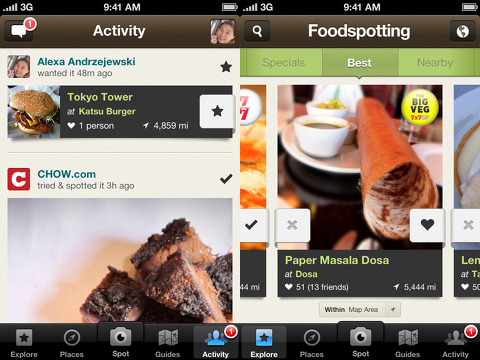
Just below the top menu bar is a green bar that allows you to filter your feeds. You can check out photos of dishes, restaurants, and feedback by the following categories: specials, best, nearby, latest, following, wanted, tried, and loved. The feed is navigated with horizontal finger swipes. For each dish, there is a nice photo, name of the dish, restaurant’s name, location, number of likes, and distance. There is an x icon on the left side of the photo, so you can delete a dish or location from your feed. You can also touch the heart on the right side of the photo to log a like.
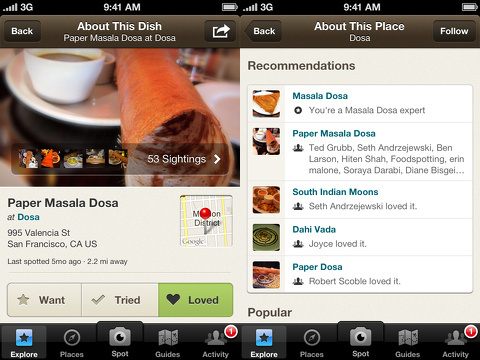
When you touch a photo of a dish, the photo fills the screen completely. Additional images from the restaurant form a banner at the bottom of the photo. With a vertical swipe up the screen, a list of pertinent items about the restaurant appears. You can find the contact information for the restaurant. A neat touch is the ability to add the dish to your want, tried, and loved feeds. You can check out reviews, find the restaurant on Yelp, and get directions.
If you want to showcase your favorite dishes, you can add them to the Foodspotting iPhone app with cool interface. You touch the spot icon at the bottom of the screen, and, like Path’s great halo of options, four circle icons form a rainbow in the lower portion of the screen. You can use an existing photo, use the in-app camera, shoot a photo with Camera+ iPhone app, and tag the location with a touch on one of the icons.
Additional neat features of the Foodspotting iPhone app are the curated guides and activity feed. The curated guides are based around your location, and they are produced by esteemed food publications like Food & Wine and the James Beard Foundation. Your activity feed is best, when you create an account with your email or Facebook authorization. The feed contains the strong visual presence, but adds comments, likes, and social engagement content in a style similar to Tumblr. If you have grown weary of creating yet another social networking account, you can access the majority of the content without an account.
The Foodspotting iPhone app is a fun filter for all of the food and restaurant iOS apps, so you can find the best dish at a restaurant that suits your mood and tastes.
AppSafari Rating: /5

7 Comments to “Foodspotting”
Leave Comment
About AppSafari
Popular App Review Categories
- Games
- Featured apps
- iPad apps
- Free apps
- Cydia apps
- App Lists
- Music
- Utilities
- Reference
- Social
- Chat
- Video
- Productivity
- Notes
- Fun
- GPS
- Files
- Augmented reality
- Shopping
- Education
- Finance
- Travel
- Food
- Sports
- News
- Weather
- Health
- Movies
- Photos
- VOIP
- Calendar
- Contacts
- Auto
- Dating
- Books
- Web apps
- All categories >>
Recent iPhone App Reviews
- Elevate – Brain Training May 28th, 14
- UpTo Calendar – Syncs with Google Calendar, iCloud, Outlook and more May 28th, 14
- Quip May 23rd, 14
- Marco Polo: Find Your Phone by Shouting MARCO! May 22nd, 14
- Ku – creative social network May 13th, 14
- Personal Zen May 9th, 14
- Fiasco! Free May 9th, 14
- Forza Football (formerly Live Score Addicts) Apr 29th, 14

I really LOVE this app! While I know the foodie space is crowded in the app store, this one stands out for me as the top in the field!
Posted on March 13th, 2013 at 6:48 pm byNotice: Only variables should be assigned by reference in /var/www/html/wp-content/plugins/subscribe-to-comments/subscribe-to-comments.php on line 591
Steven
This review is great!
Posted on November 28th, 2015 at 8:21 am byThank you for share this with us on your blog.
Notice: Only variables should be assigned by reference in /var/www/html/wp-content/plugins/subscribe-to-comments/subscribe-to-comments.php on line 591
Leia Isso
I love this app!
Posted on December 3rd, 2015 at 1:39 pm byI liked this app.
Notice: Only variables should be assigned by reference in /var/www/html/wp-content/plugins/subscribe-to-comments/subscribe-to-comments.php on line 591
website
Hey, Foodspotting is good.
Posted on December 4th, 2015 at 4:33 pm byThanks for this post.
Notice: Only variables should be assigned by reference in /var/www/html/wp-content/plugins/subscribe-to-comments/subscribe-to-comments.php on line 591
Alberto
I liked this app s2
Posted on April 19th, 2016 at 8:54 am byNotice: Only variables should be assigned by reference in /var/www/html/wp-content/plugins/subscribe-to-comments/subscribe-to-comments.php on line 591
meg
Foods potting is great!
Posted on April 22nd, 2016 at 12:09 pm byThis blog is awesome.
Notice: Only variables should be assigned by reference in /var/www/html/wp-content/plugins/subscribe-to-comments/subscribe-to-comments.php on line 591
Novo Gol Blog
great article for Foodspotting review
Posted on April 28th, 2016 at 11:08 am byNotice: Only variables should be assigned by reference in /var/www/html/wp-content/plugins/subscribe-to-comments/subscribe-to-comments.php on line 591
aqui